
In This Article
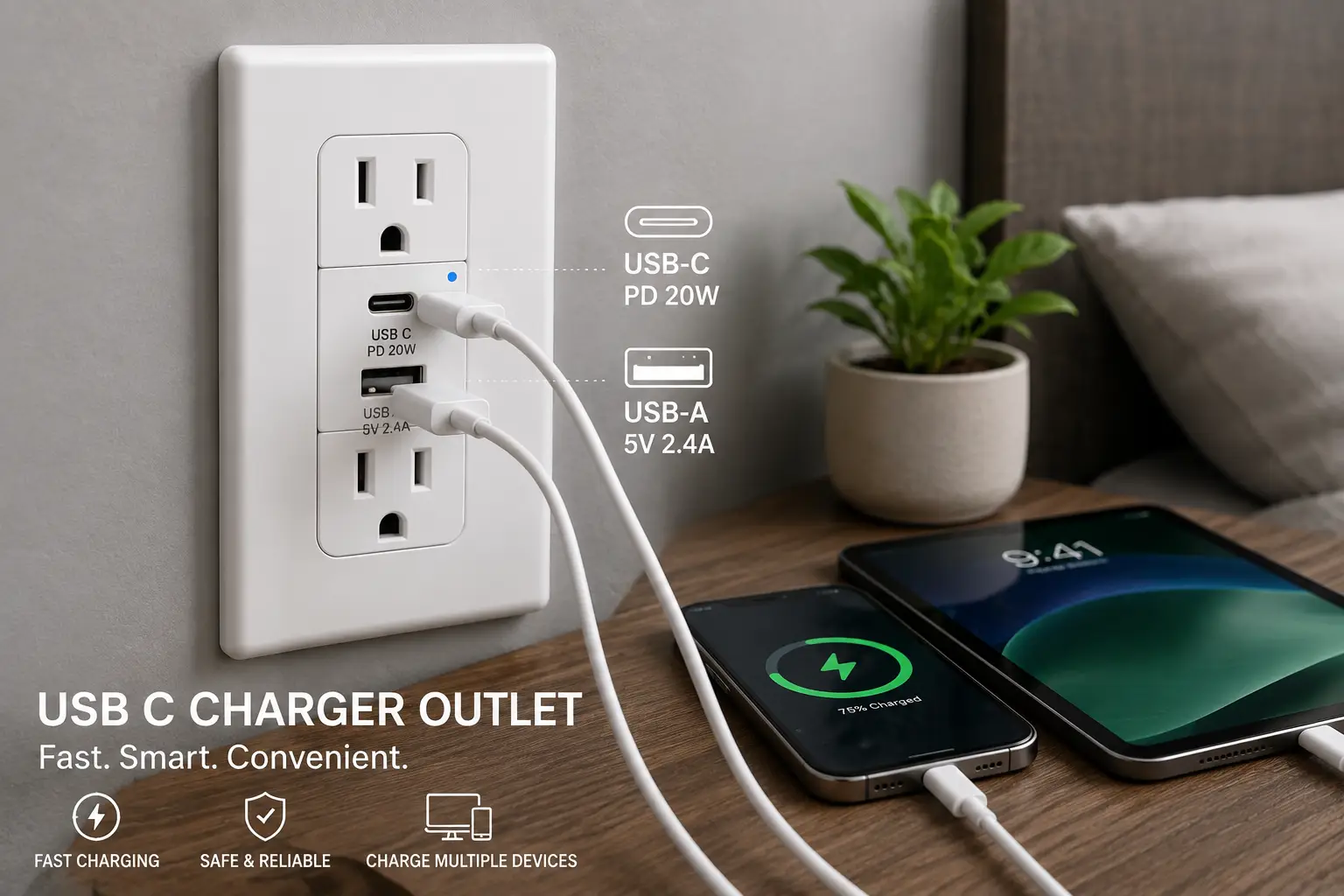
If you’ve ever stood in front of a nightstand juggling three wall-wart adapters for one phone, one tablet, and one smartwatch, you already understand the appeal of a usb c charger outlet. Instead of an adapter hogging a socket, the charging circuitry lives inside the wall itself, so a standard two-prong plug and a USB cable share the same faceplate. That’s the whole pitch, and for most bedrooms, kitchens, and home offices, it delivers.
But “usb c charger outlet” covers a wide range of hardware in 2026 — from basic 3.6-amp receptacles that trickle-charge a phone to 65-watt Power Delivery (PD) models that can legitimately top off a laptop. Picking the wrong one means either overpaying for wattage you’ll never use or under-buying and ending up right back where you started, hunting for an adapter. This guide breaks down seven real, currently available options across entry-level, mid-range, and high-end price tiers, with honest analysis of who each one actually suits.
One quick note before we get into specifics: this article contains affiliate links, and as an Amazon Associate we may earn from qualifying purchases at no extra cost to you. Prices for electrical hardware shift often, so treat every figure below as a general range rather than a locked-in number — always check the current price before buying.
Quick Comparison: USB-C Charger Outlets at a Glance
| Outlet | USB-C Output | Ports | Best For | Price Range |
|---|---|---|---|---|
| TOPGREENER TU21542AC2 | 4.2A total (shared) | 2 USB-C + 1 USB-A | Budget bedrooms | Under $25 |
| ELEGRP 30W Dual USB-C | 6.0A / 30W total | 2 USB-C | Best value | Around $20 |
| Leviton T5635-W | 30W Power Delivery | 2 USB-C | Best overall | $25–$45 |
| TOPGREENER TU215PD30AC-W | 36W Power Delivery | 1 USB-C | Mid-range PD | $30–$45 |
| Leviton GUAC1-W | Shared USB-A/USB-C | GFCI + 2 USB | Kitchens & baths | $35–$55 |
| Amerisense GaN 65W | 65W GaN, 3-port | 2 USB-C + 1 USB-A | Power users | $30–$45 |
| Legrand radiant R26USBPD65W | 65W Power Delivery | 2 USB-C | Laptop charging | $50–$85 |
Looking at the table, the split comes down to wattage and port count rather than brand loyalty. The TOPGREENER TU21542AC2 and ELEGRP 30W Dual USB-C cover phones and earbuds cheaply, the Leviton T5635-W hits the sweet spot most homeowners actually need, and the Legrand radiant R26USBPD65W is the only one on this list with enough headroom to seriously charge a laptop. The Leviton GUAC1-W stands apart because it’s a GFCI combo device, which matters a lot if you’re installing near a sink.
💬 Ready to stop hunting for chargers? Check the current price on today’s top pick below and get your outlet on the way.
Top 7 USB-C Charger Outlets: Expert Analysis
1. TOPGREENER TU21542AC2 — cheapest way to add USB-C to any room
The TOPGREENER TU21542AC2 is the entry point into in-wall charging, and it doesn’t pretend to be anything more. This 15-amp tamper-resistant receptacle packs one USB-A and two USB-C ports into a single duplex outlet, sharing a combined 4.2A output across whichever ports are active. In practice, that means one device charges at full speed while a second one plugged in alongside it slows down — the outlet’s IntelliChip circuitry automatically splits the available current rather than starving one port completely. That tradeoff is exactly what you’d expect at this price, and it’s a fair one for phones and earbuds that don’t need more than 10-15 watts anyway.
Who it’s for: renters and budget-conscious buyers replacing a single dead outlet who have no interest in laptop charging. Reviews aggregated across TOPGREENER’s retail listings consistently describe straightforward wiring — this outlet uses standard clamp-type terminals compatible with a basic screwdriver install — and a handful of buyers note the screwless wall plate scratches if pried off carelessly during install.
Pros:
- ✅ Lowest price point of any real in-wall option here
- ✅ Easy clamp-type wiring for DIY installers
- ✅ Complies with 2017 NEC Article 406.12 tamper-resistant rules
Cons:
- ❌ Shared 4.2A output slows charging with two devices
- ❌ No Power Delivery, so it won’t fast-charge newer phones
Typically priced under $25 for a two-pack, this is fair value if a phone and an earbuds case are the only things you’ll ever plug in — but check the current price, since multi-packs shift the per-unit cost.
2. ELEGRP 30W Dual USB-C — best value for two fast-charging ports
The ELEGRP 30W Dual USB-C outlet swaps the mixed-port layout for two dedicated USB-C connectors rated at a combined 6.0A (30W), which is a meaningfully better spec for the money than most budget competitors. Both ports include ELEGRP’s smart-chip identification, which reads each connected device’s charging protocol and adjusts voltage automatically rather than forcing a fixed output — practically, that means an iPhone and a Kindle plugged in side by side each get an appropriate charge rate instead of a one-size-fits-all trickle.
What most buyers overlook with a two-USB-C-only layout is that it eliminates USB-A entirely, so anyone with an older cable-only accessory will need an adapter. Aggregated reviews across ELEGRP’s outlet lineup are mixed on long-term durability: many buyers report an easy install and reliable day-one charging, while a smaller but recurring subset flags USB ports becoming inconsistent after extended use — a pattern worth weighing against the low price.
Pros:
- ✅ 30W combined output beats most outlets in this price bracket
- ✅ Smart-chip protocol detection for stable charging
- ✅ UL listed with tamper-resistant shutters included
Cons:
- ❌ No USB-A port for older cables
- ❌ Some long-term reports of port reliability issues
At around $20, the ELEGRP 30W Dual USB-C is arguably the best-value pick on this list if you’re fully committed to USB-C accessories and want more than a trickle charge without paying for Power Delivery.
3. Leviton T5635-W — the best overall usb c charger outlet for most homes
The Leviton T5635-W is the outlet most electricians reach for by default, and the reasoning holds up under scrutiny. It delivers 30 watts of Power Delivery on a single port when only one device is connected, dropping to a shared but still respectable output when both ports are active. Power Delivery matters here in a way flat-rate charging doesn’t: a PD-aware phone or tablet negotiates its own voltage and current with the outlet, which in practice means noticeably faster charging for anything released in the last few years compared to a legacy 5V-only USB port.
Leviton backs this with over a century in the wiring device business, and it shows in the build — a smart chip prevents overcurrent, and the tamper-resistant shutters meet the same 2017 NEC standard as the budget options above. Reviews aggregated from retail listings are strongly positive on reliability and Power Delivery performance, with the most common critique being that the USB-C-only design takes up as much room in the electrical box as bulkier USB-A models, which can crowd a shallow retrofit box.
Pros:
- ✅ Genuine 30W Power Delivery for real fast charging
- ✅ Trusted, century-old electrical brand with wide retail support
- ✅ Compatible with iPhones, iPads, Samsung, and Pixel devices
Cons:
- ❌ Box depth can be tight in older, shallow retrofit boxes
- ❌ Wall plate often sold separately depending on the pack
Priced in the $25–$45 range depending on finish and pack size, the Leviton T5635-W delivers the best balance of speed, reliability, and price for anyone charging phones and tablets rather than laptops.
✨ Don’t miss this pick if you’re only buying one outlet — it’s the safest default for most rooms in the house.
4. TOPGREENER TU215PD30AC-W — mid-range Power Delivery without the premium price
Sitting between the budget tier and the flagship options, the TOPGREENER TU215PD30AC-W offers a single USB-C port rated up to 36 watts of Power Delivery. The single-port design is a deliberate tradeoff: rather than splitting current across two ports, all of the outlet’s charging capacity is dedicated to one device, so a tablet or a lightly-powered laptop charger gets the full negotiated wattage instead of a shared fraction.
Based on comparing the spec sheet against the two-port PD models on this list, the practical takeaway is simple — if you typically charge one device per outlet location (a nightstand, a home office desk), a single high-wattage port is more useful than two ports splitting a smaller total. TOPGREENER’s IntelliChip technology handles protocol negotiation automatically, and the outlet complies with the same NEC 406.12 tamper-resistant requirement as the rest of the brand’s lineup. Aggregated buyer feedback on TOPGREENER’s broader USB outlet catalog highlights easy screwless-plate installation as a recurring positive.
Pros:
- ✅ 36W on a single port beats most dual-port budget outlets
- ✅ Screwless wall plate included for a cleaner install
- ✅ IntelliChip protocol detection for Apple and Android devices
Cons:
- ❌ Only one USB-C port limits it to single-device use
- ❌ No USB-A port included on this model
Expect to pay in the $30–$45 range, which puts it a notch above the Leviton T5635-W for single-device wattage but without a second port to fall back on.
5. Leviton GUAC1-W — the smart pick for kitchens and bathrooms
Most outlets on this list are built for a bedroom or living room circuit, but the Leviton GUAC1-W solves a different problem entirely: it’s a SmartlockPro self-test GFCI combined with USB-A and USB-C charging ports in one device. Ground-fault circuit interrupters are required by the National Electrical Code near sinks, countertops, and other wet locations, and swapping in a standalone GFCI plus a separate USB outlet isn’t always possible in a single-gang box — this device solves that by combining both functions.
What the spec sheet doesn’t say outright, but what matters practically, is that the self-test function continuously monitors the ground-fault circuitry and will disable the outlet automatically if it reaches end-of-life, rather than failing silently. That’s a meaningful safety upgrade over pairing an old GFCI with a separate charging outlet. Reviews of Leviton’s SmartlockPro GFCI line generally praise the reliable trip-testing, with occasional buyer notes that the combined device is deeper than a standard GFCI and needs adequate box clearance.
Pros:
- ✅ Combines GFCI protection with USB-A and USB-C charging
- ✅ Self-test technology flags end-of-life automatically
- ✅ Ideal for kitchens, bathrooms, and garages under code
Cons:
- ❌ Deeper than a standard outlet, so box clearance matters
- ❌ Charging output is modest compared to dedicated PD models
Generally priced between $35 and $55, the Leviton GUAC1-W is worth the premium specifically for wet-location installs where code requires GFCI protection anyway.
6. Amerisense GaN 65W 3-Port USB Wall Outlet — the lesser-known high-wattage alternative
The Amerisense GaN 65W 3-Port USB Wall Outlet is the least mainstream name on this list, but it earns its spot by using gallium nitride (GaN) semiconductor technology inside a wall receptacle — a component more commonly found in premium portable laptop chargers than built-in outlets. GaN circuitry runs cooler and more efficiently than traditional silicon at high wattages, and here it’s paired with two USB-C ports and one USB-A port sharing a combined 65-watt budget across all three.
Here’s what to weigh with a lesser-known brand: the underlying GaN technology is genuinely capable of laptop-level charging speeds, but Amerisense doesn’t carry the decades of wiring-device history that Leviton or Legrand bring to the table, so long-term parts support and warranty service are less established quantities. For buyers prioritizing raw charging capability per dollar over brand pedigree, that tradeoff is often worth it. Early buyer feedback on GaN-based USB wall outlets in this category tends to highlight the noticeably faster laptop charging as the standout feature, with installation described as comparable to any standard tamper-resistant receptacle.
Pros:
- ✅ 65W GaN output rivals premium portable laptop chargers
- ✅ Three total ports (2 USB-C, 1 USB-A) for flexible use
- ✅ UL listed with tamper-resistant construction
Cons:
- ❌ Less established brand history than Leviton or Legrand
- ❌ 65W is shared across all three ports, not per-port
Typically found in the $30–$45 range, this is a strong pick for buyers who want GaN-level wattage without paying flagship-brand pricing — just factor in the newer-brand tradeoff above.
7. Legrand radiant R26USBPD65W — best for actually charging a laptop
If laptop charging is the actual goal rather than a nice-to-have, the Legrand radiant R26USBPD65W is the outlet built for it. Legrand’s Pass & Seymour radiant line delivers a full 65 watts of Power Delivery across dual USB-C ports, with a status LED that shows amber during active charging and green once a device is topped off — a small but genuinely useful detail when you can’t see a phone’s screen from across the room.
This is meaningfully more capable than the 30W and 36W options earlier on this list: 65W is enough headroom for many ultrabooks and lightweight laptops to charge directly from the wall, no brick required. Legrand backs the radiant collection with multi-layered overcurrent protection and the same patented tamper-resistant shutter system used across its outlet lineup. Reviews collected on Home Depot’s product page are largely positive on charging speed, with a recurring installation note: because of its added depth, this outlet can be tight in older junction boxes with bulky cable clamps, so it’s best suited to newer construction or boxes with room to spare.
Pros:
- ✅ Full 65W Power Delivery — genuinely capable of laptop charging
- ✅ LED status light shows charging progress at a glance
- ✅ Backed by Legrand’s established Pass & Seymour engineering
Cons:
- ❌ Noticeably deeper body can be tight in older boxes
- ❌ Premium price compared to the rest of this list
Running in the $50–$85 range, the Legrand radiant R26USBPD65W is the priciest option here, but it’s the only one that legitimately replaces a laptop charger in most everyday use cases.
Top 7 Products Compared Side-by-Side
| Outlet | USB-A Port? | Tamper-Resistant | GFCI Combo | Best For |
|---|---|---|---|---|
| TOPGREENER TU21542AC2 | Yes | Yes | No | Tightest budget |
| ELEGRP 30W Dual USB-C | No | Yes | No | USB-C-only households |
| Leviton T5635-W | No | Yes | No | Most homes, overall pick |
| TOPGREENER TU215PD30AC-W | No | Yes | No | Single-device desks |
| Leviton GUAC1-W | Yes | Yes (GFCI) | Yes | Kitchens & bathrooms |
| Amerisense GaN 65W | Yes | Yes | No | Budget laptop charging |
| Legrand radiant R26USBPD65W | No | Yes | No | Dedicated laptop charging |
The clearest pattern in this table is that USB-A support and top-tier wattage rarely come in the same device — brands seem to treat them as separate product lines rather than combining both, likely because a shared amperage budget across three ports means less power per port either way. If you still own USB-A cables, the TOPGREENER TU21542AC2, Leviton GUAC1-W, or Amerisense GaN 65W are your only compatible picks on this list. Everyone else charging exclusively over USB-C should look at wattage first and let that narrow the field to the Leviton T5635-W, TOPGREENER TU215PD30AC-W, or Legrand radiant R26USBPD65W.
What Is a USB-C Charger Outlet?
A usb c charger outlet is an in-wall electrical receptacle that combines a standard AC socket with one or more built-in USB-C charging ports, letting you charge a phone, tablet, or laptop directly from the wall without a separate plug-in adapter. It replaces a normal outlet during a straightforward electrical swap and draws USB power internally from the household circuit.
The category exploded in popularity as USB-C became the default connector across phones, tablets, and laptops. The shift accelerated further once regulators pushed toward standardizing chargers — the EU’s common charger rules effectively made USB-C the default port on new consumer electronics worldwide, and U.S. manufacturers followed the same shift for compatibility. That’s why even budget outlets today skip USB-A ports entirely in favor of dedicated USB-C.
How to Choose a USB-C Charger Outlet
- Start with your devices’ actual charging needs. A phone rarely needs more than 20-30 watts, while a laptop can require 45-65W — buying more wattage than your devices support wastes money.
- Check whether you need Power Delivery. Non-PD outlets charge at a fixed rate; PD-enabled outlets negotiate speed with the device for meaningfully faster charging on supported hardware.
- Confirm the box depth before ordering. Deeper, higher-wattage outlets like the 65W models on this list can be tight in older, shallow electrical boxes.
- Decide if you still need USB-A. Older accessories and some budget cables still use USB-A — skip it only if you’re fully on USB-C.
- Match GFCI requirements to the room. Kitchens, bathrooms, and garages require ground-fault protection under the National Electrical Code, which narrows your options to GFCI-combo devices.
- Verify UL or ETL listing. This isn’t optional — it confirms the outlet passed independent safety testing for the U.S. market.
- Budget for professional installation if you’re not comfortable with wiring. A licensed electrician typically charges a modest flat fee per outlet swap, which is worth it for anyone unsure about de-energizing a circuit safely.
How to Install a USB-C Charger Outlet Safely
Installing a usb c charger outlet is a manageable DIY project for anyone comfortable with basic electrical work, but a few first-30-days mistakes come up repeatedly. Start by shutting off the breaker for that circuit and verifying it’s dead with a non-contact voltage tester before touching any wires — skipping this step is the single most common (and most dangerous) shortcut people take.
Once the circuit is confirmed off, remove the old outlet, note which wires connect to which terminals (a phone photo helps), and connect the new outlet using either the back push-in terminals or side screw terminals, depending on wire gauge. Most USB charger outlets recommend 12 or 14 AWG solid copper wire; stranded wire typically needs a wire connector rather than a direct push-in connection. After wiring, gently fold the wires back into the box — this is where depth becomes a real issue, since higher-wattage outlets with more internal circuitry are noticeably bulkier than a standard receptacle, and a crowded box with bulky cable clamps can prevent a clean fit.
Common early mistakes include forcing an outlet into a box that’s too shallow (leading to pinched wires), skipping the tamper-resistant shutter test after install, and not label-testing which USB port is active before mounting the wall plate. Give the circuit a final test with a plug-in outlet tester before considering the job done, and if a GFCI-combo model trips immediately after install, double-check the line and load wiring — a reversed connection is the most frequent cause.
💬 Not sure which outlet fits your box depth? Compare the full lineup and check today’s price before you buy.
Real-World Scenarios: Which Outlet Fits Your Life
The renter with a single nightstand plug. If you’re renting and can only justify one outlet swap, the Leviton T5635-W covers phones and tablets with genuine Power Delivery speed without overspending on wattage you won’t use in a rental.
The remote worker charging a laptop at a desk. Someone working from a home office charging a 13-inch ultrabook eight hours a day needs real wattage, not a token USB port. The Legrand radiant R26USBPD65W or the budget-friendlier Amerisense GaN 65W both deliver enough Power Delivery to actually replace a laptop brick.
The family with a kitchen charging station. A household charging three or four phones near the kitchen counter, where GFCI protection is code-required, should skip straight to the Leviton GUAC1-W — it’s the only outlet on this list that satisfies both the wet-location safety requirement and everyday charging needs in one device.
USB-C Charger Outlets vs. Plug-In Wall Chargers
The obvious alternative to any usb c charger outlet is simply plugging a standalone GaN charging brick into a regular outlet — so why bother rewiring anything? The honest answer is that it depends on your priorities. A plug-in charger is cheaper upfront, portable, and easy to upgrade as USB standards evolve, since you’re not locked into whatever wattage is soldered into your wall. An in-wall outlet, by contrast, permanently frees up the socket space a brick would otherwise occupy, looks cleaner with no dangling adapter, and can’t be misplaced or borrowed by a roommate.
| Factor | In-Wall USB-C Outlet | Plug-In Wall Charger |
|---|---|---|
| Upfront cost | Higher (device + install) | Lower |
| Upgrade path | Requires re-wiring | Swap the brick anytime |
| Outlet space freed | Yes | No, occupies the socket |
| Portability | None | Fully portable |
Reading the table, the deciding factor usually comes down to how permanent the installation is meant to be. If you rent and move every year or two, a plug-in GaN charger upgrades easily and travels with you — an in-wall outlet doesn’t. If you own your home and are charging in the same spot every day for years, the in-wall option pays for itself in convenience and a cleaner nightstand.
Long-Term Cost and Maintenance
A usb c charger outlet is close to a “buy once” purchase compared to the churn of plug-in chargers, which tend to get lost, lent out, or replaced every couple of years as standards shift. Most of the outlets on this list carry UL or ETL listings rated for tens of thousands of insertion cycles per port — TOPGREENER’s spec sheets, for example, rate their USB-C ports for 10,000 insertions and USB-A for 8,000, which at a few plugs per day works out to well over a decade of typical household use.
The real long-term cost isn’t the hardware — it’s the possibility of a professional install if you’re not doing it yourself. Budget a modest flat labor fee per outlet if hiring an electrician, and remember that GFCI-combo units like the Leviton GUAC1-W may need periodic self-testing to confirm the ground-fault protection hasn’t reached end-of-life, a built-in feature that saves you from having to remember manual testing.
USB-C Charger Outlets for Renters, Families, and Home Offices
Renters should prioritize outlets that are simple to swap back to standard before moving out — keep the original receptacle in a drawer, since most leases require restoring fixtures. A single Leviton T5635-W in the bedroom covers most renters’ actual charging needs without a big investment.
Families with young children benefit most from the tamper-resistant shutter standard every outlet on this list meets, plus GFCI protection in kitchens and bathrooms specifically. The Leviton GUAC1-W does double duty here, satisfying code while giving kids a dedicated, cable-management-friendly charging spot.
Home office workers charging laptops daily should treat wattage as the top priority over port count. Between the Legrand radiant R26USBPD65W and the Amerisense GaN 65W, the choice largely comes down to budget — both deliver genuinely useful laptop-charging speeds, with Legrand carrying the more established brand warranty.
Features That Actually Matter (and Ones That Don’t)
Power Delivery wattage matters more than almost anything else on the spec sheet, because it’s the difference between a trickle charge and genuinely fast charging on modern devices. Tamper-resistant shutters matter too, but less as a differentiator — every legitimate outlet sold in the U.S. for residential use includes them, since NEC Article 406.12 has required them in new construction since 2008, so it’s less a feature to shop for and more a baseline to confirm.
What matters far less than marketing suggests: the number of total ports. A three-port outlet sharing a fixed wattage budget across all three often charges slower per-device than a well-designed two-port model, because the total power ceiling doesn’t rise just because more physical ports were added. Read the per-port or shared wattage spec, not just the port count, before assuming more ports means more capability.
Safety, Regulations, and Standards
Every outlet on this list is UL listed, meaning it passed independent third-party testing against U.S. safety standards for electrical hardware — look for this certification on any usb c charger outlet before buying, since uncertified units sold through third-party marketplaces are a documented source of counterfeit and fire-risk hardware. Tamper-resistant construction is required by the National Electrical Code for virtually all new and replaced residential receptacles, a rule the Consumer Product Safety Commission helped drive after data showed thousands of annual childhood injuries from foreign objects inserted into standard outlet slots.
Ground-fault protection is a separate and equally non-negotiable requirement in kitchens, bathrooms, garages, and other wet or damp locations — this is exactly why the Leviton GUAC1-W exists as a dedicated GFCI-USB combo rather than expecting buyers to install two separate devices. If you’re unsure whether a specific room in your home currently meets code, that’s a reasonable moment to call a licensed electrician rather than guess.
Common Mistakes to Avoid When Buying a USB-C Charger Outlet
Buying based on port count alone, rather than actual shared wattage, is the single most common mistake — a “3-port” outlet sounds more capable than a 2-port one, but if the 3-port model splits 20W across all ports while the 2-port model delivers 30W split two ways, the two-port outlet charges faster per device. Skipping the box-depth check is the second most common error, especially with premium 65W outlets, which are noticeably bulkier than standard receptacles and can be genuinely difficult to seat in an older, shallow box.
A third recurring mistake is assuming every USB outlet supports Power Delivery by default — plenty of budget models, including several on this list, use fixed-rate charging instead, which is perfectly fine for a phone but won’t meaningfully speed up a laptop. Finally, buyers in kitchens and bathrooms sometimes install a standard USB outlet without realizing GFCI protection is legally required in those locations, which means a second, separate GFCI device (or a returned and re-bought outlet) down the line.
✨ Get it right the first time — check the current price on the model that matches your room and skip the return-and-rebuy hassle!
Frequently Asked Questions
❓ Can I install a usb c charger outlet myself?
❓ Do usb c charger outlets work during a power outage?
❓ Will a usb c charger outlet charge my laptop as fast as its original charger?
❓ Are usb c charger outlets safe for kids?
❓ Do I need an electrician to replace a GFCI outlet with USB ports?
Conclusion
A usb c charger outlet solves a genuinely annoying problem — the pile of bricks and cables crowding every outlet in a modern home — but the right pick depends entirely on what you’re actually charging. For most bedrooms and living rooms, the Leviton T5635-W hits the best overall balance of price, reliability, and real Power Delivery speed. Budget shoppers do fine with the TOPGREENER TU21542AC2 or ELEGRP 30W Dual USB-C, while anyone charging a laptop from the wall should look straight at the Legrand radiant R26USBPD65W or the more affordable Amerisense GaN 65W. Kitchens and bathrooms have one clear answer: the GFCI-combo Leviton GUAC1-W, since code requires that protection regardless of preference.
Whichever you choose, confirm the box depth, check for UL or ETL listing, and match the wattage to what you’re actually plugging in rather than chasing the highest number on the label. That’s the difference between an outlet you’re happy with in five years and one you’re re-buying next spring.
✨ Ready to ditch the charging-brick pile-up? Check today’s price on your best-fit pick and get your outlet on the way — your nightstand will thank you!
Recommended for You
- 7 Best Wireless Switch and Receiver Kits (2026 Picks)
- 7 Best Remote Receptacle Switch Options for 2026: Expert Tested
- 7 Best Remote Controlled Outdoor Light Options for 2026 (Tested & Reviewed)
Disclaimer: This post contains affiliate links. As an Amazon Associate, I earn from qualifying purchases made through these links, at no additional cost to you.
✨ Found this article helpful? Share it with someone who needs it! 💬🤗
