
In This Article
Lutron Caseta Black: Smart Lighting That Finally Matches Your Dark Decor
You finally did it. The matte black faucet is in, the cabinet pulls are black, and maybe there’s even a moody charcoal accent wall. Then you walk into the room, and there it is: a glossy white plastic light switch staring back at you like a tourist in a dimly lit jazz bar. 😅
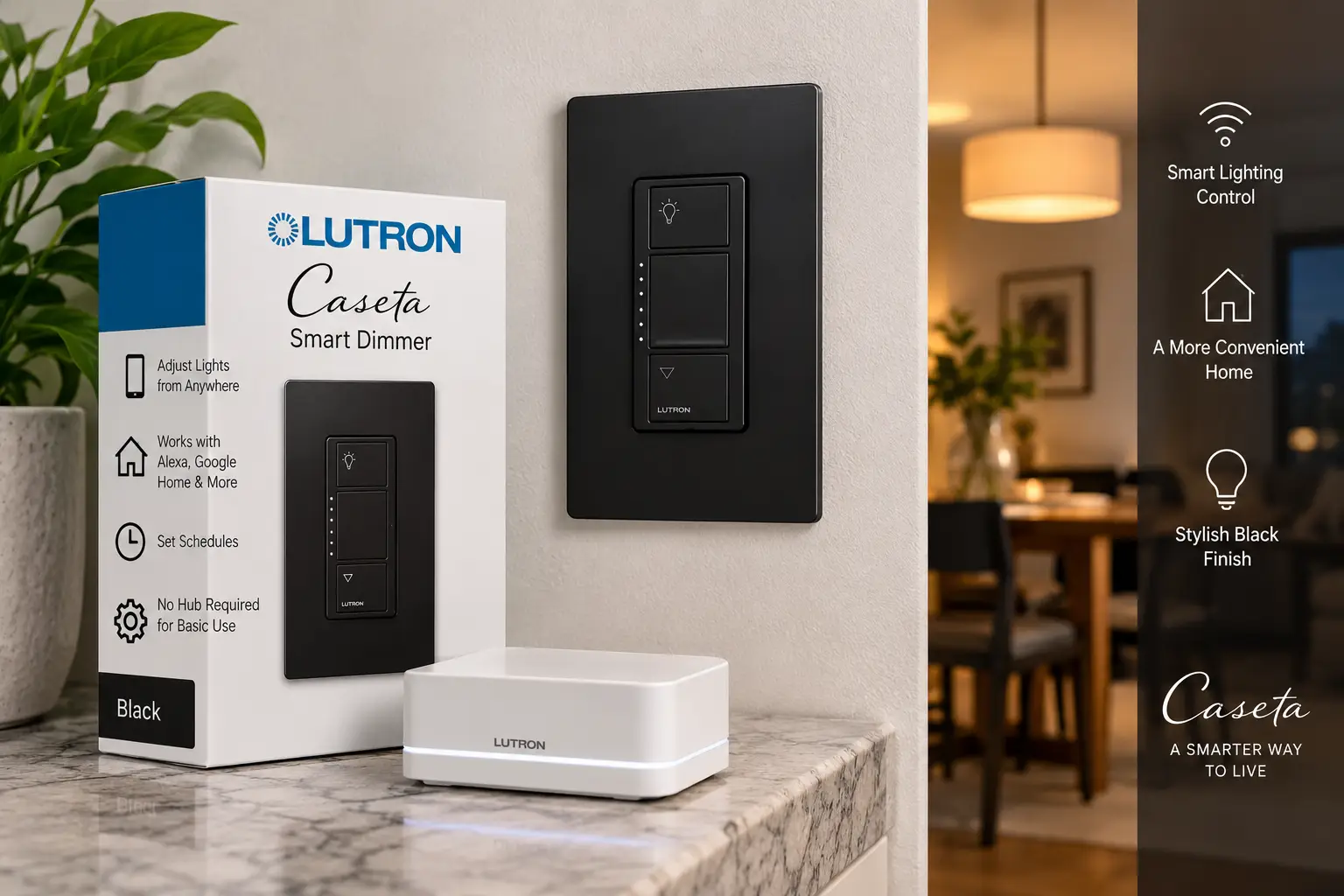
That mismatch is exactly why Lutron Caseta black has become such a popular search for anyone upgrading to smart lighting in 2026. Lutron’s Caseta line already has a strong reputation for reliability, and the black versions let you get the same smart features (schedules, voice control, wireless remotes, away-from-home control) without wrecking the look you paid good money for.
Here’s what separates Caseta from the dozens of Wi-Fi switches crowding Amazon’s search results. Caseta devices talk to each other over Lutron’s own Clear Connect radio frequency instead of your home Wi-Fi. That means they don’t clog up your router, and the local controls keep working when your internet goes down. Several of the dimmers also install without a neutral wire, which is a big deal in older homes. Consumer Reports’ review of the Caséta system also found that a three-way setup is much simpler when you use a Pico remote instead of wiring in a second smart switch.
This guide compares seven black Caseta devices: dimmers, switches, remotes, and an outdoor plug. The comparisons are based on real spec sheets, retailer data, and aggregated owner feedback. There are no invented test labs and no fake reviews. You get clear analysis of what each spec means in your actual hallway, kitchen, or backyard. ⚡
What Is Lutron Caseta Black?
Lutron Caseta black is the black-finish version of Lutron’s Caseta wireless smart lighting system. It includes in-wall dimmers, switches, Pico remotes, and plugs that communicate over Clear Connect RF. The devices work on their own with Pico remotes. Adding a Lutron Smart Hub unlocks app control, schedules, and voice assistants like Alexa, Google Home, and Apple Home.
A few details the product listings don’t spell out clearly:
- 🖤 Finish codes matter. Black in-wall devices end in “-BL” (for example, PD-6WCL-BL). Black Pico remotes typically use “-GBL,” which is short for gloss black. If a model number ends in -WH, -LA, or -IV, you’re looking at white, light almond, or ivory, whatever the photo shows.
- 🏠 The hub is white. The Lutron Smart Hub (L-BDG2-WH) is the piece that unlocks the app and voice control, and it comes in white. It sits on a shelf near your router rather than on the wall, so most people simply tuck it out of sight.
- 🔲 Wallplates are sold separately. Caseta devices don’t include a cover. Lutron’s Claro screwless plates come in black, and a Caseta Claro black wallplate is what makes the whole switch read as one clean, dark rectangle.
- 🔁 Mixing finishes is fine. Black and white Caseta devices pair and work together normally. You can go black in the kitchen and keep white in the laundry room.
The takeaway is simple. “Black” is a finish, not a separate product line. You get the same electronics, the same wireless system, and the same app, in a color that finally matches your hardware.
Lutron Caseta Black at a Glance: Quick Comparison
| # | Product | Type | Neutral Wire? | Price Range* | Best For |
|---|---|---|---|---|---|
| 1 | Caseta Smart Dimmer PD-6WCL-BL | Button dimmer | Not required | ~$55–$70 | Older homes, most rooms |
| 2 | Diva Smart Dimmer DVRF-6L-BL | Paddle + slider dimmer | Not required | ~$60–$75 | Classic paddle look |
| 3 | Claro Smart Switch DVRF-5NS-BL | Paddle on/off switch | Required | ~$55–$70 | Closets, hallways, fans |
| 4 | Caseta Smart Switch PD-6ANS-BL | Button on/off switch | Required | ~$55–$65 | Non-dimmable loads, fans |
| 5 | Pico 3-Button Remote PJ2-3BRL-GBL-L01 | Wireless remote | N/A (battery) | ~$20–$35 | Budget wireless 3-way |
| 6 | Pico Paddle Remote PJ2-P2B-GBL | Wireless paddle remote | N/A (battery) | ~$40–$50 | Matching Diva/Claro |
| 7 | Caseta Outdoor Smart Plug PD-15OUT-BL | Outdoor plug | N/A (plug-in) | ~$70–$90 | String lights, pumps |
*Approximate ranges at the time of writing. Prices change often, so check the current price on Amazon.
In this table, the Caseta Smart Dimmer PD-6WCL-BL is the safest place to start, because it skips the neutral-wire requirement and handles dimmable LEDs. If you prefer a traditional paddle, the Diva Smart Dimmer DVRF-6L-BL costs a little more for that look. The two Pico remotes are the quiet budget heroes: each one adds a control point without running a single new wire.
💬 Found your match in the table? Click a highlighted product to check current pricing — and share this guide so other shoppers can make an informed choice too! 😊
Top 7 Lutron Caseta Black Products: Expert Analysis
Each pick below covers what the specs mean in practice, who the product suits, and where it falls short. We haven’t personally tested these devices. The analysis draws on Lutron’s spec sheets, retailer listings, and published reviews.
1. Caseta Smart Dimmer PD-6WCL-BL — no-neutral pick for older homes
Most Caseta setups are built around this dimmer, and the black finish changes nothing about what’s inside.
The spec sheet rates it for up to 150W of dimmable LED or 600W of incandescent/halogen. Lutron’s own example is roughly 17 LED bulbs at 8.5W each. That’s enough for a kitchen run of recessed cans or a dining-room chandelier with headroom to spare. The bigger headline is that it doesn’t need a neutral wire, so it fits the two-wire switch boxes common in older houses. You get on/off buttons, raise/lower buttons, and a small column of LEDs that shows the brightness level at a glance.
Who should buy it? Almost anyone starting out, especially if you haven’t opened your wall box yet and don’t know what’s in there. Without a hub, it pairs with up to 10 Pico remotes or motion sensors, and three-way control works through a Pico. The trade-off is looks: the button layout reads more “tech gadget” than a paddle does.
Reviews consistently praise the simple two-wire install and the level-indicator lights. The most common complaint is flicker with LED bulbs that aren’t on Lutron’s compatibility list. Reviewed (part of the USA Today network) named the Caseta dimmer starter kit its top smart dimmer after testing, but noted that you can’t customize the fade rate.
Pros:
- ✅ Installs without a neutral wire in older homes
- ✅ Dims up to 150W of LEDs smoothly
- ✅ LED level lights show brightness at a glance
Cons:
- ❌ Button design looks less traditional than a paddle
- ❌ App and voice control require the Smart Hub
💲 Usually around $55–$70. That’s excellent value for the foundation of any Lutron Caseta black setup.
2. Diva Smart Dimmer DVRF-6L-BL — classic paddle with a precise slider
If the button look isn’t for you, the Diva brings Lutron’s familiar paddle-and-slider design into the Caseta system.
The electrical specs mirror pick #1: 150W of dimmable LED or 600W of incandescent/halogen, with no neutral required. The difference is the interface. A full paddle handles on/off, a slider sets the level, and a soft-glow white light bar shows where you are. In practice, guests know how to use it without instructions, and the slider gives you finer, more tactile control than tapping buttons. It supports three-way control with an existing mechanical switch, with Lutron’s Claro Smart Accessory Switch (sold separately, available in black), or with a Pico. One limit to know: it isn’t rated for low-voltage lighting such as some track or landscape fixtures. Lutron sells a Diva ELV+ variant in black for those loads, at a noticeably higher price.
This is the black Caseta dimmer for design-minded homeowners, and for anyone replacing existing Diva dimmers who wants every switch in the house to feel the same.
The black DVRF-6L-BL is newer than the original Caseta dimmer. We couldn’t find enough model-specific reviews to summarize owner sentiment reliably. What the spec sheet does confirm is that it uses the same wireless system and load ratings as the proven Caseta Smart Dimmer PD-6WCL-BL. The real difference between the two is feel, not function.
Pros:
- ✅ Familiar paddle works like a regular switch
- ✅ Slider allows fine brightness adjustments
- ✅ Supports wired or wireless three-way setups
Cons:
- ❌ Fewer verifiable owner reviews than older models
- ❌ Not rated for low-voltage track lighting
💲 Around $60–$75. The small premium is worth it if looks matter to you.
3. Claro Smart Switch DVRF-5NS-BL — paddle on/off for any bulb
When you don’t need dimming at all, this switch keeps the paddle look and simply turns things on and off.
It’s rated at 5A, works in single-pole or three-way setups, and uses a white status LED so you can find it in the dark. Because it only switches power instead of dimming, bulb compatibility stops being a worry. Non-dimmable LEDs, older fluorescent fixtures, and the Amazon listing’s suggested fan loads are all fair game. The catch is that it requires a neutral wire, so check your box before you buy.
Where does it make sense? Closets, hallways, garages, and laundry rooms, where you want lights on or off and nothing in between. It also pairs nicely with the Diva. Put a Diva Smart Dimmer DVRF-6L-BL and this switch side by side under a two-gang Caseta Claro black wallplate, and you get a matching row of paddles instead of a mix of buttons and paddles.
As with the Diva, the paddle-style Claro switch hasn’t built up the review volume of the older Caseta models. Rather than guess at owner sentiment, we’ll stick to what’s verifiable: it runs on the same Clear Connect system as the rest of the lineup and is sold as part of the Caseta family.
Pros:
- ✅ Works with virtually any bulb type
- ✅ Paddle design matches the Diva dimmer
- ✅ Status LED helps you find it at night
Cons:
- ❌ Neutral wire required in the switch box
- ❌ Lower 5A rating than the button switch
💲 Around $55–$70. Good value when you need a matching paddle, and less compelling if looks don’t matter.
4. Caseta Smart Switch PD-6ANS-BL — proven on/off workhorse for lights and fans
This is the heavier-duty on/off option, and it has the strongest third-party track record of any switch in this list.
It handles up to 6A of lighting, including LED, halogen, ELV, MLV, and fluorescent, or 3.6A (1/4 HP) of general-purpose fans. The practical meaning: it’s rated for loads that trip up many dimmers and smaller switches, such as a bathroom exhaust fan or a string of low-voltage fixtures. You get two large on/off buttons, three-way support with an existing mechanical switch or a Pico, and, with the hub, a “Smart Away” mode that turns lights on and off at random so the house looks occupied.
Reviewed’s roundup of the best smart light switches named the Caseta PD-6ANS its top pick overall. It cited single-pole and three-way flexibility, compatibility with all three major voice assistants, and geofencing, with the hub requirement as the main drawback. The owner reviews we found mostly praise easy setup and dependable response. A minority report reliability frustrations, and many point out that Caseta isn’t the cheapest option.
If you want a black smart light switch for anything that doesn’t need dimming, this is the most proven choice.
Pros:
- ✅ Handles lights up to 6A or small fans
- ✅ Top pick in a major independent roundup
- ✅ Works with a mechanical three-way switch
Cons:
- ❌ Requires a neutral wire to install
- ❌ Button style clashes with paddle-style rooms
💲 Usually around $55–$65. Strong value for fans and non-dimmable loads.
5. Pico 3-Button Remote PJ2-3BRL-GBL-L01 — cheapest way to add a black “switch”
The Pico is the secret weapon of the whole Caseta system, and the gloss-black version blends into dark walls or nightstands.
You get on/off, raise/lower, and a center “favorite” button that recalls a preset brightness. Battery life is rated at up to 10 years on a single coin cell. It pairs directly with a Caseta dimmer, no hub required, and works up to about 30 feet through walls. In practice, that means you can create a three-way switch at the bottom of the stairs without cutting drywall or pulling cable. You can also keep one on the nightstand so you never have to get out of bed to kill the lights.
For renters, older homes, and anyone on a budget, a Lutron Pico remote black version is the most useful add-on you can buy. Wall mounting requires a bracket or wallplate adapter such as the PICO-WBX-ADAPT, sold separately, which adds a few dollars to the cost.
Consumer Reports found that installing a Pico to complete a three-way circuit was noticeably easier than installing a second smart switch, which many competing brands require. Owner feedback on Pico remotes generally centers on convenience and long battery life.
Pros:
- ✅ Creates a three-way switch with no wiring
- ✅ Favorite button recalls your go-to brightness
- ✅ Battery rated for up to 10 years
Cons:
- ❌ Wall-mount bracket costs extra
- ❌ Button look won’t match paddle-style dimmers
💲 Typically around $20–$35, depending on the seller. The best value in the Caseta ecosystem.
6. Pico Paddle Remote PJ2-P2B-GBL — the matching partner for Diva and Claro
This is the Pico for people who care about every switch on the wall looking the same.
Instead of buttons, you get a single paddle that looks and feels like a regular switch. When it’s paired only with a Diva Smart Dimmer DVRF-6L-BL, one tap brings the lights to the level set on the dimmer, and two taps go to full brightness. When it’s paired with other Lutron dimmers, it behaves like a standard two-button on/off Pico. It has the same 10-year battery rating, can control several Caseta dimmers or switches at once, and mounts with the PICO-WBX-ADAPT bracket or a tabletop pedestal (both sold separately).
The honest assessment: you’re paying roughly double the 3-button Pico’s price mostly for looks. That’s worth it at the top of a staircase or beside a Diva, where a button remote would stick out. It makes less sense on a nightstand, where the Pico 3-Button Remote PJ2-3BRL-GBL-L01 and its dimming buttons are more practical.
Review data is thin. One major US retailer’s listing for the Pico paddle family (all colors combined) showed an average of around 4.5 stars from a few dozen reviews at the time of research. That’s a small sample, so treat it as a hint rather than proof.
Pros:
- ✅ Looks identical to a real paddle switch
- ✅ Double-tap for full brightness with Diva
- ✅ Controls multiple devices at once
Cons:
- ❌ No dedicated raise/lower buttons
- ❌ Costs noticeably more than the 3-button Pico
💲 Around $40–$50. Worth it for design consistency, not for extra features.
7. Caseta Outdoor Smart Plug PD-15OUT-BL — weatherproof control for yard lighting
Caseta’s reach doesn’t stop at your back door, and this black outdoor plug is built to blend in with siding, mulch, and dark fixtures.
The Amazon listing rates it IP66 for protection against dust and heavy rain, although a few distributor listings still show IP65, so check the box. It handles up to 15A of LED fixtures or 1/2 horsepower motors and is rated for -4°F to 122°F. The UV-resistant polycarbonate shell is designed to survive years of sun. In real terms, it can run patio string lights, landscape lighting, holiday displays, or a pond pump. With the Smart Hub, its schedules follow sunset times and Daylight Saving changes automatically, so you can retire the old mechanical timer. Without the hub, you can still switch it with a Pico.
This is the right pick if you entertain outdoors or if your holiday lights currently depend on someone remembering to plug them in. Lutron recommends mounting it within about 30 feet of the hub for reliable signal.
We couldn’t verify a large pool of model-specific owner reviews, so we won’t summarize sentiment we can’t confirm. The spec sheet shows a well-sealed, high-capacity plug on the same reliable RF system as the indoor devices.
Pros:
- ✅ Weather-sealed body handles rain and dust
- ✅ Sunset schedules adjust automatically with the hub
- ✅ Handles pumps and long light strings
Cons:
- ❌ Best features require the Smart Hub
- ❌ Needs to sit within hub range outdoors
💲 Roughly $70–$90 at the time of writing. Solid value if it replaces a timer you’re constantly resetting.
Side-by-Side: Key Specs of the 7 Black Caseta Picks
| Product | Max Load | Dims? | Control Style | Three-Way Option | Best For |
|---|---|---|---|---|---|
| Caseta Smart Dimmer PD-6WCL-BL | 150W LED / 600W incandescent | Yes | Buttons + LED level | Pico | No-neutral homes |
| Diva Smart Dimmer DVRF-6L-BL | 150W LED / 600W incandescent | Yes | Paddle + slider | Mechanical, accessory switch, or Pico | Design-focused rooms |
| Claro Smart Switch DVRF-5NS-BL | 5A | No | Paddle | Mechanical or Pico | Paddle-matched on/off |
| Caseta Smart Switch PD-6ANS-BL | 6A lights / 3.6A fans | No | Buttons | Mechanical or Pico | Fans, heavier loads |
| Pico 3-Button Remote PJ2-3BRL-GBL-L01 | N/A | Yes (controls dimmer) | Buttons | Acts as the 3-way | Budget add-on |
| Pico Paddle Remote PJ2-P2B-GBL | N/A | Presets with Diva | Paddle | Acts as the 3-way | Paddle-matched add-on |
| Caseta Outdoor Smart Plug PD-15OUT-BL | 15A / 1/2 HP | No | Plug + button | Pico | Outdoor lighting |
The spec table shows the lineup’s main split: dimmers skip the neutral wire, while the on/off switches need one but take on bigger or trickier loads. The Caseta Smart Switch PD-6ANS-BL has the widest load tolerance of any wall device here. The Diva Smart Dimmer DVRF-6L-BL offers the most three-way flexibility. If your wiring is uncertain, lean toward the dimmers first.
✨ Don’t Miss These Sleek Black Caseta Picks!
🔍 Take your smart lighting to the next level with this carefully curated lineup. Click a highlighted item to check current pricing and availability, and build a setup that finally matches your black hardware, faucets, and fixtures. 🖤
Getting Started: Installing Your First Black Caseta Dimmer (Without the Drama)
Most Caseta devices are designed as DIY-friendly swaps, but “easy” still means “electrical work.” Here’s a practical first-install roadmap.
- 🔌 Kill the power at the breaker. Turning off the wall switch is not enough. Confirm the power is off with a non-contact voltage tester (usually under $20 at hardware stores).
- 🔍 Open the box and identify your wires. Look for a bundle of white wires tied together in the back of the box. That’s usually a neutral. If you don’t see one, stick with a no-neutral model like the Caseta Smart Dimmer PD-6WCL-BL or Diva Smart Dimmer DVRF-6L-BL.
- 📸 Photograph the old wiring. This takes five seconds and saves an hour of confusion later, especially for three-way circuits.
- 🔧 Connect the new device. Caseta devices use wire leads and wire nuts. The Caseta Smart Dimmer PD-6WCL-BL has no polarity on its two black wires, so they can go either way. If your box has no ground wire, Lutron’s instructions say to cap the dimmer’s green wire, though local code may require a ground.
- ⚡ Restore power and test at the wall. Tap on, off, and dim before touching the app.
- 📱 Add the hub and app. Plug the Smart Hub into your router, then add devices in the Lutron app.
- 🎛️ Pair your Pico. Follow the pairing sequence in the instructions: hold the specified Pico button until the dimmer’s LEDs flash, then confirm on the dimmer.
Common Mistakes in the First 30 Days
- Buying random “dimmable” LEDs that aren’t on Lutron’s compatibility list, which is the fastest route to flicker.
- Mounting the hub in a basement corner, far from upstairs switches.
- Forgetting to order black wallplates, leaving a naked device on the wall for a week.
Real-World Scenarios: Which Lutron Caseta Black Setup Fits Your Home?
Specs only make sense in context, so here are three realistic homeowner profiles and the Lutron Caseta black combination that fits each one best.
🏡 Profile 1: The 1960s Ranch With No Neutrals
Budget: around $150–$200. Use: living room and hallway, used daily.
Older homes often have two-wire switch boxes, which rules out the neutral-required switches. The smart move is a Caseta Smart Dimmer PD-6WCL-BL for the living-room overhead, a Pico 3-Button Remote PJ2-3BRL-GBL-L01 at the far end of the hallway for wireless three-way control, and the Smart Hub for schedules. Everything installs on the existing wiring, and the Pico means no fishing wire through plaster walls.
🍳 Profile 2: The Modern Black-Hardware Kitchen Remodel
Budget: around $500–$650. Use: kitchen, dining, and mudroom, all used many times a day.
This homeowner cares about a consistent look and likely has neutrals in newer boxes. A Diva Smart Dimmer DVRF-6L-BL handles the recessed cans, a second Diva dims the pendant lights over the island, and a Claro Smart Switch DVRF-5NS-BL runs the non-dimmable under-cabinet strip. A Pico Paddle Remote PJ2-P2B-GBL by the dining-room entry keeps every control paddle-shaped, all under matching black Claro plates.
🌙 Profile 3: The Backyard Entertainer
Budget: around $250–$300. Use: outdoor lighting most evenings, plus seasonal decorations.
A Caseta Outdoor Smart Plug PD-15OUT-BL runs the string lights on a sunset schedule, a Caseta Smart Switch PD-6ANS-BL controls the porch fixture, and a Pico 3-Button Remote PJ2-3BRL-GBL-L01 by the patio door turns everything off at once when the party ends.
Problem → Solution: Fixing the Most Common Caseta Headaches
Even a well-reviewed system has friction points. Here are the ones owners run into most, with fixes grounded in Lutron’s own documentation.
❌ Problem 1: LEDs flicker or flash at low brightness. ✅ Solution: First, check that your bulbs are on Lutron’s LED compatibility list. If they are and the flicker continues, adjust the dimmer’s low-end trim, which cuts off the bottom of the dimming range where cheaper LEDs struggle. Lutron’s official troubleshooting page for Caséta in-wall dimmers walks through the trim process and notes that you may need to power-cycle the dimmer with its front service switch afterward.
❌ Problem 2: A switch across the house responds slowly or drops out. ✅ Solution: Caseta devices need to be within about 30 feet of the hub through walls, or about 60 feet line-of-sight. Move the hub to a more central spot, or add a Caseta repeater (PD-REP-WH) to extend coverage.
❌ Problem 3: The three-way setup doesn’t work after the install. ✅ Solution: The Caseta Smart Dimmer PD-6WCL-BL handles multi-location control through Pico remotes, not a second mechanical switch. At the old second switch location, connect the line and load wires together with a wire nut and mount a Pico over the box.
❌ Problem 4: The finished switch still doesn’t look quite right. ✅ Solution: Usually the culprit is a mismatched wallplate or a white Pico bracket. Use a Caseta Claro black wallplate on every box so each device reads as one seamless black panel.
How to Choose Lutron Caseta Black Products: 6 Expert Steps
Buying the right pieces in the right order saves money and returns. Work through these steps before you add anything to your cart.
- Check for a neutral wire first. No neutral points you to the Caseta Smart Dimmer PD-6WCL-BL or Diva Smart Dimmer DVRF-6L-BL. A neutral opens up the on/off switches too.
- Decide dim vs. on/off per room. Bedrooms and dining rooms benefit from dimming. Closets, garages, and exhaust fans don’t, so a black smart light switch like the Caseta Smart Switch PD-6ANS-BL fits better there.
- Match the load to the rating. Add up the bulb wattage on each circuit. The dimmers top out at 150W of LED, and the button switch handles up to 6A of lighting or 3.6A of fans.
- Pick one design language. Choose buttons (original Caseta) or paddles (Diva/Claro) and stay consistent within each room. The Pico should match the switch style it sits beside.
- Plan the hub from day one. You can start without it, but app control, schedules, and voice assistants all require the Smart Hub. One hub supports up to 75 devices, which covers most homes.
- Budget for the accessories. Black wallplates, Pico brackets, and possibly a repeater aren’t included with anything. Add them to your cart at the same time.
Black Smart Light Switch Showdown: Caseta vs. Wi-Fi vs. Standard Switches
If you’re shopping for a black smart light switch, you have three broad options. You can buy a Caseta device, a generic Wi-Fi smart switch, or a standard black dimmer with no smart features. Each one wins in a different situation.
| Feature | Caseta Smart Dimmer PD-6WCL-BL | Typical Wi-Fi Smart Switch | Standard Black Dimmer |
|---|---|---|---|
| Wireless system | Clear Connect RF (not Wi-Fi) | Your home Wi-Fi | None |
| Neutral wire | Not required | Often required | Usually not required |
| Local control if internet drops | Yes (wall + Pico) | Often limited | Wall only |
| Wireless three-way | Yes, via Pico | Varies by brand | No |
| App & voice control | Yes, with Smart Hub | Yes, often no hub | No |
| Best for | Reliability, older homes | Lowest upfront cost | Simple dimming only |
Caseta’s two biggest advantages over Wi-Fi switches are the no-neutral dimmers and local control that doesn’t depend on your router. Wi-Fi switches can be cheaper upfront because they skip the hub, but many require a neutral wire, and every new device adds another connection to your network. A standard black dimmer remains the budget pick if you truly never want schedules or voice control.
In practice, the value of a hub-based system grows with the number of switches you install. With one or two switches, a Wi-Fi model might be the cheaper route. At ten switches, a single dedicated hub that keeps lighting traffic off your Wi-Fi starts to look like the calmer, more reliable option.
Features That Actually Matter (and Ones That Don’t)
Smart-lighting marketing piles on features. Here’s an honest sort of what changes your daily life and what mostly looks good on the box.
✅ Features That Matter
- No-neutral installation. This decides whether a device fits your wall at all, which makes it the most important spec in older homes.
- Pico compatibility. Wireless three-way control saves you from hiring an electrician to run new cable, which is often the priciest part of a lighting upgrade.
- Local RF control. Lights that respond instantly even when the internet is down matter more than any app feature.
- LED compatibility and trim adjustment. These separate smooth, silent dimming from flicker and hum.
- Sunset-based scheduling. Set it once, and it follows the seasons for years.
🤷 Features That Matter Less Than You’d Think
- Energy monitoring. Lighting draws relatively little power on LEDs, so tracking watts per switch rarely changes behavior.
- Endless scenes. Most households settle into two or three scenes they actually use. The favorite button on the Pico 3-Button Remote PJ2-3BRL-GBL-L01 covers the rest.
- Custom fade rates. Reviewers note that Caseta doesn’t offer them, and very few people miss them after the first week.
The bottom line: prioritize fit (wiring), reliability (RF), and flexibility (Pico). Treat everything else as a bonus.
Common Mistakes to Avoid When Buying a Black Caseta Dimmer
A black Caseta dimmer is simple to buy, but a few avoidable mistakes lead to most of the returns and frustration.
1. Trusting the photo instead of the model number. Some listings show a black product image with a white SKU in the title, or the reverse. Confirm the model ends in “-BL” (or “-GBL” for Picos) before checking out.
2. Ignoring the neutral requirement. Ordering the Claro Smart Switch DVRF-5NS-BL or Caseta Smart Switch PD-6ANS-BL for a two-wire box means a return trip. Check your wiring first.
3. Overloading a dimmer. Sticking twenty LED bulbs on one Diva Smart Dimmer DVRF-6L-BL can exceed the 150W LED rating once you account for real bulb wattages. Do the math per circuit.
4. Dimming a non-dimmable load. Ceiling fans, many exhaust fans, and non-dimmable LEDs belong on an on/off switch, never a dimmer.
5. Forgetting that the hub is white. It’s not a flaw, but it surprises people who expected an all-black kit. Plan to place it out of sight.
6. Skipping the wallplate. A black device under a white or brushed-nickel plate defeats the purpose. Order a Caseta Claro black wallplate with every device.
7. Assuming every Pico matches every switch. Button Picos look out of place next to paddle dimmers. Pair the Pico Paddle Remote PJ2-P2B-GBL with Diva and Claro devices.
Long-Term Cost and Maintenance
The sticker price is only part of the story. Here’s how a Lutron Caseta black setup tends to add up, and what it costs to keep running.
| Setup | What’s Included | Estimated Total* | Value Verdict |
|---|---|---|---|
| Starter room (no hub) | Caseta Smart Dimmer PD-6WCL-BL + Pico 3-Button Remote PJ2-3BRL-GBL-L01 + plate | ~$80–$110 | Great intro, no app |
| Smart room | Starter room + Smart Hub | ~$160–$210 | Best entry value |
| Whole main floor | Hub + 6 dimmers/switches + 2 Picos + plates | ~$500–$650 | Strong long-term value |
| Outdoor add-on | Caseta Outdoor Smart Plug PD-15OUT-BL (existing hub) | ~$70–$90 | Replaces timers for good |
*Rough estimates based on typical ranges at the time of writing. Check current prices.
The hub is a one-time cost that gets cheaper per device with every switch you add. That’s why a whole-floor setup delivers better long-term value than a single smart room. The starter kit without a hub is a smart way to test the system before committing.
On the savings side, the numbers are real but modest. The US Department of Energy’s guide to lighting choices that save you money notes that lighting makes up around 15% of a typical home’s electricity use. It also says LEDs use up to 90% less energy than incandescent bulbs, and it specifically recommends dimmers and timers to cut waste further. Caseta won’t pay for itself in a month. Still, schedules that switch off forgotten lights and dimmers that run fixtures below full output chip away at your bill year after year.
Maintenance is minimal. Pico batteries are rated for up to a decade. Wipe gloss-black surfaces with a dry microfiber cloth, because black shows fingerprints more than white does, and never spray cleaner directly onto a switch. Keep the Lutron app updated so the hub receives firmware improvements.
Safety, Regulations, and Standards
Smart switches are still line-voltage electrical devices, so a few safety and code points apply to every Lutron Caseta black install.
- ⚡ Always de-energize at the breaker. Verify with a tester before touching any wire. Caseta dimmers also include a front service switch that cuts power to the fixture for safe bulb changes, though it doesn’t replace turning off the breaker for wiring work.
- 📋 Follow local electrical code. The National Electrical Code has required a neutral conductor at most new switch locations since its 2011 edition, which is why newer homes usually have one. Some cities and states require permits or a licensed electrician for any wiring changes, so check with your local building department.
- 🏷️ Look for a certification mark. Check the packaging for a listing mark from a nationally recognized testing laboratory (such as UL or ETL). Wireless devices sold in the US must also comply with FCC rules for radio-frequency equipment.
- 🌡️ Respect the ratings. Indoor Caseta switches and dimmers are rated for indoor use only, roughly 32°F to 104°F. The Caseta Outdoor Smart Plug PD-15OUT-BL is the device designed for outdoor use, and it should plug into a properly grounded outdoor receptacle, typically GFCI-protected under code.
- 🔌 Never exceed load limits. Overloading a dimmer or plug can cause overheating. Stay within the published wattage, amperage, and horsepower ratings.
When in doubt, hiring a licensed electrician for a one-hour install is a small price for peace of mind.
FAQ: Lutron Caseta Black
❓ Is Lutron Caseta black worth it compared to cheaper Wi-Fi switches?
❓ Do black Caseta switches come with a wallplate?
❓ Should I buy a Caseta starter kit or individual black pieces?
❓ Does Lutron Caseta black work with Alexa, Google Home, and Apple Home?
❓ Can I install a black Caseta dimmer myself?
Conclusion: Building a Lutron Caseta Black Setup That Lasts
Lutron Caseta black solves a surprisingly annoying design problem. You get reliable smart lighting without a glossy white switch interrupting your dark hardware and fixtures. Because the black finish uses the same electronics as the white versions, you give up nothing in reliability, range, or compatibility.
Here’s how to start. If your home is older or you’re unsure about wiring, begin with the Caseta Smart Dimmer PD-6WCL-BL, which needs no neutral. If design consistency matters most, build around the Diva Smart Dimmer DVRF-6L-BL, pair it with the Claro Smart Switch DVRF-5NS-BL for on/off loads, and match both with the Pico Paddle Remote PJ2-P2B-GBL. For fans and heavier on/off loads, the Caseta Smart Switch PD-6ANS-BL is the most proven option. The Pico 3-Button Remote PJ2-3BRL-GBL-L01 remains the best value in the entire system, and the Caseta Outdoor Smart Plug PD-15OUT-BL carries the same convenience out to the patio.
Whatever you choose, plan for the hub, confirm every model number ends in the right black finish code, and order matching black wallplates at the same time. Do that, and your lighting will look deliberate and work reliably for many years. 🖤
🚀 Ready to Make Your Switches Match Your Style?
🔍 Your black hardware deserves black switches to match. Click any highlighted product above to check current pricing and availability, and start with one room this weekend. Once you’ve tapped a Pico from your couch, you won’t go back! ✨
Recommended for You
- Connect Kasa to Alexa: 7 Best Devices for a Smarter 2026 Home
- Dual Smart Switch: 7 Best Picks for 2026 You Can Trust
- 3 Gang Smart Switch: 7 Best Picks for 2026 (Pros & Cons)
Disclaimer: This post contains affiliate links. As an Amazon Associate, I earn from qualifying purchases made through these links, at no additional cost to you.
✨ Found this article helpful? Share it with someone who needs it! 💬🤗
