
In This Article
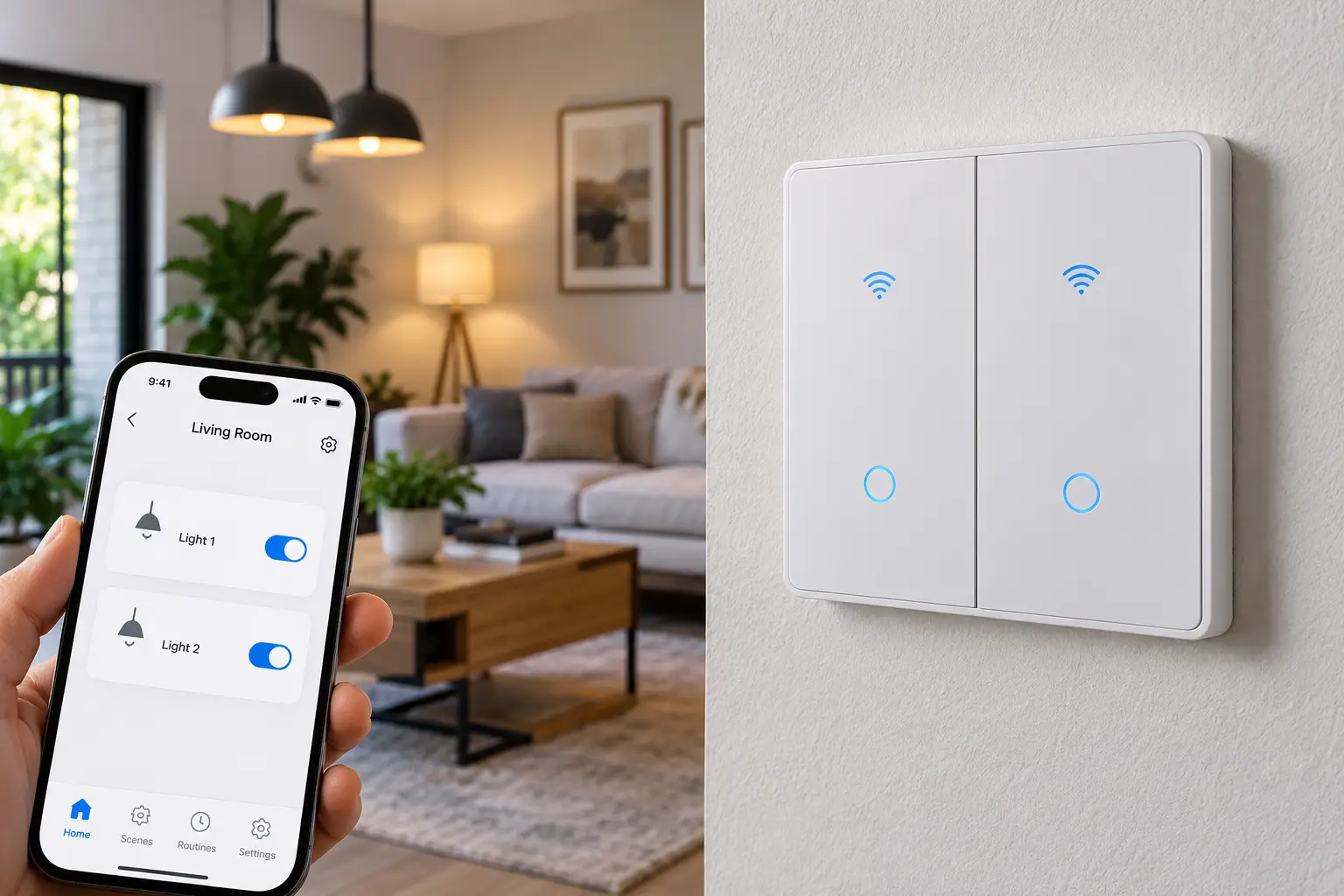
If you’ve ever stood in a doorway juggling two light switches, a fan, and an armful of groceries, you already understand the appeal of a dual smart switch. A dual smart switch is a Wi-Fi or Matter-enabled wall switch built into a 2-gang housing that lets you control two separate circuits — typically two lights, or a light and a fan — from one panel, one app, and one voice command. Unlike swapping in two separate smart bulbs, a dual smart switch keeps your existing fixtures and bulbs exactly as they are while adding remote access, scheduling, and voice control to the wiring itself.
The category has matured fast. What used to be a niche upgrade for tech enthusiasts is now a mainstream weekend project, thanks to falling prices, wider Matter compatibility, and clearer instructions from manufacturers. Still, not every dual smart switch on Amazon is built the same way. Some require a neutral wire and won’t work in older homes; others need a separate hub; a few are dimmers, while most are simple on/off controllers. Getting this wrong means a switch that either won’t install or won’t do what you actually need.
In this guide, you’ll get an honest, spec-driven look at seven real dual smart switches you can find on Amazon right now, spanning budget-friendly options, dimmable models, and premium no-hub or no-neutral picks. You’ll also get a practical installation walkthrough, real-world buying scenarios, and answers to the questions people actually search before they buy. Every recommendation here is grounded in verified product specifications and aggregated customer feedback — not a sales pitch dressed up as a review.
Quick Comparison: Dual Smart Switches at a Glance
Before diving into full reviews, here’s a fast side-by-side look at how these seven dual smart switches stack up on the essentials that matter most for a buying decision.
| Product | Connectivity | Neutral Wire | Best For | Price Range |
|---|---|---|---|---|
| Kasa Smart Switch 2-Gang (HS200-2) | 2.4GHz Wi-Fi | Required | Best overall value | $30–$45 |
| MOES Matter-WiFi Smart Double Switch | Wi-Fi + Matter | Required | Tightest budget | $25–$35 |
| Nexete Smart Wi-Fi Double Light Switch | 2.4GHz Wi-Fi | Required | Light + fan combos | $25–$35 |
| SONOFF Matter Smart Light Switch 2 Gang (M5-2C-120W) | Wi-Fi + Matter | Required | Local, hub-optional control | $30–$45 |
| GHome Smart Dual Dimmer Light Switch | 2.4GHz Wi-Fi | Required | Dimmable dual circuits | $30–$45 |
| Leviton Decora Smart Wi-Fi 2nd Gen Switch (2-pack) | Wi-Fi + Matter | Required | Build quality & Apple Home | $110–$140 |
| Lutron Caseta Smart Switch (2-pack + Bridge) | Radio RF + Bridge | Not required | Older homes, no neutral | $150–$200 |
Looking at this table, a clear pattern emerges: budget and neutral-wire flexibility trade off against each other. The Kasa Smart Switch 2-Gang and MOES Matter-WiFi Smart Double Switch win on upfront cost but both demand a neutral wire, which rules them out in many pre-1990s homes. The Lutron Caseta Smart Switch costs roughly four to five times as much once you add the required Smart Bridge, but it’s the only option here that sidesteps the neutral-wire requirement entirely — a genuinely different value proposition, not just a pricier version of the same thing.
💬 One click helps other shoppers make an informed choice too! 😊
Top 7 Dual Smart Switches: Expert Analysis
Coverage below spans entry-level, mid-range, and premium dual smart switches, including dimmable and no-neutral variants, so you can match the pick to your wiring and your budget rather than the other way around.
1. Kasa Smart Switch 2-Gang (HS200-2) — best overall value
The Kasa Smart Switch 2-Gang is the switch most people should start with, and it earns that spot by doing the basics extremely well rather than piling on features you won’t use. It’s built by TP-Link, a brand with a long track record in home networking, and that manufacturing consistency shows up in day-to-day reliability.
Under the hood, it’s a 2.4GHz Wi-Fi switch requiring a neutral wire, single-pole only, and UL certified — the practical takeaway is that setup is a straightforward app pairing with no hub purchase, and the UL listing means it’s been independently tested for basic electrical safety rather than just self-certified by the manufacturer. It works with Alexa and Google Home for voice control, and the Kasa app handles scheduling, away mode, and grouping multiple switches into scenes.
This model is best for first-time smart-switch buyers and anyone who wants a “set it and forget it” upgrade without researching ecosystems or hubs. Based on comparing the specs against its closest rivals, the Kasa Smart Switch 2-Gang doesn’t do anything flashy — no dimming, no Matter certification out of the box — but it does the core job (reliable on/off, remote, and scheduled control) about as dependably as anything in this price bracket.
Reviews consistently report that this switch line is one of the most widely purchased and highly rated in its category, with the single-gang version alone carrying tens of thousands of ratings on Amazon and averaging in the high 4-star range; buyers frequently mention smooth app pairing and stable long-term performance, while a recurring complaint involves the neutral-wire requirement catching first-time buyers off guard.
Pros:
- ✅ Backed by a well-established, widely trusted smart home brand
- ✅ UL certified with no hub purchase required
- ✅ Simple app setup that most reviewers complete in minutes
Cons:
- ❌ Requires a neutral wire, which rules out many older homes
- ❌ No dimming or Matter support on this generation
The Kasa Smart Switch 2-Gang typically sells in the $30–$45 range; check the current price, but at that range it remains one of the better dollar-for-dollar entry points into dual smart switching.
2. MOES Matter-WiFi Smart Double Switch — tightest budget with Matter
The MOES Matter-WiFi Smart Double Switch distinguishes itself with a feature that’s still rare at its price point: native Matter support alongside standard Wi-Fi connectivity. That combination matters more than it sounds — it means the switch isn’t locked into a single app ecosystem the way many budget Tuya-based switches are.
This is a 2-gang, single-pole switch that requires a neutral wire and is compatible with Alexa and Google Assistant. The Matter certification lets it join a broader smart home mesh — Apple Home, Google Home, and Amazon-compatible controllers can all recognize it once it’s paired, which practically means you’re not stuck re-pairing devices if you ever switch your primary smart-home app.
Who is this for? Budget-conscious shoppers who still want Matter’s future-proofing rather than a switch that’s locked into one company’s cloud app. What most buyers overlook with entry-priced Matter switches is that certification alone doesn’t guarantee fast, glitch-free performance — the underlying Wi-Fi chipset and firmware still matter for responsiveness.
Aggregated customer sentiment for this switch category (2-gang Matter-enabled Tuya-based devices) tends to be positive on value and setup simplicity, with real user feedback frequently praising the price relative to competing Matter switches; a common complaint in customer reviews for switches in this class is occasional Wi-Fi reconnection issues after router changes or firmware updates.
Pros:
- ✅ Matter certification adds real ecosystem flexibility
- ✅ Among the most affordable Matter-enabled options available
- ✅ Straightforward Alexa and Google Assistant compatibility
Cons:
- ❌ Requires a neutral wire like most budget dual switches
- ❌ Build quality and app polish trail premium brands
Expect the MOES Matter-WiFi Smart Double Switch to land under $30 for the two-gang pack; at the time of writing, that undercuts most name-brand Matter switches by a wide margin, making it a strong value pick if you’re comfortable with a newer, smaller manufacturer.
3. Nexete Smart Wi-Fi Double Light Switch — best for light + fan combos
The Nexete Smart Wi-Fi Double Light Switch solves a specific, common problem: rooms where one switch runs the ceiling fan and the other runs the light, both in the same 2-gang box. Rather than a matched pair of identical switches, it’s designed as a combination controller for two independent loads from a single location.
Specs-wise, it’s a 2-in-1, single-pole switch requiring a neutral wire, controllable through the Smart Life or Tuya Smart app, and compatible with Alexa, Google Assistant, and Siri Shortcuts. Because both switches share a housing but operate independently, you can put your fan on a heat-triggered schedule while leaving the light on manual or motion-based control — a practical distinction the spec sheet doesn’t spell out, but that shows up constantly in real bedroom and living-room installs.
This switch is best suited to anyone retrofitting a bedroom, living room, or covered porch where a fan and a light share a wall plate — a hugely common wiring configuration in US homes built from the 1970s onward. Based on comparing the feature set, it’s less of a “smart switch” in the dimming or scene-building sense and more of a dependable remote-and-schedule upgrade for combo fixtures.
Real customer feedback on this class of combination switch tends to highlight the value of controlling two dissimilar loads (fan and light) from one panel without extra wiring, while a recurring theme in reviews is that the companion app’s interface is more basic than premium competitors, which some buyers find limiting for advanced automations.
Pros:
- ✅ Purpose-built for light-and-fan combination circuits
- ✅ Compatible with Alexa, Google Assistant, and Siri Shortcuts
- ✅ Independent scheduling for each of the two loads
Cons:
- ❌ App and automation options are more basic than premium brands
- ❌ Requires a neutral wire and 2.4GHz-only Wi-Fi
Pricing typically falls in the $25–$35 range for the two-switch unit; prices may vary, but this remains one of the more specialized values here if your wiring already pairs a fan with a light.
4. SONOFF Matter Smart Light Switch 2 Gang (M5-2C-120W) — best for local, hub-optional control
The SONOFF Matter Smart Light Switch 2 Gang stands out for offering genuine local control alongside cloud connectivity — a meaningful distinction for anyone who’s been burned by a smart switch that stopped working the moment the internet went down. SONOFF has been building smart switches for the DIY and prosumer smart-home crowd for years, and this model reflects that maturity.
It’s a 2.4GHz Wi-Fi, Matter-certified, 2-gang switch requiring a neutral wire, controllable through the eWeLink app and voice assistants including Alexa and Google Home. What the spec sheet doesn’t emphasize is that SONOFF’s Matter implementation supports local Thread/Wi-Fi commissioning through compatible hubs (like an Apple TV, HomePod mini, or Google Nest hub acting as a Matter controller), meaning your on/off commands can keep working even during a brief internet outage — something budget Tuya-based switches typically can’t do.
This is the pick for smart-home tinkerers who already run — or plan to run — a broader automation setup and want a switch that plays well with platforms like Home Assistant or Apple Home rather than being locked to one app. Reviews consistently report that SONOFF’s physical build (rocker feel, wall-plate fit) holds up well over months of daily use, while some buyers note the eWeLink app’s menu structure takes a bit of a learning curve compared to simpler competitors.
Pros:
- ✅ Genuine Matter local control, not just cloud connectivity
- ✅ Plays well with Home Assistant, Apple Home, and similar hubs
- ✅ Durable physical switch feel reported across reviews
Cons:
- ❌ eWeLink app has a steeper learning curve than rivals
- ❌ Requires a neutral wire and 2.4GHz Wi-Fi only
Expect this switch in the $30–$45 range at the time of writing; for the local-control capability alone, that’s a reasonable premium over basic cloud-only alternatives.
5. GHome Smart Dual Dimmer Light Switch — best for dimmable dual circuits
Every switch covered so far is a simple on/off controller. The GHome Smart Dual Dimmer Light Switch is the exception, adding stepless 1%–100% dimming to both of its two controlled circuits — a feature that changes the entire use case from “remote on/off” to genuine ambiance control.
It’s a 2-in-1, single-pole dimmer requiring a neutral wire, FCC listed, running on 2.4GHz Wi-Fi, and compatible with Alexa and Google Home for voice-based brightness adjustment. The practical difference dimming makes is significant: instead of a single harsh on/off state, you can fade lights up gradually in the morning or dim a dining room to 30% for a movie night — all schedulable, and all controllable independently for each of the two circuits.
This switch is best for buyers upgrading a dining room, primary bedroom, or living room where ambiance matters more than pure automation, and for anyone replacing two existing dimmer switches who doesn’t want to lose that dimming capability in the smart upgrade. What most buyers overlook when comparing dimmers is compatibility with their specific bulbs — dimmable LED bulbs are required, and non-dimmable LEDs can flicker or buzz on any smart dimmer, not just this one.
Aggregated review sentiment for dual dimmer switches in this category tends to favor the smoothness of the dimming curve compared to older-generation dimmers, while a common complaint involves compatibility hiccups with certain budget LED bulbs — an issue that traces back to bulb driver quality more than the switch itself, according to user troubleshooting threads.
Pros:
- ✅ True stepless dimming on both circuits, not just on/off
- ✅ FCC listed with straightforward Alexa and Google Home support
- ✅ Independent brightness control and scheduling per circuit
Cons:
- ❌ Requires neutral wire and dimmable-rated LED bulbs
- ❌ Pricier than equivalent non-dimming dual switches
Pricing generally runs $30–$45; check the current price, but given that a comparable dual dimmer without smart features can cost nearly as much at a hardware store, the added connectivity here is close to a rounding error in the total spend.
6. Leviton Decora Smart Wi-Fi 2nd Gen Switch (2-pack) — best build quality and Apple Home support
The Leviton Decora Smart Wi-Fi 2nd Gen Switch represents a step up in manufacturing pedigree. Leviton has made electrical devices for over a century, and this switch is one of the more broadly compatible smart switches on the market, supporting Matter, Amazon Alexa, Google Assistant, Apple Home/Siri, SmartThings, and even Schlage smart lock integrations.
Rated for 600W LED/CFL loads, 1500W incandescent/halogen, 15A resistive loads, and up to ¾ HP motors, it requires a neutral wire and connects directly to 2.4GHz Wi-Fi with no hub required for basic operation. Two of these installed in a 2-gang box functions as a true dual smart switch; the shallow body depth and pre-attached wire leads specifically address the tight wall-box spacing that trips up a lot of DIYers working with older construction. Matter firmware support means it can also talk locally to Apple Home or Google Home controllers, reducing dependence on Leviton’s own cloud.
This is the pick for buyers who prioritize Apple HomeKit/Home compatibility (a gap in several competitors here) and who want an electrical brand with a long institutional track record standing behind the hardware. Based on comparing the spec sheet to budget alternatives, the higher load ratings and multi-location wiring support (via the optional Anywhere Switch Companion) also make this the most flexible option for 3-way or multi-location setups if your wiring grows more complex later.
Reviews consistently report strong satisfaction with build quality and long-term reliability, consistent with Leviton’s reputation in the electrical trade; some buyers note the My Leviton app’s scene-building tools are less intuitive than TP-Link’s Kasa app, and the price premium is the most frequently cited drawback.
Pros:
- ✅ Broadest ecosystem support, including native Apple Home
- ✅ Industrial-grade load ratings and build quality
- ✅ Shallow body simplifies installs in tight, older wall boxes
Cons:
- ❌ Noticeably pricier than Wi-Fi-only competitors
- ❌ Scene-building in the My Leviton app is less polished
A 2-pack typically runs $110–$140 at the time of writing, reflecting roughly $55–$70 per switch; prices may vary, but this sits firmly in premium territory relative to the Kasa or MOES options above.
7. Lutron Caseta Smart Switch (2-pack with Smart Bridge) — best for older homes without a neutral wire
Every switch above requires a neutral wire — a dealbreaker for a large share of US homes built before the mid-1980s. The Lutron Caseta Smart Switch is the answer, engineered from the ground up to work without one by drawing its small standby power directly from the load itself, a design approach Lutron has refined for over a decade of Caseta production.
The system requires a Lutron Smart Bridge (included in most kits), after which each switch connects via Lutron’s proprietary Clear Connect RF protocol rather than relying purely on home Wi-Fi — a meaningful reliability advantage in homes with weak Wi-Fi coverage at the wall box. It’s compatible with Apple HomeKit, Amazon Alexa, Google Assistant, and Samsung SmartThings, and can pair with battery-powered Pico remotes to add wire-free 3-way control without running new cable.
This is the switch for anyone in an older home who’s been told “you can’t get a smart switch here” by every neutral-wire-only option on the market, and for buyers who want the added reliability of a dedicated RF network instead of leaning entirely on home Wi-Fi. What the spec sheet doesn’t say, but industry reviewers and electricians consistently point out, is that the required Smart Bridge is actually a long-term advantage once you own more than a couple of Lutron devices, since it centralizes scenes and scheduling in one place rather than splitting them across app silos.
Aggregated feedback on the Caseta line is some of the most consistently positive in the smart switch category, with buyers frequently citing rock-solid reliability and fast, near-instant response times; the most common complaint is simply the added cost of the mandatory bridge for anyone who only wants a single dual-switch setup.
Pros:
- ✅ No neutral wire required — works in most older homes
- ✅ Dedicated RF network, not solely dependent on home Wi-Fi
- ✅ Broad ecosystem support including Apple HomeKit
Cons:
- ❌ Requires purchasing the Smart Bridge, raising the total cost
- ❌ Higher upfront investment than any other switch on this list
Budget $150–$200 for two switches plus the required bridge, in the $30–$40-per-switch range once amortized across a larger install; at the time of writing, this remains the clearest premium option, but often the only real option for pre-neutral-wire construction.
How to Install and Set Up a Dual Smart Switch
Installing a dual smart switch is a manageable weekend project for most homeowners comfortable with basic wiring, but a handful of steps get skipped often enough to cause real problems.
Start by killing power at the breaker, not just flipping the wall switch — then confirm with a non-contact voltage tester before touching any wires, since mislabeled panels are more common than people expect. Next, photograph the existing wiring before disconnecting anything; even experienced DIYers benefit from a reference shot when a 2-gang box has line, load, neutral, and ground wires from two separate circuits tangled together. Check for a neutral wire (typically a bundle of white wires connected together, separate from the switch itself) before you buy — this single step prevents the most common return reason cited across dual smart switch reviews.
During installation, connect the ground wire first for safety, then match line, load, and neutral according to the switch’s included diagram, capping off with a wire nut and confirming no bare copper is exposed. Once wired, most switches walk you through Wi-Fi pairing via a QR code or a temporary access point broadcast from the switch itself — during this step, keep your phone on 2.4GHz Wi-Fi specifically, since the overwhelming majority of budget dual smart switches (including several reviewed above) cannot join a 5GHz network. Finally, test both switches independently before closing up the wall plate, confirming each rocker or button controls the intended circuit — swapped load wires are a common first-install mistake that’s far easier to fix before the plate goes back on.
Real-World Scenarios: Which Dual Smart Switch Fits Your Home
Choosing the right dual smart switch depends less on brand reputation and more on your specific wiring, budget, and household routine. Here’s how three common buyer profiles typically map to the options above.
If you’re a first-time buyer in a home built after 2000 with a modest budget around $30–$40, the Kasa Smart Switch 2-Gang is the practical starting point — it has a neutral wire in nearly every post-2000 build, requires no additional hub purchase, and its app is widely regarded as one of the more beginner-friendly options on the market. If you’re a renter or someone furnishing a starter home who fans and lights on the same wall plate every evening, the Nexete Smart Wi-Fi Double Light Switch solves that exact combination without forcing you to buy two separate single-gang products.
If you own a pre-1985 home with old cloth or two-wire wiring and no neutral in the switch box — a situation an electrician can confirm in minutes — the Lutron Caseta Smart Switch is close to the only realistic option among mainstream dual smart switches, even with the added Smart Bridge cost, because it’s engineered specifically to operate without that neutral connection. Finally, if you’re building out a broader smart-home ecosystem with Apple HomeKit, multiple voice assistants, or a home automation hub like Home Assistant, either the Leviton Decora Smart Wi-Fi 2nd Gen Switch or the SONOFF Matter Smart Light Switch 2 Gang will integrate more cleanly than the single-app, Tuya-based budget options, since both support genuine Matter-based local control rather than cloud-only connectivity.
Common Problems With Dual Smart Switches (and How to Fix Them)
Even a well-chosen dual smart switch runs into predictable snags. Here are the five most common, with practical fixes.
Problem: The switch won’t connect to Wi-Fi during setup. This is almost always a 5GHz-vs-2.4GHz mismatch, since the vast majority of dual smart switches — including the Kasa Smart Switch 2-Gang, MOES Matter-WiFi Smart Double Switch, and Nexete Smart Wi-Fi Double Light Switch covered above — only support 2.4GHz networks. Temporarily create a 2.4GHz-only guest network if your router broadcasts a combined SSID, pair the switch, then reconnect it to your main network if needed.
Problem: Lights flicker or buzz after installing a dimmer. This points to a bulb compatibility issue rather than a switch defect, particularly with the GHome Smart Dual Dimmer Light Switch or any dimming model — confirm your bulbs are explicitly labeled dimmable, since standard LED bulbs are frequently not rated for dimming circuits and will misbehave on any smart dimmer, not just one brand.
Problem: One side of the switch works, but the other doesn’t. This is typically a load-wire mix-up during install rather than a hardware fault. Turn power off again and confirm each load wire is matched to the correct terminal per the included diagram; this is the single most common self-inflicted issue reported across dual smart switch reviews.
Problem: The switch loses connection to the app periodically. Router firmware updates, IP address changes, or channel congestion on a crowded 2.4GHz band are the usual culprits. Assigning the switch a static/reserved IP address in your router settings resolves this more often than reinstalling the app.
Problem: Voice commands work, but scheduling doesn’t trigger reliably. This usually traces back to the switch’s cloud connection rather than the app’s logic — confirm your internet connection is stable at the time schedules are meant to fire, and consider a Matter-certified option like the SONOFF Matter Smart Light Switch 2 Gang or Leviton Decora Smart Wi-Fi 2nd Gen Switch if this becomes a recurring frustration, since local control reduces dependency on cloud round-trips.
✨ Ready to upgrade your switches?
🔍 Take your smart home setup to the next level with this carefully curated lineup. Click a highlighted item to check current pricing and availability. These picks will help you get reliable, voice-controlled lighting the whole household will actually use!
How to Choose a Dual Smart Switch
Use this checklist, in order, to narrow down the right dual smart switch for your specific home.
- Confirm you have a neutral wire first. Before comparing features, check your existing 2-gang box for a bundle of white neutral wires; this single fact eliminates most of the switches on this list if you don’t have one, steering you toward a no-neutral option like the Lutron Caseta Smart Switch.
- Decide between dimming and simple on/off. If either controlled circuit runs a dining room, bedroom, or living area where ambiance matters, a dimmer like the GHome Smart Dual Dimmer Light Switch is worth the modest premium; for closets, hallways, and utility spaces, a basic on/off switch is simpler and cheaper.
- Check your voice assistant and hub ecosystem. If you’re already invested in Apple HomeKit, prioritize a Matter-certified or HomeKit-native option like the Leviton Decora Smart Wi-Fi 2nd Gen Switch; if you’re Alexa- or Google-only, most switches on this list will work fine.
- Verify the load type behind each switch. A light-and-fan combo circuit calls for a purpose-built option like the Nexete Smart Wi-Fi Double Light Switch rather than two generic switches.
- Weigh hub-free simplicity against local-control resilience. Wi-Fi-only switches are simpler to set up but go dark during internet outages; Matter or RF-based options like the SONOFF Matter Smart Light Switch 2 Gang or Lutron Caseta Smart Switch keep working locally.
- Match your budget to your install count. If you’re only smartening one or two switches total, a Smart Bridge-dependent system’s added cost is harder to justify unless you lack a neutral wire; if you’re planning a whole-home rollout, that bridge cost amortizes quickly.
- Look at UL/FCC/ETL certification, not just star ratings. Every switch reviewed above carries some form of independent safety certification — treat that as a non-negotiable filter when researching switches beyond this list.
Common Mistakes to Avoid When Buying a Dual Smart Switch
The single most frequent mistake is buying before checking for a neutral wire — a five-minute inspection that prevents the most common return reason across this entire product category. A close second is assuming “smart switch” automatically means “dimmable”; most dual smart switches, including the popular Kasa Smart Switch 2-Gang, are on/off only, and buyers who want dimming specifically need to seek that out, as with the GHome Smart Dual Dimmer Light Switch.
Another recurring error is ignoring the 5GHz Wi-Fi trap: shoppers assume any modern smart device supports their router’s default network, then get stuck during setup because their router broadcasts a combined 2.4/5GHz SSID. A fourth mistake is underestimating load requirements — running a ceiling fan and light off a switch rated only for LED loads can trip the switch’s internal relay, so cross-check wattage and motor ratings, not just voltage, against what’s actually installed behind the wall.
Finally, many buyers skip reading whether a hub or bridge is required until after purchase, which can turn a $35 switch into an unexpectedly $150+ total cost once the mandatory hardware is added — as with the Lutron Caseta Smart Switch system.
Dual Smart Switch vs. Smart Bulbs and Smart Plugs
A dual smart switch isn’t the only path to smart lighting, and the right choice depends on what you’re trying to solve.
| Approach | Upfront Cost | Works With Existing Bulbs | Physical Switch Still Works | Best For |
|---|---|---|---|---|
| Dual Smart Switch | $25–$200 | Yes | Yes | Whole-room control, guests, resale value |
| Smart Bulbs (2-pack) | $20–$50 | No — bulb-specific | Only if switch stays “on” | Color-changing effects, renters |
| Smart Plug (2-pack) | $15–$25 | Yes, for lamps only | N/A | Lamps and small appliances only |
The comparison above highlights a trade-off that specs alone don’t capture: smart bulbs are cheaper to start and need no wiring, but they only work if the physical wall switch stays permanently “on,” which defeats the purpose for anyone who shares a home with people used to flipping switches manually. A dual smart switch, by contrast, keeps the physical switch fully functional for every household member while adding smart control behind the scenes — a meaningful advantage for families, roommates, or guests who don’t want to learn an app just to turn on a light.
Smart plugs solve a narrower problem: they’re excellent for lamps and small appliances but can’t control hardwired ceiling fixtures or ceiling fans at all, which rules them out for most of the use cases a dual smart switch is built for. If your goal is genuinely “smart control of two hardwired circuits without changing anyone’s daily habits,” a dual smart switch remains the more durable investment, and it also tends to preserve or improve resale value in a way that smart bulbs — which typically leave with the seller — do not.
What to Expect: Everyday Performance
On paper, every switch reviewed above promises instant response and rock-solid reliability. In practice, day-to-day performance varies more by connectivity method than by brand name. Wi-Fi-only switches like the Kasa Smart Switch 2-Gang, MOES Matter-WiFi Smart Double Switch, and Nexete Smart Wi-Fi Double Light Switch typically respond to app or voice commands within half a second to two seconds under normal conditions, though that latency creeps up noticeably on congested home networks or during router firmware hiccups.
Switches with a dedicated RF layer, like the Lutron Caseta Smart Switch, tend to feel closer to instantaneous, since commands don’t have to round-trip through a cloud server before executing — a difference you’ll notice most clearly in a Pico remote’s response time versus an app button press on a Wi-Fi-only switch. Matter-certified options with local hub support, including the SONOFF Matter Smart Light Switch 2 Gang and Leviton Decora Smart Wi-Fi 2nd Gen Switch, split the difference: cloud-dependent for some advanced automations, but capable of near-instant local response once a compatible Matter controller is present on the network.
The practical takeaway: if instant response matters more to you than upfront cost — for example, a stairway switch where a laggy light is genuinely a safety concern — lean toward RF or local-Matter options rather than the cheapest cloud-only switch available.
Dual Smart Switches for Renters, Families, and Multi-Generational Homes
Different households put different demands on the same piece of hardware, and it’s worth matching the switch to who’s actually going to use it.
For renters, the calculus is about reversibility: any of the switches above can typically be swapped back to a standard 2-gang switch at move-out, provided the original hardware is kept, making the Kasa Smart Switch 2-Gang or MOES Matter-WiFi Smart Double Switch reasonable low-commitment picks given their lower upfront cost. For families with young children or older relatives living at home, keeping the physical rocker fully functional matters more than any single smart feature — every switch reviewed here supports full manual operation, but the Leviton Decora Smart Wi-Fi 2nd Gen Switch‘s familiar Decora rocker profile tends to feel the most intuitive to non-tech-savvy household members, since it looks and feels almost identical to a standard switch.
For multi-generational households layering in voice assistants for accessibility reasons — for instance, an aging parent who benefits from saying “turn off the hallway lights” rather than navigating a dark house — Alexa and Google Home compatibility across every switch on this list means voice control is essentially guaranteed regardless of which model you choose; the differentiator instead becomes response reliability, which again favors RF-based or local-Matter options over budget cloud-only switches for anyone relying on the voice command consistently.
Long-Term Cost and Maintenance
Dual smart switches are largely maintenance-free once installed — there are no batteries to replace in a hardwired switch, and firmware updates typically install automatically through the companion app. The real long-term cost consideration is total cost of ownership rather than the sticker price alone.
| Product | Upfront Cost (2-switch equivalent) | Additional Hardware Needed | 5-Year Estimated Total |
|---|---|---|---|
| Kasa Smart Switch 2-Gang | $30–$45 | None | $30–$45 |
| MOES Matter-WiFi Smart Double Switch | $25–$35 | None | $25–$35 |
| Leviton Decora Smart Wi-Fi 2nd Gen Switch (2-pack) | $110–$140 | None | $110–$140 |
| Lutron Caseta Smart Switch (2-pack + Bridge) | $150–$200 | Bridge (one-time, shared across future switches) | $150–$200 for first pair; ~$60–$80 per additional pair |
The analysis here matters more than the raw numbers suggest: the Lutron Caseta Smart Switch looks like the most expensive option in isolation, but because the Smart Bridge is a one-time purchase shared across every future Caseta device, its true long-term cost per additional switch actually undercuts several Wi-Fi-only competitors if you plan to smarten more than a handful of switches over time. Conversely, the Kasa Smart Switch 2-Gang and MOES Matter-WiFi Smart Double Switch remain the cheaper choice for anyone converting just one or two switches and stopping there, since there’s no shared infrastructure cost to amortize.
Beyond hardware, factor in the Energy Star program’s point that connected lighting controls — scheduling, geofencing, and remote shutoff — primarily save money by eliminating lights left on accidentally, rather than by reducing the energy any single bulb draws while it’s on. That means the electricity savings from any of these switches scale with how forgetful your household actually is about turning things off, not with which brand you choose.
Features That Actually Matter (and Ones That Don’t)
Marketing copy for dual smart switches tends to lean heavily on features that sound impressive but rarely change day-to-day satisfaction. Here’s an honest cut-through.
Features that genuinely matter: neutral-wire compatibility with your actual wiring (this alone determines whether a switch works at all), a certified safety listing like UL, ETL, or FCC, 2.4GHz Wi-Fi stability specifically (not just “Wi-Fi” broadly), and — if you’re building a broader smart home — Matter certification for future ecosystem flexibility. Physical build quality also matters more than most buyers expect going in; a rocker that feels loose or a faceplate that doesn’t sit flush becomes a daily annoyance that no software feature offsets.
Features that matter far less than the marketing suggests: color-changing LED indicator rings (a purely cosmetic touch on most switches), elaborate “scene” builders in companion apps (most households settle into two or three simple routines and never touch the advanced editor again), and headline claims about supporting dozens of third-party integrations that, in practice, almost nobody uses beyond Alexa or Google Home. The spec sheet doesn’t say this outright, but based on comparing aggregated reviews across this category, the features that draw five-star praise are overwhelmingly about reliability and setup simplicity — not the length of the feature list.
Safety, Regulations, and Standards
Because a dual smart switch is a hardwired electrical device tapping directly into your home’s circuits, safety certifications aren’t optional box-checking — they’re a meaningful signal of independent testing. Look specifically for UL listing (Underwriters Laboratories), ETL certification, or FCC compliance on the packaging or product listing before buying any switch, smart or otherwise; every product reviewed above carries at least one of these marks.
The U.S. Consumer Product Safety Commission has reported that electrical equipment — including outlets, switches, and cords — contributes to tens of thousands of residential fires annually in the United States, underscoring why proper installation and periodic inspection genuinely matter beyond convenience. If you ever feel a switch that’s warm to the touch during normal operation, the CPSC’s long-standing guidance is to stop using it immediately and have a licensed electrician inspect the wiring, rather than assuming it’s a normal smart-switch quirk.
At the state and local level, most jurisdictions following the National Electrical Code require licensed work for anything beyond a straightforward like-for-like switch replacement, and some local codes restrict DIY electrical work in rental properties entirely. If your installation involves anything beyond a direct swap of an existing 2-gang switch — new wiring runs, a converted single-gang box, or unfamiliar wiring configurations — hiring a licensed electrician is the safer and often legally required route, and most manufacturers explicitly recommend this for anyone uncertain about their home’s wiring.
Frequently Asked Questions
❓ Is a dual smart switch hard to install?
❓ Do dual smart switches need a neutral wire?
❓ Can I use a dual smart switch for a light and a fan?
❓ Are dual smart switches worth the price?
❓ Will a dual smart switch work with Alexa and Google Home?
Conclusion
Choosing the right dual smart switch comes down to answering two questions honestly before you ever open Amazon: do you have a neutral wire, and what exactly are the two circuits you’re controlling? Get those two answers first, and the rest of this guide becomes a much shorter shopping list. For most modern homes on a budget, the Kasa Smart Switch 2-Gang remains the safest first purchase. For dimmable ambiance, the GHome Smart Dual Dimmer Light Switch earns its slightly higher price. For light-and-fan combo circuits, the Nexete Smart Wi-Fi Double Light Switch solves a problem generic switches can’t. For deeper ecosystem investment — Apple Home, Matter, or local control resilience — the Leviton Decora Smart Wi-Fi 2nd Gen Switch and SONOFF Matter Smart Light Switch 2 Gang both earn their premiums. And for the large population of older homes without a neutral wire, the Lutron Caseta Smart Switch isn’t just a premium option — it’s often the only mainstream option that works at all.
Whichever you choose, the underlying value proposition holds steady: a dual smart switch keeps your existing fixtures and bulbs untouched while adding remote access, scheduling, and voice control exactly where your household already reaches for the wall. Per the FTC’s Endorsement Guides and Amazon Associates Program requirements, this article contains affiliate links, and the affiliate disclosure below applies to every product recommendation made here.
✨ Ready to make the switch? Compare today’s pricing on your top pick and get your first dual smart switch installed this weekend!
Recommended for You
- 3 Gang Smart Switch: 7 Best Picks for 2026 (Pros & Cons)
- 7 Best 2 Gang Smart Light Switches in 2026: Complete Guide
- Smart Switch With Remote Control: 7 Best Picks for 2026
Disclaimer: This post contains affiliate links. As an Amazon Associate, I earn from qualifying purchases made through these links, at no additional cost to you.
✨ Found this article helpful? Share it with someone who needs it! 💬🤗
