
In This Article
Ting Plug In: The Tiny Sensor Built to Catch Electrical Fires Before They Start
Most of the fire safety gear in your home is reactive. A smoke alarm waits for smoke. A circuit breaker waits for a fault big enough to trip it. The Ting plug in sensor flips that script: it listens to your home’s electrical network for the faint signatures of arcing (tiny sparks at loose connections or damaged insulation) and flags them while they’re still a repair job, not an insurance claim. 🔥
That matters more than most homeowners realize. According to the U.S. Fire Administration’s residential electrical fire data, electrical malfunctions caused an estimated 24,200 residential building fires, 295 deaths, 900 injuries, and roughly $1.2 billion in losses in 2021 alone. And here’s the uncomfortable part: many of those fires begin inside walls, attics, and junction boxes, where no smoke alarm can see.
So is a Ting plug in worth plugging into your wall, or is it just another subscription gadget? In this guide, you’ll get an honest, research-based answer. We break down what the sensor actually measures, what it costs over five years, where it falls short, and which six real products either complement it or cover the gaps it can’t. Every recommendation is built from manufacturer spec sheets, published expert reviews, and aggregated customer feedback, not from recycled marketing copy.
What Is Ting plug in?
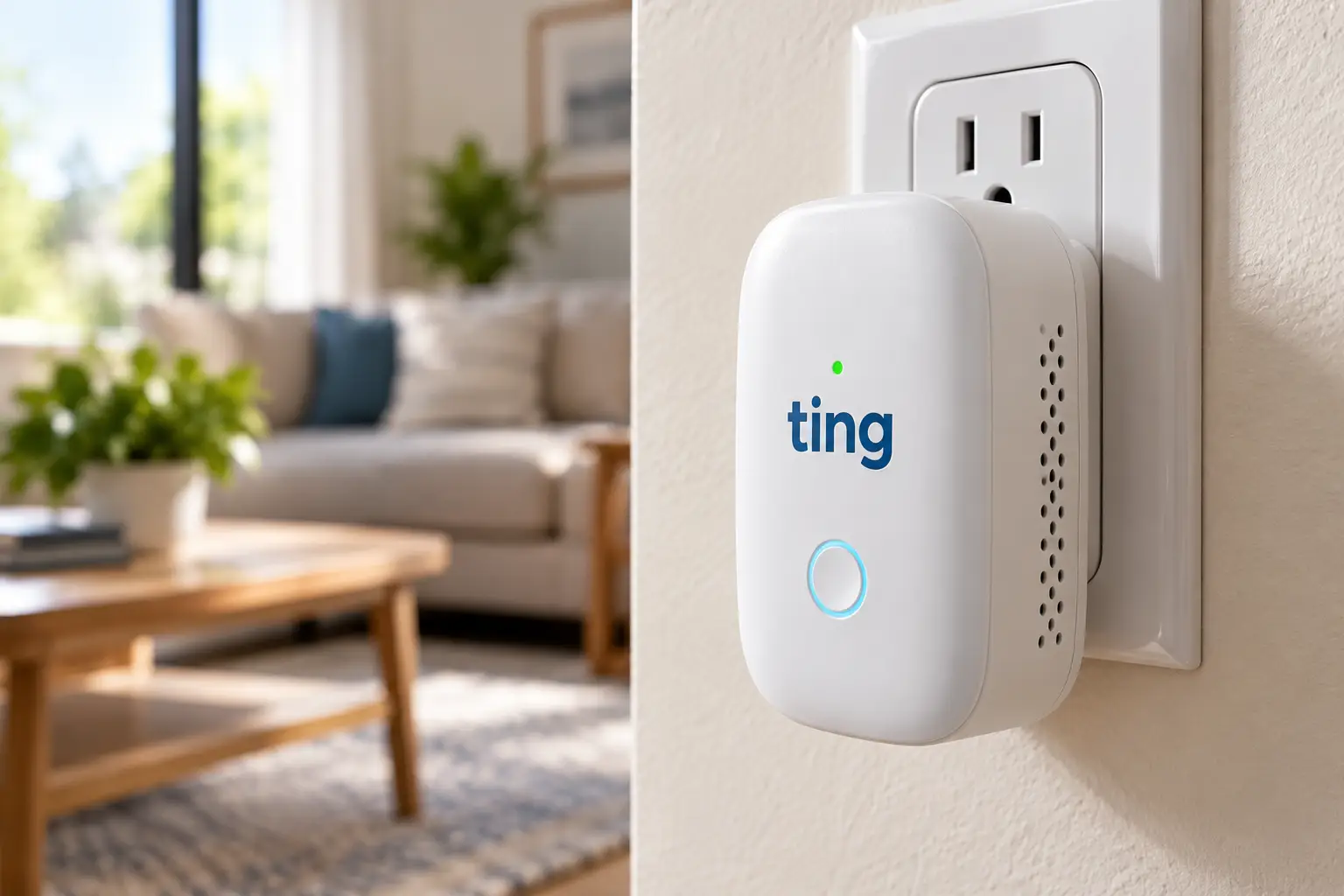
A Ting plug in is a small Wi-Fi sensor from Whisker Labs that plugs into a standard outlet and continuously analyzes your home’s voltage for signs of electrical arcing and power-quality problems. When it detects a hazard, the Ting app alerts you, and Ting’s Fire Safety Team helps you locate and fix it.
⚡ Quick facts before you dive in:
- One sensor typically covers every circuit fed by one electrical panel.
- The hardware ships bundled with 12 months of required monitoring service.
- More than 20 insurance carriers offer Whisker Labs Ting free to their policyholders.
Quick Comparison: Ting Plug In vs. 6 Home Electrical Safety Tools
| Product | Type | What It Catches | Install | Approx. Price | Best for |
|---|---|---|---|---|---|
| Ting Fire Prevention Sensor | Plug-in arc + voltage monitor | Hidden arcing, brownouts, surges, outages | Plug in, about 2 minutes | Around $100 (incl. 1 year of service) | Ting Fire Prevention Sensor: whole-home early warning |
| Sense Energy Monitor | Panel energy monitor | Appliance-level usage patterns | Inside panel, electrician advised | $300-$350 range | Sense Energy Monitor: appliance detectives |
| Emporia Vue 3 | Panel circuit monitor | Per-circuit loads, second by second | Inside panel, electrician advised | $150-$200 (16-circuit kit) | Emporia Vue 3: per-breaker data on a budget |
| Leviton AFTR1-W | AFCI outlet | Arc faults on one branch circuit (and cuts power) | Replaces an outlet | $35-$60 | Leviton AFTR1-W: retrofitting older circuits |
| Kidde Smart Smoke + CO Alarm | Hardwired Wi-Fi alarm | Smoke and carbon monoxide | Ceiling, hardwired | $60-$120 | Kidde Smart Smoke + CO Alarm: last-line alerting |
| Klein Tools RT250 | Outlet tester | Wiring faults, voltage, GFCI trip time | Handheld, plug in | $20-$30 | Klein Tools RT250: DIY outlet check-ups |
| P3 Kill A Watt P4400 | Plug-in load meter | Overdraw from single appliances | Plug in | $25-$40 | P3 Kill A Watt P4400: space heater and appliance audits |
Prices are approximate ranges at the time of writing; check the current price before you buy.
Read the What It Catches column carefully, because it tells the whole story. Only the Ting Fire Prevention Sensor watches your entire electrical network for arcing without anyone opening the panel; the Leviton AFTR1-W goes a step further by actually cutting power, but only on the circuit it’s wired into. The Sense Energy Monitor and Emporia Vue 3 are energy tools first: brilliant for spotting a failing freezer compressor, but not designed to detect fire precursors.
Meanwhile, the Kidde Smart Smoke + CO Alarm, Klein Tools RT250, and P3 Kill A Watt P4400 each fill a specific gap: alerting you once smoke or CO exists, verifying outlet wiring, and catching overloaded appliances before they cook a power strip.
The takeaway? Think in layers, not in single gadgets. For most homes, a sensible stack is a Ting plug in for early warning, a smart alarm for emergencies, and an inexpensive tester for spot checks. Everything else is a bonus that depends on your house, your budget, and how much data you actually want to look at.
💬 Found your match in the table? Click a highlighted product to check current pricing, and share this guide so other homeowners can make an informed choice too! 😊
Ting Sensor Review: The Top 7 Picks for a Safer Electrical System
The first pick is the Ting plug in itself. The other six are real, widely available products that either fill the gaps a Ting can’t cover or help you act on what it finds. Here’s the honest analysis of each.
1. Ting Fire Prevention Sensor — the only whole-home arc watcher
This is the product the keyword is really about, and it’s genuinely different from everything else on this list. Plug the Ting Fire Prevention Sensor into an open outlet, connect it to Wi-Fi through the app, and it starts analyzing your electrical network (Whisker Labs says more than 30 million electrical signals per second) for the micro-arcs that precede many electrical fires. In practice, a loose connection in a bedroom outlet or a failing splice in the attic can surface as an alert well before it’s bad enough to trip a breaker. Because it reads voltage, it also reports brownouts, surges, and outages coming from the utility side.
Based on comparing the specs, the Gen 2 model’s biggest strength is the service wrapped around it: a Fire Safety Team guides you through finding the hazard, and Ting adds a $1,000 credit toward repairs of Ting-identified hazards. It’s ideal for owners of older homes, landlords of single-family rentals, and anyone whose insurer offers it free. It’s not for people who want energy-usage charts; Whisker Labs states plainly that it isn’t designed to measure consumption. Homes with a separately fed panel (say, a detached studio) need a second sensor and a second subscription.
Customer reviews consistently praise the one-minute setup and the weekly power reports; the most common complaints center on the ongoing fee and the fact that the device itself makes no sound.
Pros:
- ✅ Monitors the whole home from one outlet
- ✅ Human-guided fixes plus a $1,000 repair credit
- ✅ Flags utility-side brownouts and surges too
Cons:
- ❌ Requires $49 a year after the first year
- ❌ No built-in audible or visual alarm
💲 Around $100 including the first year of service; excellent value, and unbeatable if your insurer hands you one for free.
2. Sense Energy Monitor — appliance-level detective work
Where Ting listens for danger, the Sense Energy Monitor listens for patterns. It installs inside your main panel with two current clamps on the service lines and uses machine learning to recognize individual appliances by their electrical signatures. Practically, that means you can eventually see when your well pump runs longer than usual or an aging freezer starts cycling nonstop, both classic early signs of a struggling motor.
Here’s what to weigh: Sense is an energy and appliance-health tool, not a fire-hazard detector. It doesn’t analyze arcing the way the Ting Fire Prevention Sensor does, so it complements rather than replaces it. It suits data-curious homeowners, solar households tracking production, and anyone trying to shrink a stubborn electric bill. Because it lives in the panel, most buyers should budget for a licensed electrician; working inside a live load center is not a casual weekend project. Its retail listing notes ETL/Intertek safety certification, which is what you want to see on anything that sits behind your panel cover.
Reviews consistently report that the app and real-time power view are excellent, while appliance detection takes weeks to mature and doesn’t always identify every device correctly.
Pros:
- ✅ Identifies appliances without buying smart plugs
- ✅ Real-time whole-home usage in a polished app
- ✅ Solar-ready versions track production as well
Cons:
- ❌ Panel installation usually means hiring an electrician
- ❌ Device detection can be slow or inconsistent
💲 Typically in the $300-$350 range; solid value for energy auditing, but a poor substitute if fire prevention is your main goal.
3. Emporia Vue 3 — per-breaker visibility without a subscription
The Emporia Vue 3 takes a more literal approach than Sense: instead of guessing which appliance is running, you clamp sensors directly onto individual circuits. The 16-circuit kit pairs the main sensors with 16 branch clamps rated at 50A, reports data second by second, and claims ±2% accuracy. In real life, if your bedroom circuit suddenly pulls twice its normal load at 2 a.m., you’ll see exactly which breaker it is, which is useful context when a space heater or dying appliance is overworking a circuit.
On paper, this is the best value in panel monitoring. There’s no subscription for core features, it supports solar net metering, and per-circuit data leaves no room for guesswork. The trade-offs are real, though: it depends on the cloud, it lacks HomeKit and Matter support, and the warranty is only one year. Like Sense, it doesn’t detect arcing, so pair it with the Ting Fire Prevention Sensor if fire risk is what keeps you up at night.
Reviews consistently highlight readings that closely track the utility meter and a clean, responsive app; complaints usually involve the cramped panel install and the lack of local, offline control.
Pros:
- ✅ Sixteen circuits monitored directly, no guesswork
- ✅ No monthly fee for core features
- ✅ Handles solar and net metering
Cons:
- ❌ Panel work makes DIY installation intimidating
- ❌ Only a one-year warranty
💲 Usually between $150 and $200 for the 16-circuit kit; the best bang for the buck if you want circuit-level insight.
4. Leviton AFTR1-W — arc protection right at the outlet
This device doesn’t just warn you; it acts. The Leviton AFTR1-W SmartlockPro is an outlet branch circuit (OBC) AFCI receptacle, which means it cuts power when it detects a dangerous arc. Installed as the first outlet on a branch circuit, an AFCI receptacle provides series arc protection for the entire branch and parallel arc protection from that outlet onward, as the overview of arc-fault circuit interrupters on Wikipedia explains. It’s rated 15A at the face with 20A feed-through, it’s tamper-resistant, and it has an LED status indicator.
What most buyers overlook is placement. Put it on the wrong outlet and you protect only a fraction of the circuit. It’s best for older homes without AFCI breakers, where replacing breakers isn’t practical, and it’s a natural fix after a Ting Fire Prevention Sensor points to a problem area. Since it involves wiring a receptacle, hire an electrician unless you’re experienced and comfortable killing power at the breaker.
Customer feedback on Leviton’s AFCI line is mixed but useful: many buyers appreciate the easy retrofit on older circuits, while some reviewers, including electricians, report nuisance tripping or early failures.
Pros:
- ✅ Actively interrupts arcs instead of only alerting
- ✅ Protects downstream outlets when installed first
- ✅ Tamper-resistant with a clear LED status
Cons:
- ❌ Covers only the circuit it’s wired into
- ❌ Some reports of nuisance trips and failures
💲 Generally in the $35-$60 range per outlet; cheap insurance for one problem circuit, though it adds up house-wide.
5. Kidde Smart Smoke + CO Alarm — the last line of defense, now on your phone
No sensor, however clever, replaces a smoke alarm, and Ting positions itself as one layer that works alongside other safety measures. The Kidde Smart Smoke + CO Alarm (model P4010ACSCO-WF) is a hardwired, Wi-Fi-connected combo alarm that pushes alerts to your phone. It’s designed to reuse existing Kidde mounting brackets and wiring, and it interconnects with other Kidde alarms so one alert sets them all off.
Practically, the phone alerts close Ting’s biggest gap. Ting warns about hazards before ignition but stays silent in the room; this alarm sounds when there’s actual smoke or carbon monoxide, and it tells you even when you’re at work. It’s best for homeowners who already have hardwired Kidde alarms and want a smart upgrade without rewiring, and for families who travel often. Renters without hardwired alarm circuits should look at battery-powered smart alarms instead.
Reviews consistently describe the app as refreshingly simple and setup as easy, especially for existing Kidde users; the main drawback buyers mention is that hardwiring makes it a poor fit for homes without existing alarm wiring.
Pros:
- ✅ Detects both smoke and carbon monoxide
- ✅ Phone alerts with no subscription required
- ✅ Swaps into existing Kidde wiring and brackets
Cons:
- ❌ Requires a hardwired installation
- ❌ Smart alerts depend on stable Wi-Fi
💲 Typically between $60 and $120 depending on version and retailer; strong value as the emergency layer of your setup.
6. Klein Tools RT250 — a budget outlet check-up
A Ting tells you something is wrong somewhere; the Klein Tools RT250 helps you check specific outlets yourself. Plug it in, and the backlit LCD shows the outlet’s voltage and identifies seven wiring conditions, such as an open ground or reversed polarity, without you decoding a chart of colored lights. Press the test button on a GFCI outlet and it displays how long the GFCI took to trip, which tells you whether that shock protection actually works.
Based on the specs, this is the most useful $20-$30 you can spend on electrical awareness. It carries a CAT II 135V safety rating and drop protection up to 6.6 feet, and it’s built for standard three-wire 120V North American outlets only. It’s perfect for new homeowners doing a move-in check, landlords between tenants, and anyone verifying a repair after an electrician’s visit. It won’t see arcing inside walls, which is exactly why it pairs so well with a Ting plug in.
Reviews on major retailers are overwhelmingly positive, praising the voltage readout and GFCI timing; the most repeated gripe is that on outlets installed ground-pin-up, the display reads upside down.
Pros:
- ✅ Shows voltage and wiring faults in plain text
- ✅ Measures actual GFCI trip time
- ✅ Durable, drop-protected design
Cons:
- ❌ Can’t detect hidden arcing inside walls
- ❌ Display flips on ground-up outlets
💲 Usually in the $20-$30 range; outstanding value and an easy add-on to any Ting setup.
7. P3 Kill A Watt P4400 — catch the power-hungry appliances
The P3 Kill A Watt P4400 is the classic plug-in load meter: plug it into the wall, plug an appliance into it, and read volts, amps, watts, line frequency, power factor, and cumulative kWh. P3 rates it at ±0.2% accuracy for voltage and current, with a 15A / 125V maximum (1,875 VA).
Why does a power meter belong in a fire-safety guide? Because overloaded cords and space heaters show up again and again in electrical fire stories. Seeing that a typical 1,500-watt heater pulls about 12.5 amps tells you exactly why it shouldn’t share a power strip with a microwave or a hair dryer. It’s best for budget-minded households, renters, and anyone auditing old appliances before winter, when heating loads peak.
Reviews consistently call it simple and eye-opening; many buyers say it changed how they think about standby power. More technical users note its limits: readings are truncated rather than rounded, and very small loads are measured less accurately.
Pros:
- ✅ Shows the real draw of any plug-in appliance
- ✅ Very affordable and completely DIY
- ✅ Tracks kWh for cost estimates
Cons:
- ❌ Measures one appliance at a time
- ❌ Less accurate on tiny standby loads
💲 Generally between $25 and $40; a smart, low-cost complement to whole-home monitoring.
✨ Build your electrical safety stack the smart way!
🔍 Start with early warning, add an emergency alarm, then grab a tester for spot checks. Click any highlighted product above to check current pricing and availability. These picks will help you sleep better knowing your wiring is being watched around the clock! 🏡
How to Set Up Your Ting Plug In the Right Way
Getting a Ting plug in running takes minutes, but a few smart choices in the first month make its alerts far more useful. 🔌
Your first-day checklist
- Plug straight into the wall. Skip power strips and surge protectors. Surge suppressors are built to filter electrical noise, and electrical noise is precisely what the sensor needs to hear.
- Choose an always-on outlet. Avoid outlets controlled by a wall switch, because flipping that switch takes your monitoring offline without anyone noticing.
- Check the Wi-Fi at that spot. The sensor reports through the cloud, so a weak signal means delayed alerts. Stand at the outlet and load a video on your phone; if it buffers, pick another outlet or add a mesh node.
- Count your panels. A detached garage, workshop, or studio fed by its own service panel needs its own sensor to be covered.
- Make your phone the alarm. Since the sensor is silent, allow notifications for the Ting app and make sure at least one other adult in the household knows what an alert means and who to call.
What the first 30 days look like
Expect a learning period. Your app will log voltage dips and brief transients as appliances cycle on and off; plenty of these are normal and simply reflect how your home and utility behave. The weekly report is your baseline, so skim it each week for the first month. If you later receive a hazard alert, you’ll understand how unusual it really is.
One common first-month mistake: unplugging the sensor to borrow the outlet for a vacuum or holiday lights. Label the outlet or tape a small note beside it so nobody does that by accident.
Real-World Scenarios: Matching the Right Setup to Your Home
Products only make sense in context, so here are three realistic profiles and how the picks fit together. 🏠
Scenario 1: The 1960s ranch, budget around $150
Older homes often have aging receptacles, mixed wiring from decades of DIY, and no AFCI protection at all. This owner should start with the Ting Fire Prevention Sensor for whole-home early warning, then add the Klein Tools RT250 to check every outlet during a single Saturday afternoon. If Ting flags a hazard on a particular circuit, a Leviton AFTR1-W installed by an electrician on the first outlet of that branch is a targeted, affordable upgrade.
Scenario 2: The young family in a newer suburb, budget $250-$350
Newer construction usually includes AFCI breakers, so the bigger gaps are remote awareness and seasonal loads. Pair a Ting plug in with the Kidde Smart Smoke + CO Alarm so both pre-fire hazards and real emergencies reach your phone, even on vacation. Add the P3 Kill A Watt P4400 to confirm the nursery space heater isn’t overloading a shared circuit in January.
Scenario 3: The solar homeowner who loves data, budget $400+
This buyer wants both safety and efficiency. The Emporia Vue 3 delivers per-circuit visibility and net-metering data with no monthly fee, while the Ting Fire Prevention Sensor handles the arc detection that energy monitors don’t do. If appliance recognition matters more than per-breaker data, the Sense Energy Monitor is the alternative, though at a higher price.
Got a Ting Alert? A Problem-to-Solution Guide
Alerts are only useful if you know what to do next. Here are the most common situations and practical fixes.
❓ Problem: Ting detected arcing, but you have no idea where. ✅ Solution: Don’t go hunting behind walls yourself. Follow the Fire Safety Team’s guidance; they help narrow the source to a device, outlet, switch, or circuit. A licensed electrician then makes the repair, and the $1,000 credit can offset Ting-identified hazard repairs. If the fix involves a circuit without arc protection, ask about a Leviton AFTR1-W on the first outlet.
❓ Problem: You’re getting low-voltage or high-voltage alerts. ✅ Solution: These often originate outside your home, at the utility transformer or service drop. Use the Klein Tools RT250 to confirm voltage at a few outlets, then contact your utility with the timestamps from the app.
❓ Problem: A breaker keeps tripping, yet Ting is quiet. ✅ Solution: Ting focuses on arcing; overloads are a different fault. Use the P3 Kill A Watt P4400 to measure what’s plugged into that circuit, or an Emporia Vue 3 to see its total load. If the math doesn’t explain the trips, call an electrician.
❓ Problem: The app says your sensor is offline. ✅ Solution: Check for a power outage, a tripped GFCI upstream, a switched outlet, or a router change. Re-pair through the app if your Wi-Fi password changed.
❓ Problem: A GFCI outlet won’t trip when you press TEST. ✅ Solution: Verify with the Klein Tools RT250‘s trip-time test. A GFCI that fails to trip offers no shock protection and should be replaced promptly.
How to Choose Ting plug in and the Right Companion Tools
Buying a Ting plug in is simple; buying it smartly takes a few minutes of homework. Follow these steps in order:
- Check your insurer first. More than 20 carriers provide Ting free to policyholders, so a five-minute call or a look at your insurer’s website could save you the full cost.
- Count your electrical panels. One sensor per separately fed panel. A main house plus a detached workshop with its own service means two sensors and two subscriptions.
- Decide between alerting and interrupting. Ting alerts you and guides a fix; an AFCI device such as the Leviton AFTR1-W physically cuts power. Older homes often benefit from both.
- Budget for the subscription. Alerts require active service, which runs $49 a year after the first year. If that fee would make you let it lapse, the sensor stops protecting you.
- Keep a last-line alarm. Pair early warning with working smoke and CO alarms, ideally connected ones like the Kidde Smart Smoke + CO Alarm.
- Add a verification tool. A tester like the Klein Tools RT250 lets you confirm repairs and spot obvious outlet faults on your own.
- Buy an energy monitor only if you’ll use the data. The Emporia Vue 3 and Sense Energy Monitor are great for bills and appliance health, not for fire detection.
Ting Sensor vs. AFCI Breakers and Smoke Alarms
The biggest misconception about a Ting plug in is that it competes with traditional protection. It doesn’t; it works at a different moment in the life of a fault.
| Protection | When It Acts | Coverage | What It Does | Best for |
|---|---|---|---|---|
| Ting Fire Prevention Sensor | Early, at the precursor stage | Whole home per panel | Alerts + guided repair | Early warning |
| Standard AFCI breaker | When an arc crosses its trip threshold | One circuit | Cuts power | Code-required protection |
| Leviton AFTR1-W | When an arc crosses its trip threshold | Branch from the first outlet | Cuts power | Retrofits without panel work |
| Kidde Smart Smoke + CO Alarm | After smoke or CO is present | Room, plus interconnected alarms | Siren + phone alert | Evacuation |
The table shows a clear timeline. Whisker Labs says Ting often detects the precursors to arc faults well before they escalate far enough to trip an AFCI breaker, which makes it the earliest layer. AFCI devices are the automatic safety net when an arc becomes dangerous, and smoke alarms are the final layer when everything else has failed.
In other words, an AFCI is a bouncer who throws out a troublemaker on the spot, while Ting is the security camera that spots the troublemaker loitering outside. You want both, and you still want the fire exit sign.
What to Expect From a Ting Electrical Fire Sensor Day to Day
Living with a Ting electrical fire sensor is mostly uneventful, which is the point. The device sits in its outlet with a small status light, and nearly all interaction happens in the app.
Here’s the realistic day-to-day picture:
- 📊 Weekly summaries. You’ll get regular health reports and can view live voltage, which many owners find surprisingly interesting.
- ⚡ Utility events. Brownouts, surges, and outages show up in the app. One owner’s story published by Whisker Labs describes a loose connection outside the home that the utility then repaired.
- 🔕 Silence in the room. As PCWorld’s hands-on Ting review points out, the device doesn’t emit audible or visual warnings, so your phone is the only alarm.
- 🔍 Source identification. Ting can often narrow an arc to its likely source, such as a switch, outlet, or plugged-in device.
What you won’t get is an energy dashboard; Whisker Labs is explicit that Ting measures voltage for hazard detection, not consumption. Set expectations accordingly and you’ll be happy with what a Ting electrical fire sensor delivers: quiet vigilance with a human team behind it.
Is Ting Worth It? Long-Term Cost and Value
The sticker price is only half the story, so let’s look at five-year cost of ownership.
| Product | Upfront (approx.) | Ongoing Cost | Est. 5-Year Cost | Best for |
|---|---|---|---|---|
| Ting Fire Prevention Sensor | Around $100 incl. year 1 | $49/year after year 1 | About $300 (or $0 via insurer) | Ting Fire Prevention Sensor: early warning |
| Kidde Smart Smoke + CO Alarm | $60-$120 | None required | $60-$120 + install | Kidde Smart Smoke + CO Alarm: emergencies |
| Emporia Vue 3 | $150-$200 | None for core features | $150-$200 + install | Emporia Vue 3: circuit data |
| Klein Tools RT250 | $20-$30 | Batteries | $20-$30 | Klein Tools RT250: spot checks |
Looking at the table, the Ting Fire Prevention Sensor is the only option with a recurring fee, which is why the question is Ting worth it comes up so often. Five years works out to roughly $5 a month, and the $1,000 repair credit for Ting-identified hazards can outweigh that entire outlay if it’s ever used. The one-time products are cheaper, but none of them watch the whole house for arcing.
So, is Ting worth it? If your insurer offers it free, the answer is an easy yes. If you’re paying, it’s most compelling for homes over 30 years old, homes with past electrical work of unknown quality, and anyone who’s frequently away.
Features That Actually Matter (and Ones That Don’t)
Marketing pages make every feature sound essential. Here’s an honest filter.
✅ Features that matter:
- Whole-home coverage. One device watching every circuit beats one device per outlet for early warning.
- Human follow-through. An alert without guidance just creates anxiety; Ting’s Fire Safety Team is a real differentiator.
- Automatic interruption. For circuits with no AFCI protection, a device that cuts power, like the Leviton AFTR1-W, adds something no alert can.
- Safety listings. UL, ETL, or CSA marks on anything connected to your wiring.
❌ Features that matter less than they sound:
- AI buzzwords. What matters is detection results and support, not the label on the algorithm.
- Energy charts for safety buyers. If fire prevention is the goal, graphs from the Sense Energy Monitor or Emporia Vue 3 are a nice extra, not protection.
- Outage notifications. Handy when you’re traveling, but you’ll usually notice an outage on your own.
Common Mistakes to Avoid With a Ting Plug In
Most disappointment with a Ting plug in comes from avoidable setup and expectation errors:
- Treating it as a smoke alarm replacement. It isn’t. Keep working smoke and CO alarms on every level.
- Plugging it into a power strip or switched outlet. Both can blind or disconnect the sensor.
- Letting the subscription lapse. Service is required for alerts, so an expired plan leaves you with a decorative night-light.
- Ignoring low-voltage alerts. Utility-side problems can damage appliances and occasionally signal dangerous connections outside the home.
- Forgetting a second panel. Outbuildings with their own service aren’t covered by the main sensor.
- DIY panel work without experience. Energy monitors and AFCI swaps involve live electrical equipment. When in doubt, hire a licensed electrician.
Safety, Regulations, and Standards
Knowing the standards behind these devices helps you judge claims and talk confidently with an electrician.
- AFCI requirements. The National Electrical Code requires arc-fault protection in many areas of new homes, and local adoption varies by state and municipality. Older homes are generally grandfathered, which is exactly why plug-in monitoring and AFCI outlets are popular retrofits.
- UL 1699. This is the UL safety standard for arc-fault circuit interrupters, the benchmark devices like the Leviton AFTR1-W are built around.
- The research behind arc detection. The CPSC’s technical paper on AFCI fire technology explains how wiring-related fire losses drove the development of arc-fault protection.
- GFCI vs. AFCI. A GFCI protects people from shock; an AFCI protects homes from arc-caused fires. A good home needs both, and the Klein Tools RT250 can verify that GFCIs actually trip.
- Product listings. Look for UL, ETL, or CSA marks. The Emporia Vue 3 carries UL certification, the P3 Kill A Watt P4400 is ETL listed, and Wi-Fi devices sold in the U.S. must meet FCC rules.
- Permits. Panel-installed monitors and receptacle replacements may require permits depending on your local code; check before you start.
Ting Plug In for Older Homes, Renters, and Seniors
Different households get very different value from the same Ting plug in.
🏚️ Older homes
This is the sweet spot. Decades of thermal cycling loosen connections, and past DIY work is often undocumented. A whole-home sensor gives you a running health check without opening walls, and the Klein Tools RT250 helps you inventory problem outlets on day one.
🏢 Renters
Because it simply plugs in, Ting is one of the few electrical safety upgrades a renter can install without landlord approval, and it moves with you. AFCI outlets and panel monitors, by contrast, need the owner’s permission. If Ting flags a hazard, share the alert details with your landlord in writing.
👵 Seniors and their families
Silent, phone-based alerts work best when someone is actively watching the phone. Make sure a trusted family member understands the app, and pair Ting with a loud, interconnected alarm such as the Kidde Smart Smoke + CO Alarm. Families with firefighters should note that Ting offers a firefighter discount.
Ting Plug In FAQs
❓ Does Ting plug in work during a power outage?
❓ Can I buy a Ting sensor on Amazon, or only through my insurer?
❓ Does Ting detect problems on 240V circuits like dryers and ranges?
❓ Can I cancel the Ting service and keep using the sensor?
❓ Is a Ting plug in worth it in a brand-new home?
Conclusion: Should You Plug In a Ting?
Here’s the honest bottom line. A Ting plug in is the only consumer product on this list that watches your entire electrical network for the arcing that precedes many electrical fires, and it backs those alerts with a real team and a $1,000 repair credit. That’s a meaningful step beyond reactive protection, especially in older homes where wiring problems hide behind drywall.
It’s not a magic shield, though. It’s silent in the room, it needs a $49 yearly service after the first year, and it doesn’t replace smoke alarms or AFCI protection. The smartest approach is a layered one: the Ting Fire Prevention Sensor for early warning, the Kidde Smart Smoke + CO Alarm for emergencies, the Leviton AFTR1-W for problem circuits without arc protection, and the Klein Tools RT250 for quick outlet checks. Data lovers can add the Emporia Vue 3 or Sense Energy Monitor, and the P3 Kill A Watt P4400 keeps space heaters and old appliances honest.
Your next step takes five minutes: call your homeowners insurance carrier and ask whether it offers Ting for free. If it does, you’ve just gotten whole-home electrical monitoring at no cost. If it doesn’t, weigh the roughly $5-a-month cost against the age of your wiring and how often you’re away. Either way, test your smoke alarms this weekend. 🔥🧯
✨ Don’t wait for smoke to find a problem!
🔍 Take your home’s electrical safety to the next level with this carefully curated lineup. Click a highlighted product to check current pricing and availability. These picks will help you protect the people and the home you love! 🏡💙
Recommended for You
- Best Automatic Power Strip: 7 Options for a Smarter Home
- Wireless Power Strip Guide 2026: 7 Smart Picks That Kill Clutter
- Dimming Smart Plug: 7 Best Picks for 2026 (Flicker-Free Guide)
Disclaimer: This post contains affiliate links. As an Amazon Associate, I earn from qualifying purchases made through these links, at no additional cost to you.
✨ Found this article helpful? Share it with someone who needs it! 💬🤗