
In This Article
A kasa smart plug alexa pairing is one of the simplest, cheapest ways to turn a “dumb” lamp, fan, or coffee maker into something you control with your voice. In plain terms, a smart plug is a small Wi-Fi-connected adapter that sits between a regular outlet and your appliance, letting an app or a voice assistant switch power on and off remotely. TP-Link’s Kasa line has been one of the most popular options in this category for years, largely because it skips the extra smart-home hub that some competing systems still require (Wikipedia’s overview of smart plugs covers how this hub-free approach became standard for budget-friendly home automation).
If you’ve just unboxed a Kasa plug, or you’re still deciding which model to buy, the good news is that the Alexa side of the equation is genuinely easy — link one skill, and Alexa finds your plug automatically. The harder decision is picking the right plug for your outlet, your appliance’s wattage, and whether you actually need energy monitoring or a Matter-certified model that also plays nicely with Apple Home. This guide walks through both: a fast, no-nonsense setup process, and a researched breakdown of seven real, currently available plugs — Kasa’s own lineup plus two worthwhile alternatives — so you’re not guessing at the checkout page.
We’ll cover entry-level single plugs, energy-monitoring models, an outdoor-rated option, a power strip for entertainment centers, and how Kasa stacks up against Amazon’s own first-party plug and TP-Link’s budget Tapo line. By the end, you’ll know exactly which plug fits your setup and how to get it talking to Alexa on the first try.
Quick Comparison: Best Kasa Smart Plugs for Alexa at a Glance
| Product | Best For | Energy Monitoring | Hub-Free | Price Range |
|---|---|---|---|---|
| Kasa Smart Plug Mini (KP125) | Simple, budget-friendly control | No | Yes | Around $20-$25 (2-pack) |
| Kasa Matter Smart Plug (KP125M) | Apple Home + Alexa households | Yes | Yes | Around $30-$40 (2-pack) |
| Kasa Smart Wi-Fi Outdoor Plug (KP400) | Holiday lights, patio gear | No | Yes | Around $30-$35 |
| Kasa Smart Wi-Fi Power Strip (HS300) | Entertainment centers, home offices | Yes (per outlet) | Yes | Around $45-$55 |
| Amazon Smart Plug | Alexa-only households | No | Yes | Around $15-$20 |
Looking at the table, the pattern that jumps out is that price scales almost directly with how much data and flexibility you get back. The Kasa Smart Plug Mini (KP125) and the Amazon Smart Plug sit at the entry level because they only do the basics — on, off, schedule — while the Kasa Matter Smart Plug (KP125M) and Kasa Smart Wi-Fi Power Strip (HS300) cost more because they add real-time energy tracking, which matters if you’re trying to identify power-hungry appliances. If your goal is simply “turn this lamp on with my voice,” don’t overspend on monitoring features you won’t check.
💬 One click helps other shoppers make an informed choice too! 😊
Top 7 Kasa Smart Plugs for Alexa: Expert Analysis
1. Kasa Smart Plug Mini (KP125) — smallest footprint for tight outlets
The Kasa Smart Plug Mini (KP125) solves the single most annoying problem with older smart plugs: bulk. Its compact, rounded design plugs in flush enough that it rarely blocks the second socket on a duplex outlet, which is exactly where cheaper competitors fall apart.
Under the hood, it’s rated for 15A/1800W max, runs on 2.4GHz Wi-Fi only (your router needs a 2.4GHz band, since most smart plugs can’t join a 5GHz network), and needs no hub — it talks directly to your home Wi-Fi and syncs with Alexa, Google Home, or Siri through Apple HomeKit. That tri-platform support is unusual at this price point; most competitors pick one or two ecosystems, not three. Scheduling, a countdown timer, and an “Away Mode” that randomizes on/off times to simulate occupancy are all built into the free Kasa app.
This is the plug we’d point a first-time smart-home shopper toward. It’s inexpensive enough that buying a two-pack to test in two rooms isn’t a big risk, and the setup process (detailed further down) takes about five minutes per plug. Reviews consistently report strong first-year reliability, though a subset of users on retailer review pages note that firmware updates occasionally require a manual re-pairing with Alexa — annoying, but not a dealbreaker for most households.
Pros:
- ✅ Compact design doesn’t block the adjacent outlet
- ✅ Works with Alexa, Google Home, and Apple HomeKit
- ✅ No hub needed, simple five-minute setup
Cons:
- ❌ No energy monitoring on this model
- ❌ 2.4GHz-only Wi-Fi can be finicky on dual-band routers
In the $20-$25 range for a two-pack, it’s one of the better cost-per-outlet deals in the category, and a sensible starting point before you invest in pricier monitoring-capable plugs.
2. Kasa Smart Plug Mini with Energy Monitoring (KP115) — budget-friendly power tracking
The Kasa Smart Plug Mini with Energy Monitoring (KP115) takes the same compact mini form factor and adds real-time wattage tracking, which is the feature most people don’t realize they want until they use it once.
Functionally, it reports live power draw and logs daily, weekly, and monthly consumption inside the Kasa app, so you can see, for instance, that your space heater is quietly costing more per month than your refrigerator. It’s rated for 15A and works with Alexa and Google Home (it does not support Apple HomeKit, unlike the newer Matter model below), and setup mirrors the standard KP125 process.
What most buyers overlook with this model is that energy monitoring isn’t just a curiosity — it’s a genuine diagnostic tool. If you suspect an appliance is drawing power even when “off” (a common issue with older electronics and chargers), this plug will show you the exact standby draw in watts, letting you decide whether it’s worth unplugging entirely. Reviews aggregated across retail sites describe the monitoring data as accurate within a reasonable margin compared to dedicated power meters, though a few users note the app’s historical charts could be more detailed.
Pros:
- ✅ Real-time and historical energy usage data
- ✅ Works with Alexa and Google Home out of the box
- ✅ Same compact, non-blocking plug design as the KP125
Cons:
- ❌ No Apple HomeKit support
- ❌ Historical usage charts feel basic compared to dedicated monitors
Typically priced around $15-$20 for a single unit, it’s a smart upgrade over the base KP125 if you’re even mildly curious about your electricity bill.
3. Kasa Matter Smart Plug with Energy Monitoring (KP125M) — best for mixed Alexa and Apple Home households
The Kasa Matter Smart Plug with Energy Monitoring (KP125M) is TP-Link’s answer to the industry’s shift toward Matter, the cross-platform smart home standard, and it’s the most future-proof plug in this roundup.
Because it’s Matter-certified, this plug works natively with Apple Home, Amazon Alexa, and Google Home simultaneously, without picking a “primary” ecosystem the way older plugs effectively forced you to. It keeps the 15A/1800W rating and compact housing of the standard Mini line, adds the same energy-monitoring dashboard found on the KP115, and is UL certified for safety compliance in US outlets.
For households where one person uses an iPhone and another uses an Android phone paired with an Echo speaker, this is the plug that ends the debate — everyone controls it from their own preferred app. Based on comparing the spec sheets, the trade-off is a moderately higher price than the non-Matter models, which is a reasonable ask given the added interoperability. Aggregated customer feedback highlights smoother multi-app syncing than TP-Link’s earlier “Kasa for Matter” firmware updates, which some early adopters found glitchy before the app matured.
Pros:
- ✅ Matter certification means true cross-platform compatibility
- ✅ Built-in energy monitoring like the KP115
- ✅ UL certified with the same compact form factor
Cons:
- ❌ Costs more than the standard KP125 or KP115
- ❌ Matter setup can be less intuitive for first-timers than classic Kasa pairing
Expect to pay in the $30-$40 range for a two-pack, which is solid value once you factor in that it replaces the need to buy separate Alexa- and HomeKit-specific plugs.
4. Kasa Smart Wi-Fi Outdoor Plug (KP400) — weatherproof control for patios and holiday lighting
The Kasa Smart Wi-Fi Outdoor Plug (KP400) moves the same voice-control convenience outside, with a IP64-rated weatherproof housing built to handle rain and temperature swings that would kill an indoor plug.
It packs two independently controllable outlets under one weatherproof cover, so you can put your patio string lights on one schedule and a fountain pump on another. A standout feature is sunrise/sunset offset scheduling — the plug pulls your location’s actual sunset time and can turn on porch lights 15 minutes before dusk automatically, rather than relying on a fixed clock time that drifts with the seasons. It works with Alexa, Google Home, and IFTTT, and, like the rest of the lineup, needs no hub.
This is the plug for anyone who’s tired of fumbling with a physical timer for holiday lights or forgetting to flip the patio switch during a summer barbecue. What the spec sheet doesn’t say, but reviews reveal, is that the outlet cover’s tight seal — while great for weatherproofing — makes it slightly awkward to plug in bulky adapters; slim plugs like LED string light connectors fit best. Owners consistently praise its reliability through cold winters and humid summers alike.
Pros:
- ✅ Two independently controlled, weatherproof outlets
- ✅ Automatic sunrise/sunset scheduling
- ✅ Works with Alexa, Google Home, and IFTTT
Cons:
- ❌ Tight outlet covers can be snug for bulky plug adapters
- ❌ No energy monitoring on this model
Priced around $30-$35, it’s a reasonable investment considering how few outdoor-rated smart plugs exist at this price with dual, independently switched outlets.
5. Kasa Smart Wi-Fi Power Strip (HS300) — best for entertainment centers and home offices
The Kasa Smart Wi-Fi Power Strip (HS300) swaps a single outlet for six individually controllable AC outlets plus three USB charging ports, making it the go-to pick for anyone trying to smarten up a cluster of devices at once.
Each of the six outlets can be scheduled, timed, or voice-controlled independently through Alexa — so you can say “turn off the TV outlet” without killing power to your router or cable box plugged into the same strip. It also includes per-outlet energy monitoring, letting you identify which specific device (a game console, a monitor, a space heater under your desk) is driving up your bill, not just the strip as a whole.
This is transformation-grade utility for home offices and media centers specifically, because it eliminates the need to buy six separate smart plugs to achieve the same outcome. Based on comparing total cost, one Kasa Smart Wi-Fi Power Strip (HS300) is usually cheaper than six individual Mini plugs, while taking up a single wall outlet instead of six. Reviews describe the build quality as sturdy, with a common piece of aggregated feedback being that the strip runs slightly warm under sustained heavy load — normal for a device switching multiple circuits, but worth noting if you’re powering high-draw equipment.
Pros:
- ✅ Six independently controlled outlets plus three USB ports
- ✅ Per-outlet energy monitoring
- ✅ Cheaper than buying six separate smart plugs
Cons:
- ❌ Larger footprint needs adequate desk or floor space
- ❌ Runs slightly warm under heavy sustained load
At around $45-$55, it delivers strong value-per-outlet once you compare it against buying multiple single plugs, and it remains one of the most requested products in this category for a reason.
6. Amazon Smart Plug — tightest native integration for Alexa-only households
The Amazon Smart Plug takes a different approach entirely: rather than supporting multiple ecosystems, it’s purpose-built as a “Certified for Humans” device that pairs with Alexa in about sixty seconds, with zero third-party app required.
Setup happens entirely inside the Alexa app — plug it in, open the app, and Alexa detects it automatically in most cases, skipping the separate account creation and skill-linking steps that Kasa (and most competitors) still require. It’s rated for standard household loads and focuses on doing one thing extremely well: fast, reliable Alexa voice and routine control, including compatibility with Alexa+ for more advanced conversational commands.
If your home is Alexa-only, with no Apple devices and no interest in Google Home, this plug genuinely simplifies the buying decision — there’s no compatibility chart to study. The honest trade-off is that you’re fully locked into Amazon’s ecosystem; there’s no HomeKit or Google Home support at all, and no companion app if you ever want data or controls outside of Alexa. Reviews aggregated from major retailers describe setup as close to foolproof, with the most common complaint being that returning users occasionally have to re-link the device after a router replacement.
Pros:
- ✅ Sets up directly in the Alexa app in about a minute
- ✅ No separate account or skill-linking required
- ✅ Compatible with Alexa+ conversational routines
Cons:
- ❌ Alexa-only — no Google Home or Apple HomeKit support
- ❌ No dedicated app for data or controls outside Alexa
Typically priced around $15-$20, it’s one of the cheapest ways to get flawless Alexa integration if you have no plans to ever mix ecosystems.
7. TP-Link Tapo P110 — best budget alternative with energy monitoring
The TP-Link Tapo P110 comes from the same parent company as Kasa but targets shoppers who want energy monitoring without paying Kasa-branded pricing, making it the value pick of this lineup.
Rated for 15A/16A depending on region, the TP-Link Tapo P110 includes real-time and historical energy tracking through the separate Tapo app, works with Alexa and Google Home, and even has a Matter-certified variant (the P110M) for Apple Home compatibility — closely mirroring what the pricier Kasa Matter Smart Plug (KP125M) offers.
What most buyers overlook is that Kasa and Tapo are both TP-Link products built on very similar hardware platforms, so choosing Tapo over Kasa here is less about quality and more about ecosystem preference and app design — some users find the Tapo app’s interface cleaner, while long-time Kasa users may prefer sticking with one app across their whole smart-home setup. Reviews comparing the TP-Link Tapo P110 directly against Kasa’s KP115 describe near-identical real-world performance for roughly half the cost, which is a compelling argument if budget is the deciding factor.
Pros:
- ✅ Energy monitoring at a lower price than Kasa’s equivalent
- ✅ Matter-certified variant (P110M) available for Apple Home
- ✅ Works with Alexa and Google Home
Cons:
- ❌ Requires a separate Tapo app, not Kasa’s app
- ❌ Slightly less brand recognition than Kasa in the US market
At around $10-$15 per unit, it’s one of the strongest value plays if you want energy monitoring without paying a premium for the Kasa name specifically.
Full Comparison Table: All 7 Plugs Side by Side
| Product | Type | Ecosystems | Energy Monitoring | Price Range | Best For |
|---|---|---|---|---|---|
| Kasa Smart Plug Mini (KP125) | Indoor mini plug | Alexa, Google, HomeKit | No | ~$20-$25 (2-pk) | First-time buyers |
| Kasa Smart Plug Mini with Energy Monitoring (KP115) | Indoor mini plug | Alexa, Google | Yes | ~$15-$20 | Tracking power draw on a budget |
| Kasa Matter Smart Plug (KP125M) | Indoor mini plug | Alexa, Google, HomeKit (Matter) | Yes | ~$30-$40 (2-pk) | Mixed Apple/Alexa homes |
| Kasa Smart Wi-Fi Outdoor Plug (KP400) | Outdoor dual plug | Alexa, Google, IFTTT | No | ~$30-$35 | Patios, holiday lighting |
| Kasa Smart Wi-Fi Power Strip (HS300) | 6-outlet power strip | Alexa, Google | Yes (per outlet) | ~$45-$55 | Entertainment centers, offices |
| Amazon Smart Plug | Indoor single plug | Alexa only | No | ~$15-$20 | Alexa-only households |
| TP-Link Tapo P110 | Indoor single plug | Alexa, Google | Yes | ~$10-$15 | Budget energy monitoring |
Reading across this table, the clearest split is between plugs built for ecosystem flexibility (the Kasa Matter Smart Plug (KP125M)) and plugs built for single-purpose simplicity (the Amazon Smart Plug). The Kasa Smart Wi-Fi Power Strip (HS300) stands out as the best per-outlet value if you’re outfitting a media console, while the TP-Link Tapo P110 undercuts every Kasa model on price for anyone who just wants basic energy data.
💬 One click helps other shoppers make an informed choice too! 😊
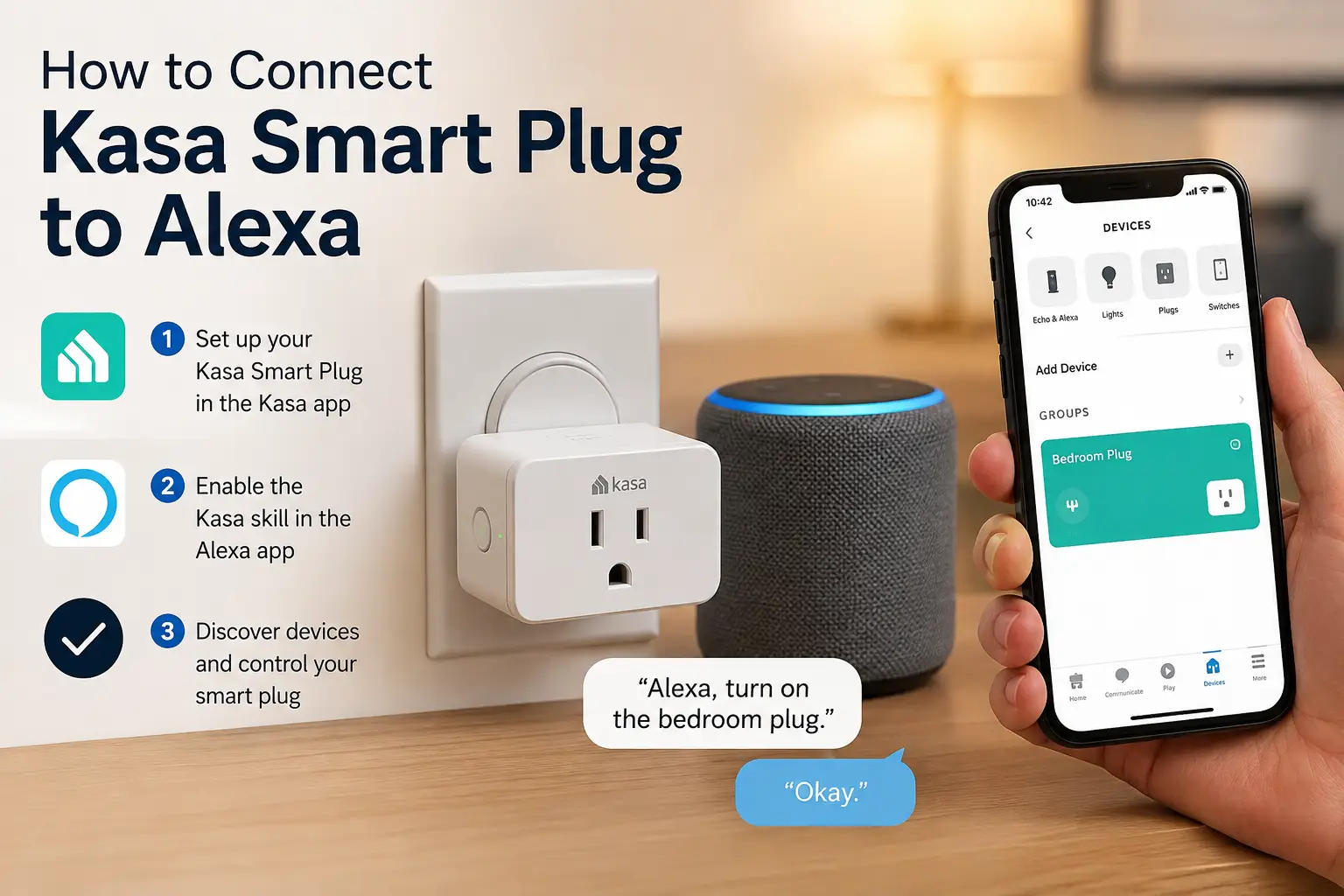
How to Set Up a Kasa Smart Plug with Alexa (Step-by-Step)
Getting a kasa smart plug alexa connection running doesn’t require any technical background, but a few steps trip people up more than others, so here’s the process in order.
1. Download the Kasa app and create an account. Available on iOS and Android, the app is required before Alexa can see the plug — you can’t skip straight to Alexa.
2. Plug in the device and add it in the Kasa app. Tap the “+” icon, select “Smart Plug,” and follow the in-app prompts, which walk you through connecting the plug to your 2.4GHz Wi-Fi network specifically (5GHz networks won’t work with most Kasa models, which trips up a lot of dual-band router setups).
3. Name the device clearly. Call it something Alexa can parse easily by voice, like “Lamp” or “Coffee Maker” — avoid overly long or similar-sounding names for multiple plugs.
4. Open the Alexa app and enable the Kasa Smart skill. Go to More → Skills & Games, search “TP-Link Kasa,” and select Enable to Use, then log in with the same Kasa account you created in step one.
5. Let Alexa discover devices. This usually starts automatically after linking; if not, go to Devices → Add Device → choose your device type and let Alexa search, which typically takes under a minute per plug.
6. Assign it to a group or room. This step is optional but makes “Alexa, turn off the office lights” work across multiple devices at once instead of naming each one individually.
7. Test it by voice before walking away. Say “Alexa, turn on [device name]” to confirm the pairing actually stuck — occasionally a plug shows as discovered in the app but needs a manual re-sync to respond to voice commands. TP-Link’s own support documentation walks through this exact linking process if you hit a snag partway through.
Real-World Scenarios: Which Plug Fits Your Household
The renter with one lamp. If you live in a studio apartment and just want a single lamp to turn on with your voice or a schedule, the Kasa Smart Plug Mini (KP125) is overkill-free and cheap enough to not think twice about.
The budget-conscious energy tracker. If you’re specifically trying to lower a high electric bill and want to know which appliance is the culprit, the TP-Link Tapo P110 delivers monitoring data at nearly half the cost of Kasa’s equivalent model, making it the rational pick for anyone counting dollars.
The mixed-device household. If one partner uses an iPhone and the other an Android phone with an Echo Dot on the nightstand, the Kasa Matter Smart Plug (KP125M) avoids the awkward “whose app do we use” conversation entirely, since it works natively across all three major platforms.
The home office or media room owner. Someone juggling a monitor, a console, a router, and a desk lamp on one power strip should skip individual plugs altogether and go straight to the Kasa Smart Wi-Fi Power Strip (HS300), which controls all six outlets independently through Alexa.
The Alexa purist. If Alexa is genuinely the only voice assistant in your home and you have zero interest in Google or Apple integration, the Amazon Smart Plug‘s near-instant, app-free setup process is hard to beat for pure convenience.
Common Problems and Solutions
Problem: The plug won’t appear during Alexa discovery. Solution: confirm the plug is on a 2.4GHz network first (most home routers broadcast both bands under the same name, which confuses the pairing process); temporarily splitting your router’s 2.4GHz and 5GHz networks into separate names during setup often resolves this instantly.
Problem: Alexa says the device is unresponsive. Solution: open the Kasa app first and confirm the plug is online there; if it’s offline in Kasa too, it’s a Wi-Fi issue, not an Alexa issue, and usually resolves with a router restart or moving the plug closer to the router.
Problem: Voice commands work but scheduling in the Kasa app doesn’t sync with Alexa Routines. Solution: Alexa Routines and Kasa’s built-in scheduler run independently of each other — pick one system per device to avoid the two fighting over the same schedule, rather than setting both.
Problem: Multiple plugs with similar names cause Alexa to control the wrong one. Solution: rename devices with distinct, single-word identifiers in the Kasa app, then re-run Alexa discovery so the updated names sync over.
Problem: The plug keeps dropping offline after a firmware update. Solution: manually re-link the Kasa skill in the Alexa app (disable, then re-enable it) rather than waiting for it to reconnect automatically, which can take much longer than a manual refresh.
✨ Don’t miss these exclusive deals! 🔍 Take your smart home setup to the next level with this curated lineup of Alexa-ready plugs. Click a highlighted pick to check current pricing and availability, and start automating the rooms you use most.
How to Choose a Kasa Smart Plug for Alexa
- Confirm your Wi-Fi band. Nearly every plug in this category, Kasa included, requires 2.4GHz — check your router settings before buying anything.
- Decide if you need energy monitoring. If you’re not going to check the data, don’t pay extra for it; go with a base model like the Kasa Smart Plug Mini (KP125) instead.
- Check your appliance’s wattage against the plug’s rating. Most mini plugs top out at 1800W (15A) — space heaters and window AC units can exceed that, so verify before assuming a plug will work.
- Consider whether you need multi-ecosystem support. Households with mixed Apple/Android devices benefit from Matter-certified options like the Kasa Matter Smart Plug (KP125M).
- Match the form factor to the job. Outdoor use calls for the Kasa Smart Wi-Fi Outdoor Plug (KP400) specifically — a standard indoor plug is not weather-rated and shouldn’t be used outside.
- Count your outlets, not just your devices. If you’re outfitting a cluster of gadgets in one spot, a power strip like the Kasa Smart Wi-Fi Power Strip (HS300) is usually cheaper than buying several single plugs.
- Factor in brand lock-in. The Amazon Smart Plug is the cheapest, simplest option if you’re certain you’ll never add Google or Apple devices to your home.
Common Mistakes to Avoid When Buying a Smart Plug for Alexa
One of the most frequent mistakes is buying based on price alone without checking the wattage rating against the appliance you intend to plug in — a 15A plug on a 1500W space heater is running close to its ceiling, which isn’t dangerous with a UL-certified plug but does mean it’s not the right choice for anything higher-draw.
Another common misstep is assuming every smart plug supports every voice assistant. As this roundup shows, the Amazon Smart Plug is Alexa-exclusive, while most Kasa models support three ecosystems — read the compatibility list before checkout, not after unboxing.
A third mistake is ignoring the Wi-Fi band requirement entirely. Buyers who assume “Wi-Fi is Wi-Fi” often spend twenty minutes troubleshooting a plug that’s technically working fine — it’s just trying to join a 5GHz network it can’t see. Splitting your router’s bands, even temporarily, resolves this in seconds.
Finally, some shoppers overbuy on energy monitoring for devices where the data is genuinely useless — a smart plug controlling a single LED lamp doesn’t need per-outlet wattage tracking, while a plug for a space heater or window AC genuinely benefits from it.
Kasa vs Tapo vs Amazon Smart Plug: Which Alexa Plug Wins?
| Feature | Kasa (KP125/KP115) | TP-Link Tapo P110 | Amazon Smart Plug |
|---|---|---|---|
| Ecosystems | Alexa, Google, HomeKit (select models) | Alexa, Google, HomeKit (P110M) | Alexa only |
| Energy Monitoring | KP115 yes, KP125 no | Yes | No |
| App | Kasa app | Tapo app | Alexa app only |
| Price Range | ~$15-$40 | ~$10-$15 | ~$15-$20 |
| Setup Complexity | Low | Low | Lowest |
The Kasa lineup wins on brand maturity and ecosystem breadth — it’s been refined over more product generations than Tapo, and its app has more scheduling flexibility. The TP-Link Tapo P110 wins on pure price-per-feature, especially for energy monitoring, since it’s built by the same manufacturer without the Kasa brand premium. The Amazon Smart Plug wins only on setup friction — nothing beats native Alexa pairing — but that’s the extent of its advantage once you factor in the total lack of cross-platform support.
If you’re deciding purely on which “wins,” the honest answer depends on your ecosystem: multi-platform households should lean Kasa, budget-focused energy trackers should lean Tapo, and Alexa-only households can save a few dollars with the Amazon Smart Plug without losing anything they’d actually use.
Features That Actually Matter (and Ones That Don’t)
Energy monitoring matters if you’re actively trying to diagnose a high bill or track a specific appliance; it doesn’t matter if you’re just automating a porch light on a schedule. Away Mode — which randomizes on/off timing to simulate occupancy while you’re traveling — is a genuinely useful security feature that costs nothing extra on most Kasa models, and it’s worth enabling even if you never touch it again afterward.
On the other hand, app-exclusive “scenes” that chain multiple smart devices together sound appealing in marketing copy but matter far less in practice if Alexa Routines already do the same job through voice, which most users end up relying on instead of digging through a separate app. Similarly, IFTTT support (found on the Kasa Smart Wi-Fi Outdoor Plug (KP400)) is a nice-to-have for advanced tinkerers but isn’t a deciding factor for most buyers who just want reliable voice control.
The feature that consistently gets overlooked, and shouldn’t be, is Wi-Fi band compatibility — it’s not flashy on a spec sheet, but it’s the single most common cause of setup frustration across every plug in this roundup. On the monitoring side, ENERGY STAR’s guidance on smart home energy management points out that real-time consumption data is one of the more effective tools for catching “phantom load” — power drawn by devices that are technically off but still plugged in — which is exactly the kind of insight plugs like the Kasa Smart Plug Mini with Energy Monitoring (KP115) are built to surface.
Kasa Smart Plugs for Different Types of Alexa Users
Beginners setting up their first smart home device should start with the Kasa Smart Plug Mini (KP125) specifically because its setup process is the most forgiving — no Matter pairing quirks, no separate app to learn beyond Kasa itself.
Tech-savvy users who already run Apple HomeKit alongside Alexa should go straight to the Kasa Matter Smart Plug (KP125M), since retrofitting Matter support onto an older, non-Matter plug isn’t possible — you’d simply be buying twice.
Renters and apartment dwellers benefit most from plugs that require zero permanent installation, which describes nearly this entire lineup, though the Amazon Smart Plug‘s near-zero setup friction makes it especially appealing for someone who wants voice control working before they’ve even finished unpacking boxes.
Budget-focused households, particularly those managing utility costs closely, get the most practical value from the TP-Link Tapo P110, since energy monitoring at a lower price point directly supports the goal of identifying and cutting unnecessary electricity spend.
Long-Term Cost and Maintenance
Smart plugs carry no subscription fees and no consumable parts, which makes their long-term cost almost entirely front-loaded into the initial purchase price — a meaningful advantage over smart home products that require a monthly cloud fee.
| Product | Price Range | Multi-Pack Savings | Energy Monitoring Payback Potential |
|---|---|---|---|
| Kasa Smart Plug Mini (KP125) | ~$20-$25 (2-pk) | Yes, notable per-unit savings | N/A (no monitoring) |
| Kasa Matter Smart Plug (KP125M) | ~$30-$40 (2-pk) | Yes, moderate savings | Moderate, useful for high-draw devices |
| Kasa Smart Wi-Fi Power Strip (HS300) | ~$45-$55 | Effectively replaces 6 single plugs | High, per-outlet visibility |
| TP-Link Tapo P110 | ~$10-$15 | Limited multi-packs available | High relative to price paid |
Looking at this table, the Kasa Smart Wi-Fi Power Strip (HS300) offers the strongest long-term value if you’re consolidating multiple devices, since its per-outlet cost undercuts buying six separate mini plugs. The TP-Link Tapo P110, meanwhile, has the fastest theoretical “payback” on its energy-monitoring investment simply because the unit cost is so low to begin with.
Maintenance itself is minimal across every product here: firmware updates happen automatically through the app, and the only real long-term consideration is Wi-Fi router replacement, which typically requires re-linking each plug to both the manufacturer’s app and the Alexa skill.
Safety, Regulations, and Standards
Every plug covered in this guide is UL certified, meaning it has been independently tested against US electrical safety standards for things like overheating, short-circuit protection, and fire resistance — a certification worth confirming on any smart plug before you buy, since uncertified imports sold through third-party marketplace listings don’t always meet the same bar.
The Consumer Product Safety Commission’s home electrical safety guidance recommends never exceeding a plug or outlet’s rated wattage and avoiding daisy-chaining power strips into other power strips — advice that applies directly to smart plugs and smart power strips alike. If you’re using a device like the Kasa Smart Wi-Fi Power Strip (HS300) to power several appliances at once, add up their combined wattage and confirm it stays under the strip’s total rated capacity, not just each individual outlet’s limit.
Frequently Asked Questions
❓ Does a kasa smart plug alexa setup require a separate smart home hub?
❓ Why is my kasa smart plug not connecting to alexa?
❓ Can I use Alexa Routines with a Kasa smart plug?
❓ Is the Kasa Matter Smart Plug better than a regular Kasa plug for Alexa users?
❓ How many Kasa smart plugs can I connect to one Alexa account?
Conclusion
Getting a kasa smart plug alexa connection working is genuinely one of the easier entry points into home automation — the real decision-making happens before you buy, not during setup. For most people starting out, the Kasa Smart Plug Mini (KP125) is the safest, cheapest first purchase. If tracking energy use matters to you, the Kasa Smart Plug Mini with Energy Monitoring (KP115) or the budget-friendly TP-Link Tapo P110 both deliver that data without much added cost. Mixed-ecosystem households should lean toward the Kasa Matter Smart Plug (KP125M), outdoor projects call for the Kasa Smart Wi-Fi Outdoor Plug (KP400), and anyone consolidating several devices in one spot should skip straight to the Kasa Smart Wi-Fi Power Strip (HS300).
Whichever model you land on, the setup process is nearly identical across the board: link the Kasa skill in Alexa, confirm your 2.4GHz network, and let discovery do the rest. Beyond that, the choice really comes down to how many ecosystems you need to support and whether energy data is something you’ll actually use.
✨ Ready to automate your home? Compare today’s pricing on any pick above and get your first plug talking to Alexa this weekend.
Recommended for You
- Israel Power Outlets: 7 Best Adapters & Converters (2026)
- Smart Plug Guide 2026: 7 Best Picks to Save Energy Now
- Denmark Electrical Plug Type: 7 Best Adapters to Pack for 2026
Disclaimer: This post contains affiliate links. As an Amazon Associate, I earn from qualifying purchases made through these links, at no additional cost to you.
✨ Found this article helpful? Share it with someone who needs it! 💬🤗
