
In This Article
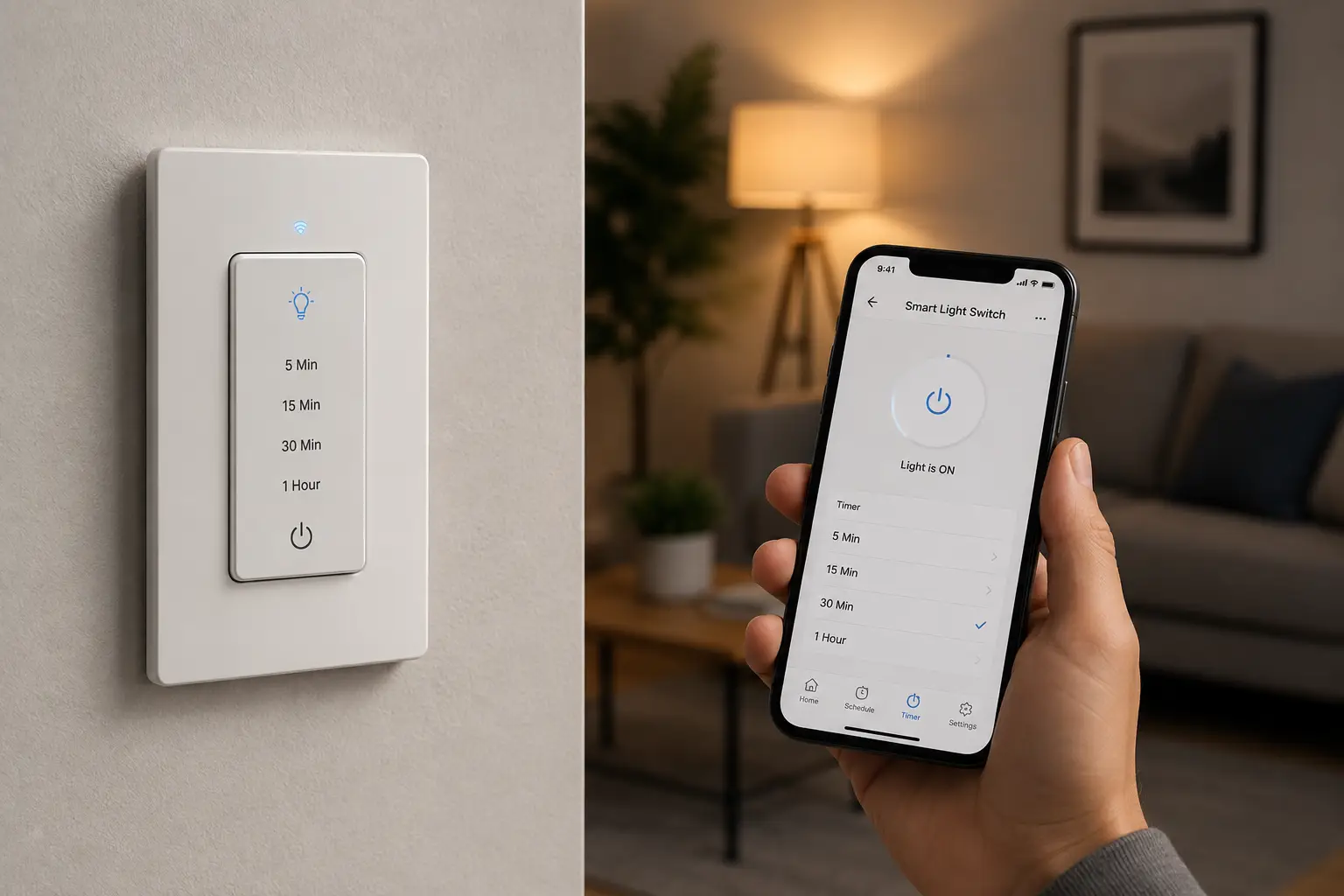
A smart light switch timer is a wall-mounted device — either a Wi-Fi-connected smart switch or a self-contained digital timer — that turns your lights on and off automatically on a schedule you set. It replaces a standard toggle switch and requires no separate hub in most cases, though some premium options do use one. If you’ve ever come home to a dark house or worried about your porch light burning all night, this is the fix.
Here’s the thing nobody tells you upfront: “smart light switch timer” actually covers two different product categories that get lumped together in search results. There are true smart switches — Wi-Fi devices you control from an app, with Alexa or Google Assistant tied in — and there are old-school digital timer switches, which have no app at all but run their schedule locally, forever, with zero dependence on your router. Both solve the “lights on a schedule” problem. They just solve it differently, and picking the wrong category for your situation is the single most common regret buyers report in aggregated reviews.
This guide breaks down seven real, current products spanning both categories — from a $15 mechanical-style digital timer to a $60 Matter-certified Wi-Fi switch — plus the wiring quirks, installation gotchas, and long-term costs that Amazon’s product photos never show you. We’ll also get into astronomic scheduling (timers that shift automatically with sunrise and sunset), the neutral-wire requirement that trips up more installers than anything else, and how to avoid buying a switch that’s incompatible with your existing wiring. By the end, you’ll know exactly which type — and which model — fits your home.
Quick Comparison: 7 Smart Light Switch Timer Options at a Glance
| Product | Type | Neutral Wire? | Voice Control | Price Range |
|---|---|---|---|---|
| Honeywell Home ECONOSwitch | Digital timer (no app) | No | No | Around $30 |
| Intermatic ST01 | Astronomic digital timer | No | No | Around $45 |
| GE SunSmart In-Wall Timer | Digital timer (no app) | No | No | Around $25 |
| TP-Link Kasa Smart Switch (HS200) | Wi-Fi smart switch | Yes | Alexa, Google | Around $20 |
| meross Smart Wi-Fi Switch | Wi-Fi smart switch | Yes | Alexa, Google, Apple Home | Around $18 |
| Leviton Decora Smart Wi-Fi Switch (D215S) | Wi-Fi smart switch | Yes | Alexa, Google, Apple Home, Matter | Around $45 |
| Lutron Caseta Smart Switch (PD-6ANS) | Hub-based smart switch | Yes | Alexa, Google, Apple Home | Around $60 (switch only) |
Looking at this lineup, there’s a clear split worth noticing before you shop: the three digital timers at the top (Honeywell Home ECONOSwitch, Intermatic ST01, GE SunSmart In-Wall Timer) never touch your Wi-Fi and never stop working if your internet goes down, while the four Wi-Fi and hub-based switches trade that offline reliability for remote access and voice control. If your goal is purely “porch light on at dusk, off at 11pm, forever,” the digital timers are honestly hard to beat on value. If you want to check your lights from your phone at the airport, you need one of the Wi-Fi options.
✨ Ready to see current pricing? Tap any highlighted pick above to check availability on Amazon.
What Is a Smart Light Switch Timer?
A smart light switch timer is an electrical wall switch that replaces a standard single-pole or 3-way toggle and automatically turns connected lights on and off according to a programmed schedule — either a fixed daily/weekly routine, an astronomic sunrise/sunset pattern, or app-based scheduling controlled remotely over Wi-Fi.
That definition covers a lot of ground, and understanding where a given product sits on the spectrum is the first real decision you’ll make. On one end are purely mechanical-feeling digital timers with a small LCD screen and physical buttons — no app, no cloud account, nothing to hack. On the other end are full smart switches that sync to your phone, log usage, and respond to “Alexa, turn off the hallway light.” Both are legitimately “smart” in the sense that they automate a decision you’d otherwise make manually — they just automate it at different levels of sophistication.
Top 7 Smart Light Switch Timer Picks: Expert Analysis
1. Honeywell Home ECONOSwitch — most schedules per week, no app needed
The Honeywell Home ECONOSwitch (model RPLS730B) is built for people who want a genuinely “set it and forget it” timer without ever opening an app. It supports up to seven unique on/off schedules per week — meaning your Tuesday routine can differ from your Saturday routine — plus a manual override button for one-off nights when your normal schedule doesn’t fit.
Its solar/astronomic mode is the standout feature: rather than locking in a fixed 7:00 PM “on” time, it calculates local sunset and shifts the schedule automatically as the seasons change, so you’re not manually re-programming it every few weeks like a basic mechanical timer. In practice, that means the switch does the seasonal math a plain digital timer forces you to do by hand — a small thing, but one that matters if you tend to forget. This model works well for renters and anyone who wants automation without adding another device to their home Wi-Fi network, since it has no app, no cloud account, and nothing that can be hacked remotely.
Reviews consistently report that the ECONOSwitch is straightforward to program once you sit down with the manual for ten minutes, though a recurring complaint is that the button sequence for setting the astronomic offset isn’t intuitive on the first attempt. Aggregated feedback also flags the battery backup (which holds your schedule during a power outage) as a genuinely appreciated detail that budget competitors sometimes skip.
Pros:
- ✅ Up to 7 unique daily schedules per week
- ✅ Astronomic mode adjusts automatically for sunset
- ✅ No app, hub, or Wi-Fi dependency required
Cons:
- ❌ No remote control from your phone
- ❌ Initial programming has a learning curve
At around $30, the Honeywell Home ECONOSwitch is a strong value pick if remote app control isn’t a priority — you’re paying for reliable local scheduling, not smart-home connectivity.
2. Intermatic ST01 — most rugged build for heavy daily use
The Intermatic ST01 is a 7-day, astronomic, self-adjusting digital in-wall timer switch aimed at buyers who want commercial-grade durability in a residential package. It’s rated for both lighting and small motor loads, which matters if you’re timing something beyond a bulb — a bathroom exhaust fan, for instance.
Its self-adjusting astronomic clock recalculates sunrise and sunset locally without any manual daylight-saving-time reset, and the seven-day programming lets you set entirely different patterns for weekdays versus weekends. What that means in practice: once it’s programmed correctly, you genuinely never have to touch it again, which is the whole point of buying a timer switch instead of a plain toggle. Its heavier internal components and simpler firmware (no Wi-Fi radio to maintain) are a big part of why aggregated reviews describe it as one of the more failure-resistant digital timers on the market, with buyers frequently mentioning units still working reliably after several years of daily cycling.
A common theme in customer feedback is that the LCD screen and buttons are utilitarian rather than polished — this is a workhorse, not a lifestyle gadget — and a handful of reviewers note the manual programming steps require more patience than a smartphone app would.
Pros:
- ✅ Rated for both lighting and small motor loads
- ✅ Self-adjusting astronomic clock, no manual DST reset
- ✅ Reputation for long-term reliability in reviews
Cons:
- ❌ Dated LCD interface compared to app-based options
- ❌ No remote or voice control
In the $40-$50 range, the Intermatic ST01 earns its price through durability rather than features — a fair trade if you want a timer that quietly works for a decade.
3. GE SunSmart In-Wall Digital Timer — easiest first-time install
The GE SunSmart In-Wall Digital Timer is designed to be the least intimidating option for someone installing their first timer switch. It replaces a standard wall switch, includes sunrise/sunset presets out of the box, and its door doubles as a manual on/off override button, so you’re never locked out of simple control.
Its “Sun Smart” technology automatically adjusts for the actual sunset time in your location and rolls forward through daylight saving time changes without user input, which addresses the single most common frustration reviewers report with older mechanical timers — that endless twice-a-year re-programming. A battery backup preserves your schedule through a power outage, a detail that seems minor until you’ve lost a programmed schedule to a brief blackout and had to start over. This model is compatible with LED, CFL, and incandescent bulbs, which matters because some older digital timers were designed around incandescent loads and can behave unpredictably with modern LED bulbs’ lower wattage draw.
Aggregated customer reviews describe the installation and initial programming as noticeably easier than competing digital timers, with several buyers specifically praising the clear LCD prompts; a recurring criticism is that the vacation/random mode (designed to vary on/off times slightly to simulate occupancy while you’re away) is less customizable than some competitors offer.
Pros:
- ✅ Automatic sunrise/sunset and DST adjustment
- ✅ Compatible with LED, CFL, and incandescent bulbs
- ✅ Straightforward LCD-guided programming
Cons:
- ❌ Vacation/random mode has limited customization
- ❌ No app or remote access
At around $25, the GE SunSmart In-Wall Digital Timer is a genuinely beginner-friendly pick that doesn’t cut corners on the astronomic scheduling that makes timers worth buying in the first place.
4. TP-Link Kasa Smart Light Switch (HS200) — best value true Wi-Fi switch
The TP-Link Kasa Smart Light Switch (HS200) is where this list crosses from “digital timer” into “actual smart switch.” It connects directly to your home Wi-Fi — no separate hub required — and hands you full app-based scheduling, remote on/off control from anywhere, and voice control through Alexa or Google Assistant.
Beyond basic scheduling, the Kasa app supports “Away Mode,” which randomizes on/off timing within a window you set to simulate someone being home, and countdown timers you can trigger on the fly (handy for “turn off in 20 minutes” scenarios a fixed schedule can’t handle). What that means for day-to-day use: you get the reliability of a scheduled timer plus the flexibility of checking and adjusting things from your phone when your routine changes unexpectedly — a capability none of the three digital timers above can offer. It requires a neutral wire, which is standard in most homes built after the late 1980s but is worth confirming before you buy, since installing it without one simply won’t work.
Reviews consistently describe the Kasa app as one of the more intuitive smart-switch apps on the market, with setup typically taking under ten minutes; a recurring complaint in aggregated feedback is that the switch occasionally drops its Wi-Fi connection after a router firmware update or network change, requiring a re-pair.
Pros:
- ✅ No hub required, connects directly to home Wi-Fi
- ✅ Away Mode simulates occupancy for security
- ✅ Widely praised for an easy-to-use app
Cons:
- ❌ Requires a neutral wire
- ❌ Occasional Wi-Fi reconnection issues reported
At around $20 for a single switch, the TP-Link Kasa Smart Light Switch is arguably the best entry point into true smart-switch territory for the price of a nice dinner out.
5. meross Smart Wi-Fi Light Switch — budget pick with Apple Home support
The meross Smart Wi-Fi Light Switch targets buyers who specifically want Apple HomeKit/Apple Home compatibility without paying Lutron-level prices. Like the Kasa switch, it’s a direct Wi-Fi connection with no hub, and it supports scheduling, remote control, and voice commands across Alexa, Google Assistant, and Siri.
Its standout practical feature is broad multi-ecosystem support in a genuinely low-cost package — many budget Wi-Fi switches skip Apple Home entirely because of Apple’s certification requirements, so finding one that includes it at this price point is worth flagging. What that means for a mixed-device household (say, one partner on iPhone and one on Android) is that everyone gets native voice control without needing a third-party bridge. It requires a neutral wire and a 2.4GHz Wi-Fi network, same as most switches in this category.
Aggregated review sentiment is generally positive on ease of setup and app stability, though a recurring theme is that meross’s cloud servers have occasionally experienced brief outages that temporarily disable remote (though not local) control — worth knowing if you rely heavily on the away-from-home features.
Pros:
- ✅ Native Apple Home, Alexa, and Google support
- ✅ No hub required, budget-friendly price
- ✅ Straightforward scheduling and countdown timers
Cons:
- ❌ Occasional cloud-server outages reported
- ❌ Requires 2.4GHz Wi-Fi (no 5GHz support)
At around $18, the meross Smart Wi-Fi Light Switch delivers Apple Home compatibility at a price point that undercuts most competitors offering the same feature.
6. Leviton Decora Smart Wi-Fi Switch (D215S) — best for Matter and multi-platform homes
The Leviton Decora Smart Wi-Fi Switch (D215S, second generation) is built for buyers who want long-term platform flexibility. It connects over Wi-Fi with no hub required, and it’s Matter-certified — meaning it can be added to Apple Home, Google Home, Amazon Alexa, and Samsung SmartThings simultaneously rather than being locked to a single ecosystem.
Through the My Leviton app, you can group devices into rooms, build multi-device scenes, and schedule based on sunrise/sunset — and because it’s Matter-certified, switching your primary smart-home hub down the road (say, from Alexa to Apple Home) doesn’t mean re-buying your switches. What that means in practice is this device is somewhat future-proofed against smart-home ecosystem changes in a way that single-platform switches aren’t. It also supports wired or wire-free 3-way installations, useful for stairwells and hallways with two switches controlling one light.
Reviews consistently praise the build quality and the Decora form factor’s compatibility with matching wall plates and other Decora-family devices; a common critique in aggregated feedback is that the My Leviton app’s scene-building interface is less polished than some competitors’, even though the core scheduling functions work reliably.
Pros:
- ✅ Matter-certified for multi-platform compatibility
- ✅ Supports wired and wire-free 3-way setups
- ✅ Room grouping and scene-building via app
Cons:
- ❌ App interface less refined than top competitors
- ❌ Requires a neutral wire
At around $45, the Leviton Decora Smart Wi-Fi Switch is worth the premium over basic Wi-Fi switches specifically for its Matter certification and multi-way wiring flexibility.
7. Lutron Caseta Smart Switch (PD-6ANS) — most reliable radio, best for larger homes
The Lutron Caseta Smart Switch is the pick for buyers who’ve had connectivity headaches with pure Wi-Fi switches and want rock-solid performance instead. Unlike every other product on this list, it uses Lutron’s proprietary Clear Connect radio protocol through a required Caseta Smart Bridge hub rather than connecting directly to Wi-Fi, which keeps individual switches off your home network entirely.
That architectural choice is the whole story with this switch: because each device talks to the hub over a dedicated low-power radio band instead of competing for bandwidth on your 2.4GHz Wi-Fi, Lutron switches are widely regarded — including in professional installer circles — as some of the most dependable smart switches available, with minimal dropped connections even in homes with dozens of devices. It works with the Pico wireless remote for true 3-way and 4-way setups without running new wire, a meaningful advantage over Wi-Fi switches that need dedicated wiring for multi-location control. It pairs with Alexa, Google Assistant, Apple Home, and Ring.
Reviews consistently single out Lutron’s reliability and app responsiveness as class-leading; the tradeoff reviewers most often mention is the added cost and complexity of the required Smart Bridge hub, which isn’t included with a standalone switch and needs to be purchased separately if you don’t already own one.
Pros:
- ✅ Dedicated radio protocol for exceptional reliability
- ✅ Wire-free 3-way/4-way setup via Pico remote
- ✅ Works with Alexa, Google, Apple Home, and Ring
Cons:
- ❌ Requires a separately purchased Smart Bridge hub
- ❌ Higher total cost than direct Wi-Fi competitors
At around $60 per switch (plus roughly $90 for the required hub if you don’t have one), the Lutron Caseta Smart Switch is a premium investment that pays off most clearly in larger homes running many connected devices at once.
Full Product Comparison: Features, Price, and Best Use Case
| Product | Best For | Schedules | Neutral Wire | Price Range |
|---|---|---|---|---|
| Honeywell Home ECONOSwitch | No-app, no-hassle scheduling | 7-day, astronomic | No | Around $30 |
| Intermatic ST01 | Heavy daily use, durability | 7-day, astronomic | No | Around $45 |
| GE SunSmart In-Wall Timer | First-time timer buyers | 7-day, astronomic | No | Around $25 |
| TP-Link Kasa Smart Switch | Best overall value Wi-Fi switch | App-based, unlimited | Yes | Around $20 |
| meross Smart Wi-Fi Switch | Apple Home households on a budget | App-based, unlimited | Yes | Around $18 |
| Leviton Decora Smart Wi-Fi Switch | Multi-platform, future-proofing | App-based, unlimited | Yes | Around $45 |
| Lutron Caseta Smart Switch | Large homes, max reliability | App-based, unlimited | Yes | Around $60 + hub |
This table makes the entry/mid/high-end split easier to see at a glance: the three digital timers cluster under $50 with no ongoing dependency on your network, the TP-Link Kasa Smart Switch and meross Smart Wi-Fi Switch undercut $20 while adding full remote control, and the Leviton Decora Smart Wi-Fi Switch and Lutron Caseta Smart Switch sit at the top for buyers who specifically need Matter certification or hub-grade reliability. If you’re outfitting a whole house, mixing categories often makes the most financial sense — Wi-Fi switches for rooms you actually want to check remotely, and cheaper digital timers for a porch light or two that just need to run on schedule.
💬 One click helps you compare current pricing on all seven picks before you commit! 😊
How to Set Up and Program Your First Smart Light Switch Timer
Getting a new timer switch running correctly on day one avoids the most common source of buyer frustration: a schedule that silently doesn’t match what you thought you programmed. Here’s the process that applies to nearly every model on this list, with model-specific notes where they matter.
Start by shutting off power to the switch at your breaker panel and confirming it’s off with a non-contact voltage tester — never trust the wall switch alone. Once the old switch is out, take a photo of the existing wiring before disconnecting anything; this single step saves more troubleshooting time than any other, especially if you’re installing a Wi-Fi model like the TP-Link Kasa Smart Switch or Leviton Decora Smart Wi-Fi Switch, both of which require identifying the neutral wire (typically the white wire capped or tucked into the back of the box) before you begin.
For digital timers like the GE SunSmart In-Wall Digital Timer or Honeywell Home ECONOSwitch, wiring is simpler since no neutral is needed — just line, load, and ground in most single-pole installations. After wiring is complete and the switch is secured in the box, restore power and set the current time and date first; every schedule these timers run is calculated relative to that clock, so an error here cascades into every programmed on/off event. For Wi-Fi switches, download the manufacturer’s app before you start (Kasa, meross, or My Leviton, depending on your pick), and complete Wi-Fi pairing while standing near your router for the strongest signal during setup.
Once the base clock or app connection is confirmed, program a single test schedule — lights on in five minutes, off in ten — rather than your full weekly routine. This isolates whether the automation itself works before you invest time building out a complex schedule. If the test succeeds, build your full schedule, then let it run for one full day before adjusting anything; small timing habits (dimming ramp speed, exact sunset offset) are easier to fine-tune once you’ve seen a real cycle. A common first-30-days mistake is over-programming too many overlapping rules right away — start simple, then layer in complexity like vacation mode or astronomic offsets once the basics are working reliably.
Real-World Scenarios: Which Timer Fits Your Household
Matching a product to your actual routine matters more than chasing the highest feature count, so here are three common buyer profiles and the picks that fit them best.
The budget-conscious renter. If you’re renting and want automated porch or entry lighting without touching your building’s Wi-Fi setup or committing to a multi-device smart-home ecosystem, the Honeywell Home ECONOSwitch or GE SunSmart In-Wall Digital Timer are the natural fits. Both install as a direct swap for your existing switch (check your lease on modifications first), need no ongoing subscription or app account, and can be removed and taken with you when you move, leaving the original switch back in place.
The tech-forward family with a mixed device household. If your household has a mix of iPhones and Android phones and you want everyone to get native voice control and app access, the meross Smart Wi-Fi Switch or Leviton Decora Smart Wi-Fi Switch cover Alexa, Google Assistant, and Apple Home without a third-party bridge. For a family with young kids, pairing either with a simple “porch light on at sunset, off at 11pm” schedule plus a manual override for late nights covers most real needs without over-engineering the setup.
The larger household running many connected devices. If you’re automating five, ten, or more switches across a larger home and have run into other smart-home devices fighting for Wi-Fi bandwidth, the Lutron Caseta Smart Switch is worth the extra hub cost. Its dedicated radio protocol keeps lighting control responsive even as you add more devices, and the Pico remote option solves multi-location switching (stairwells, long hallways) without an electrician running new wire for a traditional 3-way setup.
Common Smart Light Switch Timer Problems and How to Fix Them
Even a well-chosen timer switch runs into predictable snags. Here are the five most common, based on recurring themes across aggregated product reviews.
Problem: The schedule shifted after daylight saving time. Digital timers without astronomic mode need a manual DST adjustment twice a year; models like the Intermatic ST01 and GE SunSmart In-Wall Digital Timer handle this automatically, so if you’re using a non-astronomic timer, mark your calendar for the March and November time changes.
Problem: A Wi-Fi switch stopped responding remotely. This is almost always a router issue rather than a switch failure — check whether your router recently updated its firmware or changed its network name/password, both of which can force the TP-Link Kasa Smart Switch or meross Smart Wi-Fi Switch to need re-pairing.
Problem: The switch buzzes or flickers with certain LED bulbs. Some LED bulbs, especially cheaper dimmable ones used in a non-dimming on/off switch, can cause minor flickering due to low minimum load. Swapping to a bulb explicitly listed as smart-switch compatible on its packaging usually resolves this.
Problem: A 3-way setup isn’t working correctly. Wi-Fi switches generally need a companion switch or specific wiring for 3-way (two-location) control — you can’t simply wire a smart switch into an existing 3-way circuit the same way as a traditional toggle. Check whether your model (like the Leviton Decora Smart Wi-Fi Switch) supports wire-free 3-way via a companion device before assuming a wiring mistake.
Problem: You forgot your app password or lost hub access. For hub-based systems like Lutron Caseta, a factory reset of the Smart Bridge (following the manufacturer’s specific button-hold sequence) will let you re-pair from scratch — a step worth knowing before you assume the hardware has failed.
How to Choose a Smart Light Switch Timer: 7 Criteria That Actually Matter
- Neutral wire availability. Most true Wi-Fi smart switches require a neutral wire; homes built before the late 1980s sometimes lack one at the switch box, which either limits you to no-neutral-specific models or digital timers that don’t need one at all.
- App-based vs. local-only control. Decide honestly whether you’ll actually use remote/app control, or whether a no-app digital timer with astronomic scheduling meets 100% of your real need at a lower price and with no ongoing Wi-Fi dependency.
- Voice assistant ecosystem. If you already use Alexa, Google Home, or Apple Home, prioritize a switch explicitly certified for that platform (or Matter-certified, which works across all of them) to avoid compatibility surprises.
- 3-way/multi-location requirements. If a light is controlled from two or more switches, confirm the model explicitly supports 3-way or wire-free 3-way before buying — this is one of the most common post-purchase headaches.
- Load type and wattage rating. Confirm the switch is rated for your specific bulb type (LED, CFL, incandescent) and total wattage; older timers sometimes have minimum load requirements that modern low-wattage LEDs don’t meet.
- Hub dependency and total cost. Factor in whether a required hub (like Lutron’s Smart Bridge) is already something you own, since it can add $50-$100 to your first purchase even if each additional switch is affordable.
- Reliability track record. Weigh aggregated review sentiment on connectivity drops and long-term durability — a slightly pricier switch with a stronger reliability reputation often costs less over time than replacing a flaky budget unit.
Common Mistakes to Avoid When Buying a Smart Light Switch Timer
The single most frequent mistake is buying a neutral-wire-required Wi-Fi switch without checking your existing wiring first — this leads directly to a returned product and a wasted trip to the hardware store. Always check the switch box (with power off) before ordering.
A close second is underestimating hub costs. Buyers eyeing the Lutron Caseta Smart Switch sometimes compare its per-switch price to Wi-Fi competitors without accounting for the required Smart Bridge, then feel surprised at checkout. Read the fine print on whether a hub is included or sold separately.
A third common misstep is assuming any smart switch works with any 3-way circuit out of the box. As covered above, most Wi-Fi switches need a specific companion device or wire-free remote for multi-location control — a standard smart switch dropped into an existing 3-way setup without the right accessory typically won’t function correctly, or will only control the light from one location.
Finally, some buyers overbuy on features they won’t use — paying for Matter certification, scene-building, and multi-room grouping when their actual need is “porch light on and off on schedule.” If that’s genuinely your only use case, one of the digital timers on this list will do the job for a third of the price with zero ongoing app maintenance.
Smart Wi-Fi Switch Timers vs. Mechanical and Digital Timer Switches
This is the comparison that matters most before you buy, and it’s worth walking through in plain terms rather than just a spec sheet. Digital timers — like the Honeywell Home ECONOSwitch, Intermatic ST01, and GE SunSmart In-Wall Digital Timer — run their schedule on an internal clock with no dependency on your home network. That means they keep working through a Wi-Fi outage, a router replacement, or a change of internet providers, and they carry no ongoing cybersecurity exposure since there’s nothing on them to hack remotely. The tradeoff is that you can’t check or adjust them from outside the house, and any schedule change means walking over to the physical switch.
Wi-Fi smart switches — the TP-Link Kasa Smart Switch, meross Smart Wi-Fi Switch, Leviton Decora Smart Wi-Fi Switch, and Lutron Caseta Smart Switch — flip that tradeoff. You get remote control, voice commands, usage history, and integration with other smart-home routines (like “turn off all lights” scenes), at the cost of a neutral-wire requirement in most cases, a small ongoing dependency on your home network, and, for cloud-connected models, a theoretical (if generally low) risk if the manufacturer’s servers have an outage.
| Factor | Digital Timer Switch | Wi-Fi Smart Switch |
|---|---|---|
| Works during internet outage | Yes | Local schedules usually persist; remote control does not |
| Remote/app control | No | Yes |
| Neutral wire required | Typically no | Typically yes |
| Voice assistant support | No | Yes (model-dependent) |
| Typical price | $20-$50 | $18-$60+ (plus hub, if required) |
The practical takeaway: if remote access and voice control genuinely matter to your daily routine, a Wi-Fi switch like the TP-Link Kasa Smart Switch is worth the extra wiring requirement. If your goal is simply reliable, unattended scheduling with zero network dependency, a digital timer like the GE SunSmart In-Wall Digital Timer delivers the same core benefit — lights on schedule — for less money and less long-term fuss.
What to Expect: Everyday Performance and Reliability
On paper, every product on this list “works.” In daily use, the differences show up in small but meaningful ways. Digital timers execute their schedule with essentially zero latency and zero dependency on anything outside the device itself — when the internal clock hits the programmed time, the relay switches, full stop. Wi-Fi switches introduce a small amount of variability: most schedules run locally on the device itself once configured (not fetched fresh from the cloud each time), so day-to-day scheduled on/off events are typically just as instant as a digital timer’s. Where latency does show up is in remote commands sent through the app while you’re away — those depend on your home’s internet connection and the manufacturer’s cloud servers, and can lag by a second or two, occasionally longer during a server hiccup.
Voice control performance varies by ecosystem more than by switch brand; Alexa and Google Assistant tend to respond within a second in typical home Wi-Fi conditions, and Matter-certified devices like the Leviton Decora Smart Wi-Fi Switch generally show the most consistent cross-platform response times since Matter is specifically designed to reduce cloud round-trips for local commands. The Lutron Caseta Smart Switch stands out in everyday use less for raw speed and more for consistency — its dedicated radio protocol means it doesn’t compete for bandwidth with your other Wi-Fi devices, and that translates into noticeably fewer “did it actually turn off?” moments reported in aggregated reviews compared to switches relying purely on home Wi-Fi.
Smart Light Switch Timers for Renters and No-Neutral-Wire Homes
Two overlapping groups of buyers face the same practical constraint: they either can’t (or don’t want to) permanently modify wiring, or their home’s switch boxes genuinely lack a neutral wire — common in houses built before roughly 1985. If either applies to you, your options narrow in a useful way.
Digital timers like the Honeywell Home ECONOSwitch, Intermatic ST01, and GE SunSmart In-Wall Digital Timer typically don’t require a neutral wire at all, since they don’t need to stay continuously powered to maintain a Wi-Fi connection — they draw the small standby power they need directly through the switch loop. That makes them a practical default for older homes without a full rewire. If you specifically want app control despite a no-neutral situation, some manufacturers (including Leviton) offer dedicated no-neutral smart switch models that route power differently, though these often require an additional accessory like a compatible bridge — worth researching by exact model number before buying, since a standard neutral-required switch simply won’t function safely without a neutral present.
For renters specifically, a plug-in smart outlet paired with a lamp is sometimes a simpler workaround than replacing a hardwired switch at all, since it requires zero permanent modification and travels with you at move-out. But for a hardwired overhead fixture, a digital timer swap is usually simple enough to reverse before you move out — just keep the original switch to reinstall.
Long-Term Cost and Maintenance
The sticker price on any of these switches is only part of the real cost. Digital timers have effectively zero ongoing cost — no subscription, no hub, and battery backups (where present) typically last several years before needing replacement. Their maintenance is limited to the twice-yearly DST check on non-astronomic models and an occasional battery swap.
Wi-Fi smart switches carry a slightly different cost profile. The switches themselves have no subscription fee in the vast majority of cases — Kasa, meross, and Leviton’s My Leviton apps are all free to use for core scheduling and control — but hub-based systems like Lutron Caseta add a one-time hardware cost ($80-$100 for the Smart Bridge) that should be factored into your total investment, especially if you’re only installing one or two switches initially. That said, a single Caseta hub supports dozens of additional switches, dimmers, and shades, so the per-device cost drops sharply as you expand your system — a relevant point if you’re planning to eventually automate an entire house rather than a single room.
On the maintenance side, Wi-Fi switches occasionally need a firmware update (usually pushed automatically through the app) and, per aggregated reviews, an occasional re-pair after a router change. None of the products here have reported major mid-life failure rates in aggregated feedback, and most carry manufacturer warranties in the 1-to-5-year range — Leviton’s Decora Smart line, for instance, carries a notably long 5-year limited warranty, worth factoring in if longevity matters to your buying decision.
Safety, Regulations, and Standards
Every product recommended in this guide should carry independent safety certification — look for UL or ETL listing on the packaging before buying any electrical switch, which confirms the device has been independently tested against recognized US safety standards for fire and shock hazard. This matters more than it might seem: the Consumer Product Safety Commission has documented tens of thousands of home electrical fires annually tied to wiring, switches, and receptacles, and using uncertified components is a real, avoidable risk factor.
Installation itself carries real electrical risk, and if you’re not confident distinguishing line, load, neutral, and ground wiring — or if your home has aluminum wiring, older cloth-insulated wiring, or anything that looks non-standard once you open the switch box — hiring a licensed electrician for the swap is the safer call rather than troubleshooting live circuits yourself. Always shut off power at the breaker, not just the switch, before beginning any installation, and verify with a non-contact voltage tester before touching any wires.
On the smart-switch side specifically, look for FCC compliance (required for any Wi-Fi-radio device sold in the US) and, if energy efficiency matters to your decision, note that ENERGY STAR highlights smart lighting controls as a legitimate tool for reducing unnecessary electricity use, alongside pairing any smart switch with LED bulbs for the largest efficiency gain.
FAQs
❓ Do smart light switch timers work without Wi-Fi?
❓ Can I install a smart light switch timer without a neutral wire?
❓ How much does a smart light switch timer cost?
❓ Are smart light switch timers hard to install?
❓ Do smart switches work with both LED and incandescent bulbs?
Conclusion
Choosing the right smart light switch timer comes down to one honest question: do you actually need app-based remote control and voice commands, or do you just want reliable lights-on-schedule automation? If it’s the latter, the Honeywell Home ECONOSwitch, Intermatic ST01, or GE SunSmart In-Wall Digital Timer deliver that without a Wi-Fi dependency, an app account, or a recurring “did my router reconnect it?” worry — and they cost less doing it.
If remote control, voice assistants, or multi-device smart-home integration are genuinely part of your daily routine, the TP-Link Kasa Smart Switch and meross Smart Wi-Fi Switch offer that at a genuinely accessible price, the Leviton Decora Smart Wi-Fi Switch adds Matter-certified future-proofing for households juggling multiple ecosystems, and the Lutron Caseta Smart Switch is the pick for larger homes where rock-solid reliability across many devices matters more than shaving a few dollars off the sticker price. Whichever category fits your household, confirm your wiring — specifically neutral-wire availability and any 3-way requirements — before you buy, and you’ll avoid the single most common return reason reported across all seven of these products.
<br>
✨ Don’t miss these exclusive deals!
🔍 Take your home lighting setup to the next level with this carefully researched lineup. Click a highlighted pick above to check current pricing and availability. These picks will help you get reliable, automated lighting the whole household will actually use!
Recommended for You
- Power Cut Monitor: 7 Best Picks to Stop Blackout Surprises (2026)
- 7 Best Plug In Dimmers for 2026: Brighter Choices, Fewer Regrets
- Exterior Timer Switch: 7 Best Picks for 2026 (Pros & Cons)
Disclaimer: This post contains affiliate links. As an Amazon Associate, I earn from qualifying purchases made through these links, at no additional cost to you.
✨ Found this article helpful? Share it with someone who needs it! 💬🤗
