
In This Article
Swapping out a dumb paddle switch for a ge cync smart light switch sounds simple — until you’re standing in the electrical aisle staring at four nearly identical white boxes, none of which explain whether your 1978 ranch house even has the wiring for them. That confusion is exactly why this guide exists. GE’s Cync line (formerly branded C by GE) has quietly become one of the most practical entry points into smart lighting for US homeowners, mostly because it doesn’t force you into a proprietary hub the way some competitors do.
This isn’t a rehash of a product listing. We pulled real spec sheets, cross-referenced independent reviews from outlets like PCWorld, and compared GE’s own lineup against the two switches most commonly cross-shopped against it: Lutron Caséta and TP-Link Kasa. You’ll get honest pros and cons, a plain-English breakdown of the neutral-wire question that trips up most first-time buyers, and a decision framework so you’re not guessing which of the seven switches below actually belongs in your wall.
By the end, you’ll know exactly which ge cync smart light switch matches your home’s wiring, your smart home ecosystem, and your budget — no electrician consultation required just to understand the options.
What Is a GE Cync Smart Light Switch?
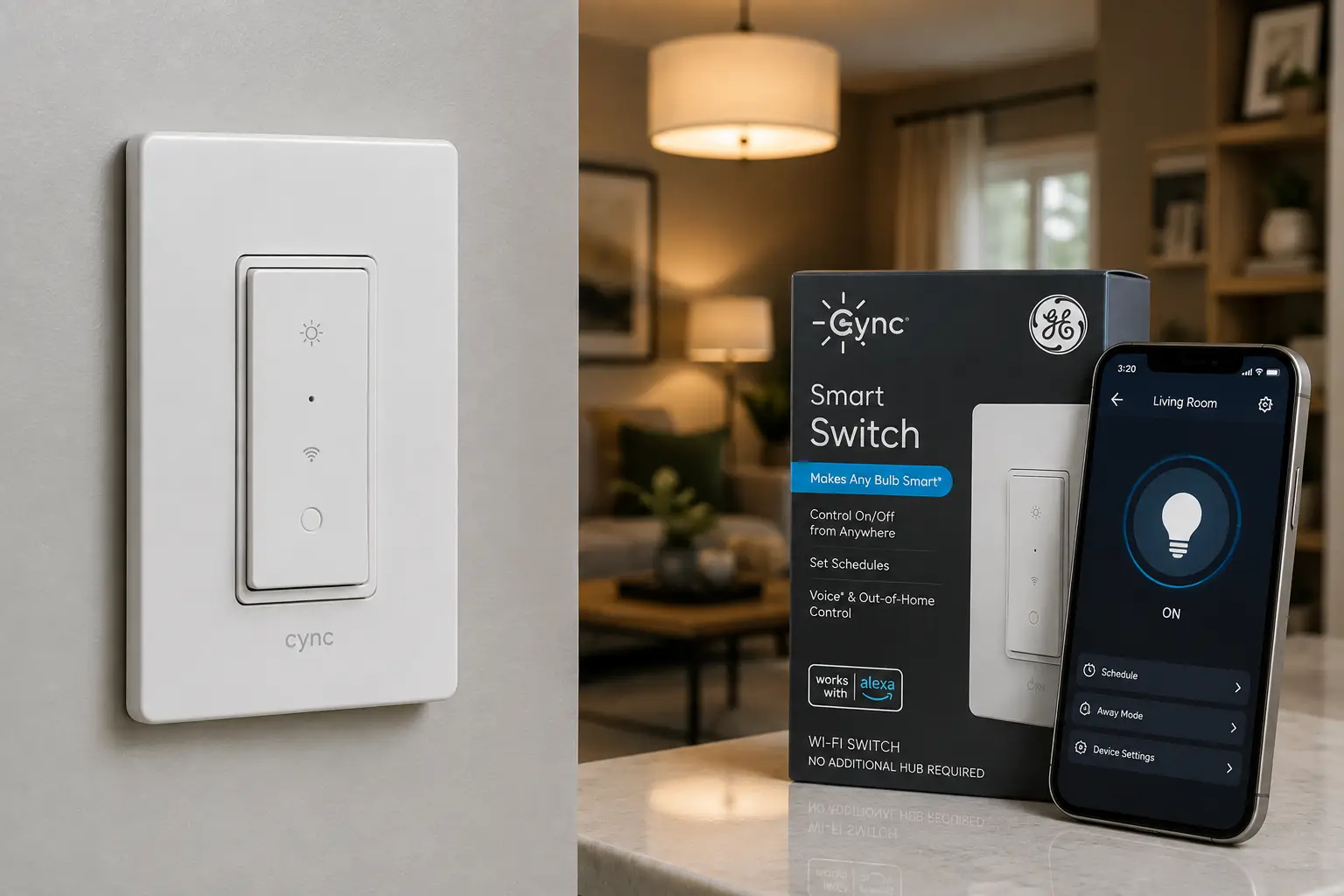
A GE Cync smart light switch is a Wi-Fi- and Bluetooth-enabled in-wall replacement for a standard paddle or toggle switch, letting you control lighting remotely through the Cync app, voice assistants like Alexa and Google Home, or schedules and automations — with newer models adding Matter support for Apple Home and SmartThings compatibility.
Unlike a smart bulb, the switch controls the physical circuit, so it works with any bulb already installed — including bulbs that aren’t smart at all. That’s a meaningful practical difference: you’re not replacing every bulb in the house, just the control point.
Quick Comparison: GE Cync Smart Light Switch Lineup at a Glance
| Switch Style | Neutral Wire Needed? | Connectivity | Best For |
|---|---|---|---|
| Basic On/Off Paddle | Yes | Bluetooth + 2.4GHz Wi-Fi | New builds, straightforward single-pole rooms |
| No-Neutral On/Off Paddle | No | Bluetooth + 2.4GHz Wi-Fi | Older homes (pre-1980s wiring) |
| Matter-Compatible Paddle Dimmer | Yes | Bluetooth + Wi-Fi + Matter | Buyers wanting Apple Home/SmartThings support |
| No-Neutral Dimmer | No | Bluetooth + 2.4GHz Wi-Fi | Older homes needing dimming |
| Dimmer + Motion Sensor | No | Bluetooth + 2.4GHz Wi-Fi | Hallways, closets, bathrooms |
Looking at this table, the single biggest fork in the road isn’t dimming versus on/off — it’s whether your electrical box has a neutral wire. Homes built before roughly 1985 frequently don’t, which immediately narrows your options to the no-neutral models regardless of which features you’d otherwise prefer. If you’re unsure what you have, the CPSC’s home wiring guidance is a useful primer before you open any electrical box.
💬 One click helps other shoppers make an informed choice too! 😊
The 7 Best GE Cync Smart Light Switches (and Top Alternatives) for 2026
We chose these seven to cover every realistic buying scenario: brand-new construction, century-old wiring, dimming needs, motion automation, and the two competing brands most worth cross-shopping before you commit to the Cync ecosystem.
1. GE Cync Smart Light Switch, Paddle Style (Neutral Wire Required) — simplest entry point for new construction
If your breaker box wiring is modern and you just want reliable on/off control from your phone, this is the switch GE built for exactly that. It’s a straightforward 4-wire install: line, load, neutral, and ground, with a familiar paddle form factor that doesn’t look out of place next to standard switches.
The dual Bluetooth-and-Wi-Fi radio setup matters more than it sounds: Bluetooth handles local pairing and lets the switch keep working for people standing in the room even if your Wi-Fi hiccups, while the 2.4GHz Wi-Fi connection is what enables remote control and voice assistant integration through Alexa and Google Home. In practice, that redundancy means fewer “why won’t my switch respond” moments than single-radio competitors.
Who it’s for: renters moving into a newer apartment building, or homeowners doing a full smart-switch rollout in a house built after the mid-1980s. It’s not the switch to buy if you haven’t confirmed a neutral wire is present — trying to force this model into a 3-wire box is the single most common installation complaint in owner forums and reviews.
Reviews consistently describe the app pairing process as quick, typically under five minutes per switch, though several buyers note the Cync app’s automation builder is less flexible than dedicated hub systems like Lutron’s.
Pros:
- ✅ Reliable dual Bluetooth and Wi-Fi connection
- ✅ Familiar paddle design blends into existing decor
- ✅ Fast five-minute pairing per switch
Cons:
- ❌ Requires a neutral wire — unusable in many pre-1985 homes
- ❌ App automations are basic compared to hub-based systems
At around $18 to $25 per switch at the time of writing, it’s one of the more affordable ways into whole-home smart lighting, and the value holds up well if your wiring already supports it — check the current price before assuming compatibility, since GE’s SKUs are easy to mix up in search results.
2. GE Cync Smart Light Switch, Paddle Style (No Neutral Wire Required) — built for older homes
This is functionally the same on/off paddle switch as our first pick, but engineered as a 3-wire device that doesn’t need a neutral conductor in the box — which is the single most common wiring gap in homes built before the mid-1980s.
Under the hood, the switch draws its small standby power differently than the neutral-wire version, using the load wire itself in a way that’s safe by design but does mean it’s slightly pickier about compatible bulb types; heavily dimmed LED bulbs paired with the wrong switch can occasionally flicker. GE’s compatibility list is worth checking against your existing bulbs before buying, not after installing.
This is the pick for anyone in a Craftsman bungalow, a 1960s ranch, or most pre-war city apartments who assumed smart switches simply weren’t an option for their wiring. It removes that barrier without requiring an electrician to fish a new neutral wire through the wall, which can easily cost more than the switch itself.
Aggregated reviews are largely positive on reliability, though a recurring theme in customer feedback is that occupancy in older homes sometimes means multiple switches control one fixture (three-way wiring), and buyers report needing GE’s specific 3-way companion switch rather than a standard one — an easy detail to miss during planning.
Pros:
- ✅ No neutral wire needed for older home wiring
- ✅ Same simple app and voice assistant support
- ✅ Avoids costly electrician rewiring in most cases
Cons:
- ❌ Can flicker with incompatible dimmable LED bulbs
- ❌ Three-way setups require a specific companion switch
Priced in the $25 to $32 range at the time of writing, it commands a small premium over the neutral-wire version — a fair trade-off given what a rewiring job would otherwise cost.
3. GE Cync Paddle Dimmer Smart Switch (Matter Compatible) — the newest and most future-proof pick
Released as part of GE’s 2026 Matter-compatible lineup, this dimmer is the first Cync switch built from the ground up to work natively with Apple Home and Samsung SmartThings, not just Alexa and Google, via the Matter smart home standard.
Matter compatibility isn’t a marketing footnote here — it’s the practical difference between being locked into GE’s own app ecosystem and being able to control the switch from whatever smart home platform you actually prefer, including mixing it into an existing Apple HomeKit setup without a workaround. The dimming curve itself is also more customizable than GE’s older dimmers, with adjustable minimum brightness levels to stop LED bulbs from buzzing or flickering at the low end.
Who should buy this: anyone starting a smart home from scratch in 2026, or existing Apple Home users who’ve been avoiding Cync specifically because of past ecosystem lock-in. It’s a meaningfully better long-term bet than GE’s older dimmer switches for that reason alone, even though the underlying dimming hardware is broadly similar.
Early adopter feedback is still limited compared to GE’s older models, but initial aggregated sentiment highlights easier multi-platform setup as the standout improvement, with a handful of buyers noting firmware updates were still being refined shortly after launch.
Pros:
- ✅ Native Matter support for Apple Home and SmartThings
- ✅ Adjustable minimum dimming level reduces LED flicker
- ✅ Most future-proof option in the current lineup
Cons:
- ❌ Requires a neutral wire
- ❌ Fewer long-term reviews than established GE models
Expect to pay in the $30 to $40 range at the time of writing — a modest premium over non-Matter dimmers that’s easy to justify if you’re not fully committed to one smart home ecosystem yet.
4. GE Cync Smart Dimmer Light Switch (No Neutral Wire Required) — dimming for older wiring
Take everything from the no-neutral on/off switch above and add dimming, and you’ve got this model — the go-to pick for anyone with older wiring who specifically wants mood lighting control rather than a hard on/off.
The dimmer uses a similar power-draw workaround as GE’s other no-neutral switches, which means bulb compatibility matters even more here than on the on/off version; GE publishes a dimmable-LED compatibility list, and skipping that check is the most common reason buyers report flickering at low brightness. Once paired with a compatible bulb, though, the dimming range is smooth and the app lets you save specific brightness presets by scene, not just a simple slider.
This is the right call for dining rooms, living rooms, and bedrooms in older homes where a flat on/off switch feels like a downgrade from what you’re used to, but a full rewire isn’t in the budget. It’s less suited to a hallway or laundry room where dimming adds little practical value.
Customer feedback aggregated across retailers is generally favorable, with the dimming smoothness singled out as better than several budget competitors, though a recurring complaint is that the physical paddle’s dimming bar can be harder to locate in the dark without the built-in indicator light turned on.
Pros:
- ✅ Smooth, presettable dimming without a neutral wire
- ✅ No rewiring needed for older homes
- ✅ Scene-based brightness presets in the app
Cons:
- ❌ Bulb compatibility list must be checked carefully
- ❌ Dimming bar can be hard to locate in low light
At roughly $28 to $35 at the time of writing, it sits in the sweet spot for buyers who specifically need dimming without paying for motion sensing they won’t use.
5. GE Cync Smart Dimmer Light Switch & Motion Sensor — the feature-packed high-end pick
This is the top of GE’s current switch lineup, combining dimming, a passive infrared motion sensor, and an ambient light sensor into one no-neutral-required switch — effectively three devices in one wall plate.
The motion sensor can trigger lights automatically based on occupancy, while the ambient light sensor prevents it from turning lights on during daytime when there’s already enough natural light — a genuinely useful combination for spaces like hallways, closets, laundry rooms, and bathrooms where hands-free lighting matters most. PCWorld’s review of this model specifically praised the motion detection as reliable in daily use, while flagging the sensitivity and timeout settings as less intuitive to configure than they should be.
This switch makes the most sense for spaces where you consistently forget to flip a switch, particularly for households with young kids, aging parents who benefit from automatic lighting, or anyone who’s tired of walking into a dark bathroom at 2 a.m. It’s overkill for a living room where you actually want manual control most of the time.
Aggregated review sentiment is positive on functionality but notes the price is high relative to competitors like Wemo and Ecobee’s motion switches, and several reviewers described the physical design as more utilitarian than sleek compared to newer Cync paddle styles.
Pros:
- ✅ Built-in motion and ambient light sensors
- ✅ No neutral wire required
- ✅ Genuinely useful hands-free automation
Cons:
- ❌ Motion sensitivity settings are fiddly to configure
- ❌ Priced noticeably higher than simpler Cync switches
Pricing runs around $65 to $75 at the time of writing, making it the most expensive switch in this roundup — worth it specifically for occupancy-based automation, less so as a general-purpose dimmer.
6. Lutron Caséta Smart Switch (PD-6ANS) — the premium hub-based alternative
Stepping outside the Cync ecosystem entirely, the Lutron Caséta Smart Switch is consistently rated as a top overall pick by independent reviewers, including being named an Editor’s Choice by Reviewed, largely on the strength of its rock-solid wireless reliability.
Unlike Cync’s direct Wi-Fi approach, Caséta switches communicate over Lutron’s own Clear Connect RF protocol back to a Smart Bridge hub, which then talks to your Wi-Fi network and voice assistants. That extra hop sounds like a downside, but in practice it means Caséta switches keep responding instantly even when your home Wi-Fi is congested or briefly down — a real advantage in larger homes with spotty coverage. It also supports proper three-way and multi-location switching using battery-powered Pico remotes, without requiring a traveler wire.
Who it’s for: buyers who’ve had flakiness issues with direct Wi-Fi switches, or anyone building out a whole-house system where rock-solid reliability matters more than avoiding a one-time hub purchase. It’s a poor fit if you only want one or two switches and don’t want to buy a $60-plus bridge just to unlock full functionality.
Reviews consistently rank Caséta’s reliability and app polish above GE Cync’s, though the tradeoff — the required Smart Bridge purchase and a narrower design selection — comes up repeatedly as the main hesitation for budget-conscious buyers.
Pros:
- ✅ Exceptional wireless reliability via dedicated RF protocol
- ✅ True three-way switching without a traveler wire
- ✅ Works with Alexa, Google Assistant, and Siri
Cons:
- ❌ Requires a separate Smart Bridge for full features
- ❌ Higher total cost once the hub is factored in
At roughly $65 to $90 per switch at the time of writing (plus the one-time bridge cost), it’s a bigger upfront investment than Cync, but one that consistently pays off in day-to-day reliability for multi-switch households.
7. TP-Link Kasa Smart Wi-Fi Light Switch (KS200M) — best no-hub budget alternative
If GE Cync’s price or feature set doesn’t quite fit but you still don’t want to buy a hub, the TP-Link Kasa Smart Wi-Fi Light Switch is the most commonly recommended direct-Wi-Fi alternative, connecting straight to your home network the same way Cync does.
Where it distinguishes itself is runtime analytics — the Kasa app tracks how long lights stay on and logs usage history, which is a small but genuinely useful feature for anyone trying to trim electricity costs on always-on fixtures like porch lights. It requires a neutral wire and supports single-pole installations only, so it’s more limited than GE’s broader lineup, but the core on/off smart control is dependable and the app is frequently cited as more intuitive for first-time smart home users than Cync’s.
This is the pick for budget-focused buyers who already have a neutral wire, don’t need dimming or motion, and want a proven, well-reviewed alternative brand to compare against before settling on Cync specifically. It’s not the right choice for older homes without a neutral wire, or anyone wanting three-way switching.
Aggregated customer sentiment praises the low price-to-reliability ratio, with the app’s simplicity singled out repeatedly as a standout compared to more feature-dense competitors — though the lack of a dimmer option in this specific model is a common point of disappointment in reviews.
Pros:
- ✅ Simple, well-reviewed app experience
- ✅ Built-in energy usage tracking
- ✅ Lower price point than most competitors
Cons:
- ❌ Requires a neutral wire, no exceptions
- ❌ No dimming or three-way support on this model
At around $20 to $26 at the time of writing, it’s one of the most budget-friendly entries here, ideal as a low-risk way to test whether direct-Wi-Fi smart switches fit your household before investing further.
Comparing the Top 7 Switches
| Product | Wiring | Price Range | Best For |
|---|---|---|---|
| GE Cync Smart Light Switch, Paddle (Neutral Required) | 4-wire | $18–$25 | New construction, simple on/off |
| GE Cync Smart Light Switch, Paddle (No Neutral) | 3-wire | $25–$32 | Older homes, on/off only |
| GE Cync Paddle Dimmer (Matter Compatible) | 4-wire | $30–$40 | Apple Home/SmartThings users |
| GE Cync Smart Dimmer (No Neutral) | 3-wire | $28–$35 | Older homes needing dimming |
| GE Cync Dimmer + Motion Sensor | 3-wire | $65–$75 | Hallways, bathrooms, hands-free lighting |
| Lutron Caséta Smart Switch | 4-wire (+ hub) | $65–$90 | Whole-home reliability, three-way switching |
| TP-Link Kasa Smart Switch | 4-wire | $20–$26 | Budget buyers with a neutral wire |
Reading across this table, the clearest pattern is that price scales almost entirely with added sensing and ecosystem flexibility rather than basic reliability — the cheapest and most expensive switches here both perform their core function well. If three-way switching or rock-solid multi-switch reliability is your priority, the Lutron Caséta Smart Switch‘s hub investment pays for itself; if you just need dependable on/off or dimming in a single room, GE’s no-neutral models solve that at a fraction of the cost.
💬 One click helps other shoppers make an informed choice too! 😊
How to Install Your GE Cync Smart Light Switch: A Step-by-Step Guide
Before touching any wiring, always shut off power at the breaker and confirm it’s off with a non-contact voltage tester — this is non-negotiable, and the CPSC’s home wiring safety guidance is worth a quick read if you’ve never done electrical work before.
Once power is confirmed off, remove the existing switch plate and unscrew the old switch, noting which wire connects to which terminal (a quick phone photo before disconnecting anything saves a lot of guesswork later). Identify whether you have a neutral wire — typically a white wire capped or connected inside the box — since that determines which Cync model you actually need; if you bought the wrong one, better to find out now than mid-installation.
Connect the wires according to GE’s included diagram, matching line, load, neutral (if present), and ground exactly. Gently fold the wires back into the box, screw the switch into place, and restore power. Download the Cync app, follow the in-app pairing flow (usually Bluetooth-based for initial setup), and assign the switch to a room and, if desired, a voice assistant. Most users complete a single-switch install in 20 to 30 minutes total, faster on repeat installs once the process feels familiar.
A common first-30-days mistake is skipping the firmware update prompt during setup — outdated firmware is behind a disproportionate share of early connectivity complaints in aggregated reviews, so always let the app finish updating before you close it.
Real-World Scenarios: Which GE Cync Switch Fits Your Home?
If you’re renting a newer apartment built after 2000 and just want basic remote control without committing to a big investment, the neutral-wire on/off paddle switch is the practical choice — it’s inexpensive, easy to remove when you move out, and doesn’t assume any special wiring knowledge.
If you own a home built in the 1960s or 70s and you’ve been told a “real” smart switch upgrade means an electrician bill, the no-neutral dimmer switch solves that specific problem directly, letting you add dimming control in an evening without opening up walls to add a missing wire.
If you’re a tech-forward household already juggling Apple HomeKit, a few Google Nest devices, and an Echo speaker in different rooms, the Matter-compatible paddle dimmer is worth the small price premium, since it’s the one switch here that won’t lock you into choosing a single ecosystem going forward. And if reliability across ten-plus switches in a larger home matters more than any single feature, budget for the Lutron Caséta Smart Switch system and its hub — the aggregated reliability data consistently favors it for multi-switch installs specifically.
How to Choose the Right GE Cync Smart Light Switch
- Confirm your wiring first. Open the switch box (with power off) and check for a neutral wire before comparing any features — this single factor eliminates roughly half the lineup immediately for older homes.
- Decide if you actually need dimming. Dimmers cost more and add a small compatibility burden with LED bulbs; skip it for closets, laundry rooms, and garages where full brightness is always preferred.
- Think about three-way switches. If one fixture is controlled from two locations, confirm the specific companion switch required — standard single-pole switches won’t work in that setup.
- Weigh ecosystem lock-in. If you already use Apple Home, prioritize the Matter-compatible model; Alexa- or Google-only households have more flexibility across the whole lineup.
- Consider motion needs room by room. Motion-and-dimmer combos earn their higher price in hallways and bathrooms but are unnecessary spending in living rooms and bedrooms.
- Budget for the whole project, not just one switch. Multi-switch households should compare Cync’s per-switch pricing against Lutron’s hub-plus-switches total cost before deciding.
- Check bulb compatibility for dimmers specifically. Not every dimmable LED plays well with every smart dimmer; GE publishes a compatibility list that’s worth five minutes of checking before you buy.
GE Cync vs. Hub-Based Systems Like Lutron Caséta: Which Is Better?
The honest answer is that it depends on how many switches you’re installing and how much you value redundancy. GE Cync switches connect directly to your home Wi-Fi network, which means no additional hardware purchase and a simpler mental model — one switch, one app connection, done. For a handful of switches in a small to mid-size home, that simplicity is genuinely the better tradeoff, and it’s why Cync remains one of the most-searched entry points into smart switches.
Lutron’s hub-based approach adds a layer of complexity and a one-time cost, but that hub is also precisely what makes multi-switch reliability so much stronger — the Clear Connect RF protocol doesn’t compete with your Wi-Fi network for bandwidth the way a house full of direct-Wi-Fi switches eventually does. Reviewers and aggregated owner feedback consistently note that direct-Wi-Fi switch reliability tends to degrade somewhat as more devices join the same network, an issue hub-based systems are specifically designed to avoid.
The practical rule of thumb: under roughly five to seven switches, direct-Wi-Fi options like Cync or Kasa are usually the more cost-effective and simpler choice. Beyond that, the Lutron ecosystem’s upfront hub cost starts paying for itself in fewer dropped connections and more robust three-way switching.
What to Expect: Everyday Performance
On paper, the difference between a 2.4GHz Wi-Fi switch and a hub-based RF switch sounds abstract, but day to day it shows up as response lag — Cync switches typically respond to a voice command or app tap within half a second to two seconds depending on Wi-Fi conditions, while Caséta’s dedicated RF protocol tends to feel closer to instantaneous.
Dimming smoothness is another area where the spec sheet doesn’t tell the whole story: GE’s dimmers use a trailing-edge dimming method well-suited to modern LED bulbs, which in practice means less visible flicker at low brightness than older leading-edge dimmers designed for incandescent bulbs — but only when paired with a genuinely compatible LED, which is why the bulb compatibility checks mentioned earlier matter so much in real-world use.
Motion sensor responsiveness on the Dimmer + Motion model is generally described as prompt, typically triggering within a second or two of entering a room, though several reviewers note the default sensitivity can feel slightly aggressive in high-traffic hallways until manually tuned down in the app.
Common Mistakes to Avoid When Buying a Smart Light Switch
The most common and costly mistake is buying a neutral-wire switch without checking your box first — it’s the single biggest source of returns and frustrated one-star reviews across this entire product category, and it’s entirely avoidable with a five-minute check before ordering.
A close second is ignoring three-way wiring situations. Buyers frequently install a single-pole switch in a location controlled from two spots, only to discover the second switch now does nothing, requiring a return and a second, more expensive purchase of the correct companion switch pair.
Skipping the dimmable-bulb compatibility check is another recurring issue — pairing an incompatible LED with any smart dimmer, GE’s included, is the leading cause of flickering complaints, and it’s frequently mistaken for a defective switch when the bulb is actually the culprit. Finally, some buyers assume all “smart switches” work identically across brands and skip reading whether a hub is required, only to be surprised when a Lutron switch doesn’t fully function until they’ve also bought a Smart Bridge.
Safety, Regulations, and Standards for Smart Light Switches
Every switch featured in this guide is UL or ETL listed, meaning it’s been independently tested against US electrical safety standards for fire and shock hazard — always confirm this certification mark on the packaging before installing anything in a wall, since it’s not optional for household electrical devices. The CPSC’s guidance on home wiring hazards is a useful baseline reading before any DIY electrical project, particularly around box fill limits and proper wire nut connections.
On the wireless side, Wi-Fi- and Bluetooth-enabled switches must carry FCC certification for their radio components, which all the products in this roundup do. If you’re specifically motivated by energy efficiency rather than just convenience, ENERGY STAR’s smart lighting guidance outlines how connected lighting controls, including occupancy and scheduling features like those on the Dimmer + Motion switch, can meaningfully reduce unnecessary runtime compared to manually operated switches.
If your local jurisdiction requires permits for electrical work, that generally applies to adding or moving wiring, not to a like-for-like switch swap — but multi-family buildings and some HOAs do have their own rules about modifications, so it’s worth a quick check before installing in a rental or condo.
✨ Don’t miss these exclusive deals! 🔍 Take your home lighting setup to the next level with this carefully curated lineup. Click a highlighted item to check current pricing and availability. These picks will help you get hands-free, voice-controlled lighting the whole family will actually use!
Long-Term Cost and Maintenance of GE Cync Switches
Beyond the upfront purchase, GE Cync switches carry effectively zero ongoing subscription cost — unlike some smart home platforms, the Cync app’s core scheduling and voice integration features are free, which meaningfully lowers the total cost of ownership compared to systems with app subscriptions.
Maintenance is minimal by design: there’s no battery to replace on any of the hardwired models covered here, and firmware updates happen automatically through the app. The main long-term cost consideration is bulb compatibility churn — as you replace burned-out bulbs over the years, it’s worth rechecking GE’s dimmer compatibility list, since bulb manufacturers periodically change internal driver designs in ways that can affect dimming behavior.
For the Lutron Caséta system, the hub itself is a one-time cost with no subscription requirement either, though replacement Pico remotes (roughly $15–$25 each) are a minor ongoing expense in larger multi-switch households. Across every product in this roundup, the total cost of ownership over five years is dominated almost entirely by the initial hardware purchase rather than any recurring fees — a meaningfully different picture than subscription-based smart home platforms in other categories.
Frequently Asked Questions
❓ Does the ge cync smart light switch need a neutral wire?
❓ Is the ge cync smart light switch compatible with Alexa and Google Home?
❓ Do I need a hub for a ge cync smart light switch to work?
❓ How much does a ge cync smart light switch cost?
❓ Is the ge cync smart light switch compatible with Matter and Apple HomeKit?
Conclusion
Choosing the right ge cync smart light switch really comes down to answering two questions honestly: what wiring does your home actually have, and what smart home ecosystem are you already invested in? Everything else — dimming, motion sensing, Matter support — is a genuine feature decision, but those two constraints eliminate wrong purchases before you even open the comparison table.
For most straightforward upgrades, GE’s core paddle switches (with or without a neutral wire) deliver reliable, affordable smart control without unnecessary complexity. If you specifically want hands-free automation in a hallway or bathroom, the dimmer-plus-motion model earns its higher price. And if you’re building a whole-home system across ten or more switches, it’s genuinely worth comparing the Lutron Caséta Smart Switch‘s hub-based reliability against Cync’s simpler direct-Wi-Fi approach before committing to either ecosystem at scale.
Whichever you choose, confirm your wiring first, check bulb compatibility before buying a dimmer, and don’t skip the firmware update during setup — those three habits prevent the overwhelming majority of first-time smart switch complaints found in aggregated reviews.
✨ Ready to upgrade your switches? Compare current prices and availability on the models above and find the right fit for your home today!
Recommended for You
- AC Power Meter: 7 Proven Picks to Cut Your Bill in 2026
- 7 Best Programmable Outdoor LED Lights in 2026 (Buyer’s Guide)
- 7 Best Programmable Color Changing Outdoor Lights of 2026 (Ranked)
Disclaimer: This post contains affiliate links. As an Amazon Associate, I earn from qualifying purchases made through these links, at no additional cost to you.
✨ Found this article helpful? Share it with someone who needs it! 💬🤗
