
In This Article
Your electric bill goes up every year, but the breakdown of why stays a mystery — until you plug in an AC power meter and watch the numbers do the talking. An AC power meter is the small, unglamorous gadget that answers the question every homeowner eventually asks: which device is actually driving up the bill? Whether it’s a decades-old chest freezer humming in the garage, a gaming PC that never fully sleeps, or a whole panel’s worth of circuits you’ve never audited, the right meter turns guesswork into hard numbers.
This guide breaks down seven real, currently available AC power meter options for 2026 — from $20 plug-in classics to whole-home systems that watch every circuit in your breaker panel. You’ll get honest analysis of the specs that matter, how each option performs in reviews, who each one is actually built for, and the practical knowledge to install and use one without wasting a weekend. We’ll also cover how to choose between plug-in, panel-mount, and whole-home designs, common buying mistakes, and the safety standards that separate a legitimate meter from a fire hazard.
Affiliate disclosure: this post contains affiliate links, and as an Amazon Associate we earn from qualifying purchases at no extra cost to you.
By the end, you’ll know exactly which AC power meter fits your budget, your technical comfort level, and what you’re actually trying to measure.
What Is an AC Power Meter?
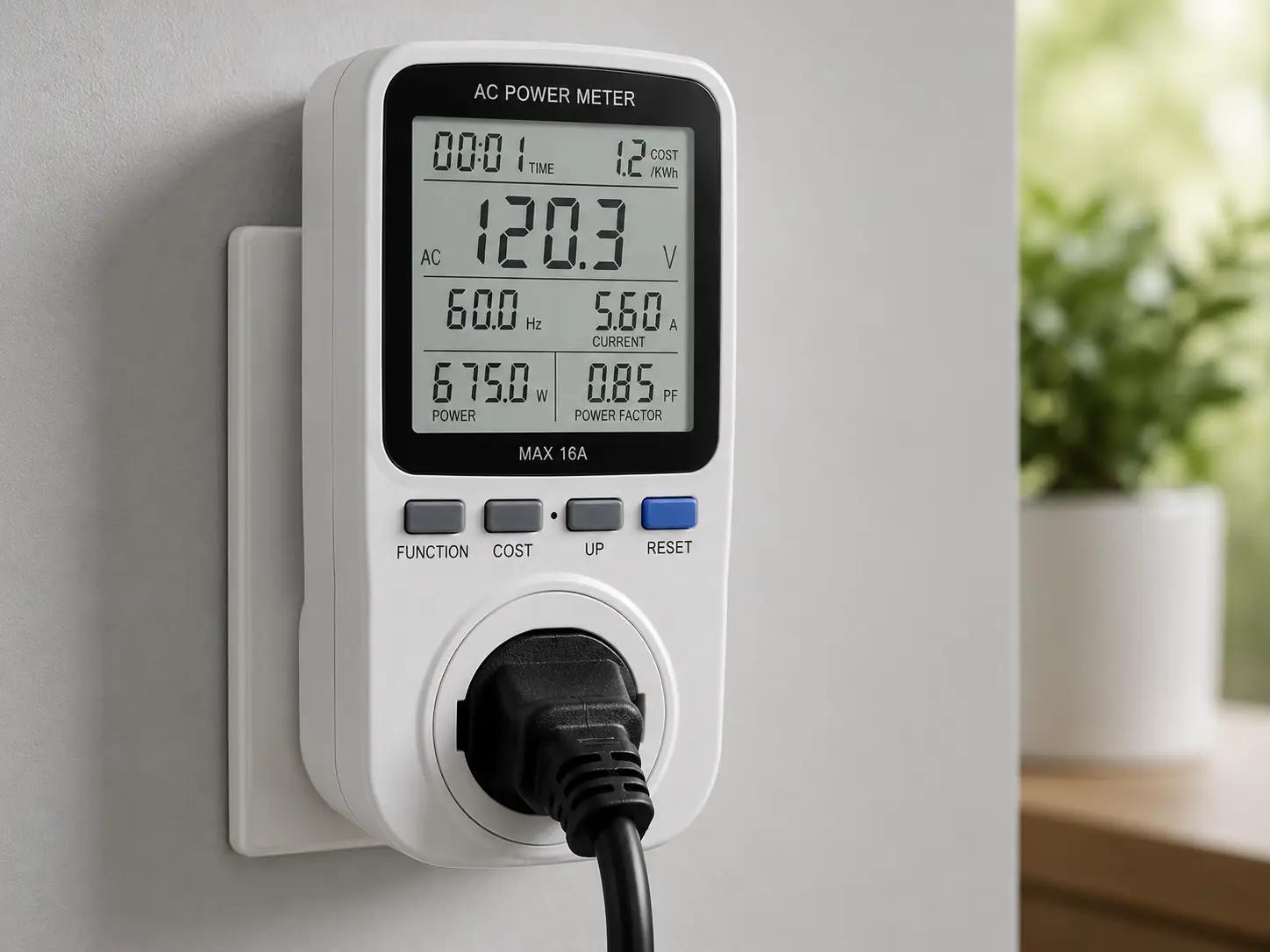
An AC power meter is a device that measures electrical characteristics — voltage, current (amperage), wattage, power factor, and cumulative energy use in kilowatt-hours — for anything connected to it, whether that’s a single plugged-in appliance or an entire home’s electrical panel. Basic versions sit between a device and the outlet; advanced versions clip onto wires inside a panel or clamp around a cable without breaking the circuit. According to the overview on Wikipedia’s home energy monitor entry, these devices range from single-outlet monitors to whole-house systems that report near real-time usage to a smartphone app.
Quick Comparison Table
Before diving into the full write-ups, here’s a fast overview of how these seven picks stack up on type, what they measure, and rough pricing.
| # | Product | Type | Key Measurements | Price Range | Best For |
|---|---|---|---|---|---|
| 1 | P3 International Kill A Watt P4400 | Plug-in | V, A, W, kWh, power factor | $25–$35 | Budget-first single-appliance checks |
| 2 | Poniie PN2000 | Plug-in | V, A, W, kWh, frequency | $20–$30 | Reading meters in dim/tight spaces |
| 3 | TP-Link Kasa Smart Plug KP125M | Smart plug | W, kWh, remote app data | $15–$30 | Remote/app-based monitoring |
| 4 | DROK AC 80-260V Digital Panel Meter | Panel-mount | V, A, W, PF, Hz, kWh | $20–$35 | DIY panels, generators, EV setups |
| 5 | Emporia Vue 3 | Whole-home | Per-circuit W, kWh, trends | $100–$180 | Multi-circuit real-time tracking |
| 6 | Sense Home Energy Monitor | Whole-home | AI device-level detection | $300–$400 | Appliance-level insight without extra sensors |
| 7 | UNI-T UT243 Power & Harmonics Clamp Meter | Clamp meter | V, A, kW, PF, harmonics | $150–$250 | Field diagnostics for electricians |
Looking at this table, the split is really about how much wiring work you’re willing to do: the top three plug straight into a wall outlet with zero tools, the DROK AC 80-260V Digital Panel Meter and the UNI-T UT243 Power & Harmonics Clamp Meter are built for people comfortable around live wiring, and the Emporia Vue 3 and Sense Home Energy Monitor sit in between — a one-time panel installation followed by fully hands-off, ongoing monitoring. If you only want to check one or two appliances, skip straight to the plug-in section; if you want whole-house visibility, the last two rows matter most.
💬 Ready to stop guessing what’s driving up your electricity bill? Scroll down, pick the AC power meter that matches your setup, and start tracking today! 😊
Top 7 AC Power Meters: Expert Analysis
Each pick below covers real specs, what those specs mean in practice, who it’s genuinely built for, and an honest read on aggregated customer sentiment — not invented reviews, just what the pattern of real feedback actually shows.
1. P3 International Kill A Watt P4400 — the industry-standard plug-in classic
The P3 International Kill A Watt P4400 has been the reference point for plug-in electricity monitoring since long before “smart home” was a marketing term, and it’s still one of the most-purchased AC power meters on Amazon. It plugs directly into a standard 115V outlet (rated up to 15A / 1,875W) and anything you plug into it — a lamp, a space heater, a window AC unit — gets measured in real time.
The large LCD reports voltage, amperage, wattage, power factor, and cumulative kWh with 0.1W resolution, which matters because it lets you catch small “phantom load” draws (chargers, cable boxes) that a coarser meter would round to zero. Based on comparing the spec sheet to competitors, the P3 International Kill A Watt P4400‘s biggest advantage is simplicity: no app, no Wi-Fi setup, no account — just plug in, read, done. That makes it the right call for renters, first-time energy auditors, or anyone who wants one clean number without a learning curve.
Reviews consistently report strong accuracy compared to utility meter readings and near-universal praise for ease of use; the most common complaint is that the base model has no battery backup, so unplugging it to move rooms resets the display to zero — a real limitation if you’re tracking usage over days rather than minutes.
Pros:
- ✅ No app or account setup required — plug and read
- ✅ Precise 0.1W resolution catches small standby loads
- ✅ Decades of proven accuracy and brand trust
Cons:
- ❌ No battery backup — unplugging resets the display
- ❌ No historical data logging or remote access
At around $25 to $35, the P3 International Kill A Watt P4400 is hard to beat as a one-time-purchase, zero-maintenance way to audit individual appliances.
2. Poniie PN2000 — brightest display for dim, hard-to-reach outlets
The Poniie PN2000 solves the one problem every Kill A Watt owner eventually runs into: you can’t read a screen behind a refrigerator or under a desk. Its backlit LCD stays legible in low light, and it ships with a short extension cord so you can pull the readout out into view instead of contorting yourself behind furniture.
Functionally, it covers the same core ground as a classic plug-in meter — voltage, current, wattage, frequency, and kWh consumed — with accuracy that independent review aggregators consistently place within about 1% of dedicated lab equipment. What most buyers overlook is that the extension cord isn’t just a convenience; it also lets you monitor a device that’s plugged into a hard-to-access outlet (behind a couch, inside a cabinet) without moving furniture every time you want a reading.
Aggregated customer feedback is largely positive on build quality and the backlight specifically, with a recurring theme that it’s “the Kill A Watt you can actually read in a dark room.” A smaller subset of reviews mention occasional reading drift at very low wattages (under 5W), which is a known limitation across budget plug-in meters generally, not unique to this unit.
Pros:
- ✅ Backlit display readable in dim spaces
- ✅ Included extension cord for awkward outlet locations
- ✅ Reports frequency in addition to standard metrics
Cons:
- ❌ Minor reading drift reported at very low wattages
- ❌ No app connectivity or data export
Priced around $20 to $30, the Poniie PN2000 is the practical upgrade pick if visibility, not just accuracy, is your main frustration with basic plug-in meters.
3. TP-Link Kasa Smart Plug KP125M — best app-connected smart plug with energy monitoring
The TP-Link Kasa Smart Plug KP125M takes a fundamentally different approach: instead of a screen you walk over and read, it’s a Wi-Fi smart plug that reports live wattage and historical kWh straight to the Kasa app on your phone, and it’s Matter-certified, meaning it plays nicely with Alexa, Google Home, and Apple Home ecosystems.
Rated for roughly 15A/1,800W, it’s built more for continuous background monitoring than one-off spot checks — plug in your refrigerator, your entertainment center, or a workshop tool, and the app quietly logs daily and monthly usage plus a rough cost estimate. Based on comparing this to the plug-in meters above, the real trade-off is convenience versus independence: you get remote access and historical trend graphs, but you’re also depending on your home Wi-Fi and TP-Link’s cloud service to see your own data.
Reviews consistently praise the compact “slim” form factor (it doesn’t block the second outlet on a duplex receptacle) and the simplicity of Matter pairing. A recurring critique in aggregated feedback is that very low-draw devices sometimes report inconsistent wattage in the app, and a small number of users note the energy history resets or gaps after firmware updates.
Pros:
- ✅ Real-time and historical data in the Kasa app
- ✅ Matter-certified — works across major smart home platforms
- ✅ Compact slim design doesn’t block adjacent outlets
Cons:
- ❌ Requires Wi-Fi and an app account to view data
- ❌ Some users report inconsistent readings at low wattage
At about $15 to $30 depending on single or 2-pack pricing, the TP-Link Kasa Smart Plug KP125M is the pick for anyone who wants to track a device’s usage over weeks without manually checking a screen.
4. DROK AC 80-260V Digital Panel Meter — best for DIY panels, generators, and EV setups
The DROK AC 80-260V Digital Panel Meter isn’t a plug-and-play consumer gadget — it’s a panel-mount instrument designed to be wired permanently into an enclosure, generator setup, solar interconnect, or custom control panel. It reads voltage across an 80–260V range and current up to roughly 20A (about 4,600W at 230V), displaying voltage, amperage, active power, power factor, frequency, and accumulated energy on a compact LCD.
What that spec range means in practice: this is the meter hobbyists and small-scale electricians reach for when they’re building something — a backup generator transfer panel, a workshop sub-panel, a DIY solar monitoring rig — and need a permanent, always-visible readout rather than something they plug and unplug. Unlike the consumer plug-in meters above, installing the DROK AC 80-260V Digital Panel Meter means working with exposed wiring, so it assumes a baseline of electrical comfort or a willingness to follow a wiring diagram carefully.
Aggregated reviews are strongly positive on accuracy relative to price, with hobbyist and maker communities frequently citing it in generator and solar-monitoring builds. The most common critique is that the included documentation is sometimes thin or awkwardly translated, and a handful of buyers report needing to double-check current transformer polarity to get correct readings on first setup.
Pros:
- ✅ Wide 80-260V range fits many household and generator setups
- ✅ Displays power factor and frequency, not just watts
- ✅ Inexpensive way to add a permanent power readout
Cons:
- ❌ Requires wiring knowledge — not a plug-and-play device
- ❌ Documentation quality varies by batch
Typically priced between $20 and $35, the DROK AC 80-260V Digital Panel Meter delivers professional-style readings at a hobbyist price, provided you’re comfortable with basic wiring.
5. Emporia Vue 3 — best multi-circuit whole-home monitor
The Emporia Vue 3 moves past single-device monitoring entirely: it installs at your breaker panel and reports usage per individual circuit, so instead of guessing which appliance is spiking your bill, you can see your HVAC, water heater, dryer, and a dozen other circuits broken out separately in one app.
Setup involves clipping current sensors around your main lines and, depending on the kit size (8, 16, or up to 24 circuits), around individual branch circuit breakers — a job most homeowners hire a licensed electrician for, though confident DIYers with the panel powered down can do it themselves. It’s UL certified, connects over Wi-Fi, and its predecessor (the Vue 2) was previously recommended by the New York Times’ Wirecutter for whole-home tracking — a strong signal for accuracy and reliability in this category. Based on comparing it against Sense below, the Emporia Vue 3‘s core advantage is directness: because every circuit gets its own sensor, you get exact per-circuit wattage from day one rather than waiting for a device-recognition algorithm to “learn” your home.
Reviews consistently highlight the granularity of the per-circuit data and the relatively approachable price for a whole-home system. A recurring complaint involves occasional app lag or sync delays, and some reviewers note that unlocking advanced historical features nudges you toward an optional subscription.
Pros:
- ✅ True per-circuit breakdown, not estimated device detection
- ✅ UL certified and previously Wirecutter-recommended (Gen 2)
- ✅ Supports solar and EV charging circuits
Cons:
- ❌ Full installation typically requires an electrician
- ❌ Some advanced features are subscription-gated
Priced roughly $100 to $180 depending on circuit count, the Emporia Vue 3 is the strongest value pick for anyone who wants precise, circuit-by-circuit visibility across their whole home.
6. Sense Home Energy Monitor — best AI-powered whole-home insight
The Sense Home Energy Monitor takes the opposite technical approach from the Emporia Vue 3: instead of a sensor on every circuit, it clips onto your two main power lines at the panel and uses machine learning to identify individual appliances from their unique electrical “signature” — the way a refrigerator compressor cycling on looks different, electrically, from a dishwasher heating element.
That single-point installation (still best handled by a licensed electrician, given it’s wired at the main panel) means less physical hardware inside your panel, and the app gradually builds a device list — fridge, AC compressor, water heater — without you manually labeling each circuit. What the spec sheet doesn’t say, but aggregated reviews consistently reveal, is that this device-detection process takes real patience: many users report it takes anywhere from a few weeks to a few months to reliably identify most major appliances, and some smaller or newer electronics may never get automatically detected at all.
Where it clearly earns its premium price is whole-home total wattage accuracy from day one, plus solar production tracking on models configured for it. Reviewers who stick with it past the initial learning period tend to report strong long-term satisfaction; the most common frustration in aggregated feedback is exactly that ramp-up period, along with the higher upfront cost compared to circuit-level competitors.
Pros:
- ✅ Detects individual appliances without a sensor on every circuit
- ✅ Strong whole-home wattage accuracy from installation day one
- ✅ Optional solar production monitoring
Cons:
- ❌ Appliance detection can take weeks or months to mature
- ❌ Highest upfront price in this lineup, plus install cost
At around $300 to $400, the Sense Home Energy Monitor suits homeowners who want device-level insight without running a sensor to every breaker — and who are willing to be patient while it learns.
7. UNI-T UT243 Power & Harmonics Clamp Meter — best professional-grade clamp meter
The UNI-T UT243 Power & Harmonics Clamp Meter is built for a different job than everything above: field diagnostics. Instead of a permanent installation, it’s a handheld clamp meter that a technician opens around a live wire to instantly read voltage, current, and — critically, unlike a basic clamp multimeter — true active power in kilowatts, power factor, and harmonic distortion, without breaking the circuit or shutting anything down.
That last point matters in practice: because it measures true power (not just volts and amps separately, which you’d have to multiply and estimate), it gives a far more accurate on-the-spot wattage reading on inductive loads like motors and compressors, where power factor skews simple V×A math. It also supports three-phase measurement and USB data transfer for logging readings to a PC, which is why it shows up repeatedly in electrician and HVAC-technician toolkits rather than typical homeowner setups.
Aggregated professional reviews consistently praise its accuracy against calibrated lab equipment and the convenience of harmonics analysis in a handheld form factor — a feature usually reserved for far more expensive power quality analyzers. The trade-off, unsurprisingly, is complexity and price: casual users report a real learning curve interpreting power factor and harmonic readings correctly.
Pros:
- ✅ Measures true power and power factor, not just V and A separately
- ✅ Non-invasive clamp design — no need to break the circuit
- ✅ Three-phase capability plus USB data logging
Cons:
- ❌ Steeper learning curve than consumer plug-in meters
- ❌ Overkill (and overpriced) for simple single-appliance checks
Running $150 to $250, the UNI-T UT243 Power & Harmonics Clamp Meter is the right tool if you need professional-grade field readings rather than a fixed household display.
How to Choose an AC Power Meter
Picking the right option comes down to matching the device to what you’re actually trying to learn. Work through these in order:
- Decide your scope first. Are you checking one or two suspect appliances, or do you want visibility into your whole home? Single-device questions point toward a plug-in meter like the P3 International Kill A Watt P4400 or Poniie PN2000; whole-home questions point toward the Emporia Vue 3 or Sense Home Energy Monitor.
- Match your technical comfort level. Plug-in meters and smart plugs need zero wiring knowledge. Panel-mount options like the DROK AC 80-260V Digital Panel Meter and whole-home systems generally involve exposed wiring or a professional install — be honest about whether that’s a DIY job or an electrician’s job.
- Decide if you want remote access. If you want to check usage from your phone without walking over to a screen, prioritize the TP-Link Kasa Smart Plug KP125M or a whole-home app-connected system over a basic plug-in display.
- Factor in installation cost, not just sticker price. A $300 whole-home monitor that needs a $150-200 electrician visit is a different total investment than the sticker suggests — budget for both.
- Consider how fast you need answers. Plug-in meters give instant readings; AI-based systems like the Sense Home Energy Monitor need weeks to fully “learn” your appliances, which matters if you need answers this month, not next quarter.
- Check the current draw range against your target device. High-draw appliances (space heaters, window AC units, dryers) can exceed the rating on some budget meters — verify the amp rating before you buy, not after a warranty claim.
- Weigh data logging needs. If you want month-over-month trend data for budgeting, a screen-only meter without memory (like the base P3 International Kill A Watt P4400) won’t cut it — you’ll want app-based logging instead.
How to Use an AC Power Meter: Step-by-Step Setup Guide
Getting accurate readings isn’t complicated, but a few early mistakes skew results for weeks if you don’t catch them.
Step 1 — Start with a baseline. Before plugging in any device, note your home’s total usage from your utility’s smart meter or app if available, so you have a reference point to compare against.
Step 2 — Plug in and let it settle. For plug-in meters like the P3 International Kill A Watt P4400 or Poniie PN2000, connect the meter to the outlet first, then the appliance to the meter — and give it a minute before trusting the reading, since some appliances draw a brief startup spike that isn’t representative of steady-state use.
Step 3 — Track over a full cycle, not a snapshot. A refrigerator’s compressor cycles on and off; a single reading might catch it mid-cycle. Devices with memory, like the TP-Link Kasa Smart Plug KP125M, solve this automatically by logging over 24+ hours — for screen-only meters, check back several times across a day.
Step 4 — For panel-mount or whole-home installs, cut power first. If you’re wiring the DROK AC 80-260V Digital Panel Meter or preparing for an electrician to install the Emporia Vue 3 or Sense Home Energy Monitor, the breaker feeding that panel must be off before anyone touches exposed conductors — this isn’t optional, and it’s the single most important safety step in this entire guide.
Step 5 — Let AI-based systems finish learning. If you’ve chosen the Sense Home Energy Monitor, resist the urge to judge accuracy in the first week. Real-world reports suggest meaningful device detection improves substantially after 4-8 weeks of continuous operation.
Step 6 — Cross-check against your utility bill monthly. Once you have 30 days of data from any meter with memory, compare the total kWh reported against your actual utility bill for that period — small discrepancies are normal, but large gaps suggest a sensor placement or calibration issue worth investigating.
Step 7 — Reset your assumptions periodically. Appliances degrade and draw more power as they age (an aging refrigerator compressor is a classic example) — re-check devices you tested a year or two ago rather than assuming the original reading still holds.
Real-World Scenarios: Matching the Right AC Power Meter to Your Needs
The renter auditing a few suspect appliances. Jordan rents a small apartment and suspects an old window AC unit is behind a spike in the summer bill. With no ability to touch the breaker panel and a tight budget, the P3 International Kill A Watt P4400 is the obvious fit — no installation, no landlord permission needed, and a direct wattage reading in under a minute per appliance.
The remote-work household tracking a home office setup. Priya runs a home office with a desktop, two monitors, and networking gear that she suspects never fully powers down. Rather than checking a screen daily, she wants a dashboard she can glance at from her phone — making the TP-Link Kasa Smart Plug KP125M the better match, since its app logs daily and monthly totals automatically.
The new homeowner who wants the full picture. The Alvarez family just bought a house with an unfamiliar electrical setup and wants to understand where every dollar of their bill goes — HVAC, water heater, the works — before deciding whether solar makes sense. That circuit-by-circuit clarity points toward the Emporia Vue 3, since it labels usage by breaker rather than guessing at the whole-home total.
The busy professional who wants insight without the wiring project. Marcus wants appliance-level detail but doesn’t want a sensor on every one of his panel’s 30 circuits, and he’s willing to pay a premium and be patient. The Sense Home Energy Monitor‘s single-point installation and AI-based detection fits that priority — insight over hands-on control.
The electrician or HVAC technician doing field diagnostics. A technician troubleshooting a compressor that’s tripping breakers needs an instant, accurate power reading on-site without shutting down a client’s system to wire in a permanent meter. The UNI-T UT243 Power & Harmonics Clamp Meter is built exactly for that — clamp on, read true watts and power factor, move to the next job.
✨ Don’t let hidden energy hogs quietly drain your wallet!
🔍 Take your home’s electricity use from a mystery to a spreadsheet. Click through to check current pricing and availability on the AC power meter that matches your household — knowing where every watt goes is the first step toward actually lowering next month’s bill.
Common Problems and Solutions With AC Power Meters
Problem: The reading resets every time you unplug the meter. This is a known limitation of base-model plug-in meters without battery backup, including the standard P3 International Kill A Watt P4400. Solution: leave the meter connected for the full measurement period instead of moving it between outlets, or step up to an app-connected option like the TP-Link Kasa Smart Plug KP125M, which retains history in the cloud regardless of power interruptions.
Problem: Wattage readings look wrong on inductive loads (motors, compressors, AC units). Simple meters that only multiply volts by amps can overstate wattage on inductive loads because they ignore power factor. Solution: for accurate readings on motors and compressors specifically, a meter that reports true power directly — like the UNI-T UT243 Power & Harmonics Clamp Meter — avoids this math error entirely.
Problem: A whole-home monitor isn’t identifying an appliance months after install. This is the most commonly reported frustration with AI-based detection systems like the Sense Home Energy Monitor. Solution: smaller electronics with weak or unusual electrical signatures may never auto-detect; in that case, spot-check the specific device with a plug-in meter instead of waiting indefinitely.
Problem: App-connected meters lose Wi-Fi and stop logging. Smart plugs like the TP-Link Kasa Smart Plug KP125M depend on a stable home network. Solution: place the plug within reliable Wi-Fi range, keep firmware updated, and periodically confirm the app is still actively logging rather than assuming silent background operation.
Problem: DIY panel-meter readings seem off after installation. With the DROK AC 80-260V Digital Panel Meter, incorrect readings are frequently traced to current transformer polarity or orientation. Solution: double-check the CT is installed in the direction specified in the documentation, and verify against a known load (like a labeled space heater) before trusting the readout for critical measurements.
AC Power Meter vs. Smart Home Energy Monitor: What’s the Difference?
“AC power meter” is really an umbrella term covering several distinct device categories, and picking the wrong category for your goal is the single most common buying mistake in this space.
| Category | Setup Difficulty | Data Granularity | Typical Cost | Best For |
|---|---|---|---|---|
| Plug-in meter | None — plug and read | Single device only | $20–$30 | Quick spot-checks |
| Smart plug | Minutes — app pairing | Single device, historical | $15–$30 | Remote/ongoing tracking of one device |
| Panel-mount meter | Moderate — requires wiring | Single circuit or panel | $20–$35 | DIY panels, generators, EV setups |
| Whole-home monitor | High — electrician recommended | Whole home, per-circuit or per-device | $100–$400 | Full-house visibility |
| Clamp meter | None — handheld, no install | Instant, single point | $150–$250 | Professional field diagnostics |
The clearest takeaway from this comparison is that “granularity” and “setup effort” move together almost in lockstep — the Sense Home Energy Monitor and Emporia Vue 3 give you the richest data specifically because someone did real installation work at the panel. If you’re not ready for that step, a plug-in meter or the TP-Link Kasa Smart Plug KP125M still answers 80% of the “what’s costing me money” question for a fraction of the cost and zero electrical risk.
Common Mistakes to Avoid When Buying an AC Power Meter
Even careful shoppers trip over the same handful of issues repeatedly. First, buying a plug-in meter rated below your target appliance’s amperage — a $25 meter rated for 15A won’t safely or accurately measure a 20A window AC unit, so always check the rating against your highest-draw device before purchasing. Second, assuming a smart plug and a whole-home monitor answer the same question; a smart plug like the TP-Link Kasa Smart Plug KP125M only ever sees what’s plugged into it, while whole-home systems see everything, including hardwired appliances like water heaters and central air that never touch an outlet.
Third, underestimating installation cost for whole-home systems — the Sense Home Energy Monitor and Emporia Vue 3 both typically involve panel work, and skipping the electrician to save money is a real safety risk, not just a minor inconvenience. Fourth, expecting instant appliance-level detail from AI-based systems; reviewers who abandon the Sense Home Energy Monitor in the first week before device learning matures are judging the product before it’s had a chance to work as designed. Fifth, ignoring power factor on motor-driven loads — a basic V×A calculation can meaningfully overstate real wattage on compressors and pumps, which is exactly the gap a true-power clamp meter like the UNI-T UT243 Power & Harmonics Clamp Meter is built to close.
Finally, some buyers assume any AC power meter also functions as a surge protector or safety device — it doesn’t. A power meter measures; it doesn’t protect against overloads, and treating it as one is a genuine safety misunderstanding worth correcting before, not after, an incident.
What to Expect: Everyday Performance and Accuracy
In day-to-day use, plug-in meters like the P3 International Kill A Watt P4400 and Poniie PN2000 deliver near-instant, reliably accurate readings for individual appliances — this is mature, well-proven technology with minimal surprises. The practical friction shows up around data retention (you have to be present to read the screen or write the number down) rather than accuracy itself.
Smart plugs shift that trade-off: the TP-Link Kasa Smart Plug KP125M trades a slightly more complex initial setup (Wi-Fi, app account) for the convenience of checking usage from anywhere, and its historical graphs make patterns — like a device that spikes every night at 2 a.m. — far easier to spot than they would be on a screen-only meter.
Whole-home systems behave differently again. Expect the Emporia Vue 3 to feel accurate and “done” almost immediately after a correct install, since every circuit gets a dedicated sensor from day one. The Sense Home Energy Monitor, by contrast, genuinely improves over the first two to three months as its algorithm gathers more data — set the expectation going in that week-one insights will be noticeably thinner than month-three insights. For field-diagnostic tools like the UNI-T UT243 Power & Harmonics Clamp Meter, expect lab-grade accuracy on the spot, but also expect a real learning curve interpreting power factor and harmonic distortion readings if you’re not already familiar with those concepts.
AC Power Meters for Renters, Homeowners, and Electricians
Renters should stay firmly in plug-in territory. Whole-home systems require panel access most landlords won’t authorize, and panel-mount meters like the DROK AC 80-260V Digital Panel Meter aren’t appropriate for a space you don’t own. The P3 International Kill A Watt P4400 or Poniie PN2000 covers essentially every legitimate renter use case: auditing a window AC unit, a space heater, or an old appliance before deciding whether to replace it.
Homeowners have the most options and the most reason to think about scope before spending. If the goal is a specific appliance question, start with a plug-in meter or the TP-Link Kasa Smart Plug KP125M before committing to a whole-home system. If the goal is comprehensive visibility — especially ahead of a solar installation or an EV charger purchase — the Emporia Vue 3 or Sense Home Energy Monitor is worth the higher upfront cost, since both explicitly support solar and EV monitoring.
Electricians, HVAC technicians, and solar installers need field-portable, non-invasive tools that don’t require a permanent install on someone else’s property. The UNI-T UT243 Power & Harmonics Clamp Meter fits that role directly, while the DROK AC 80-260V Digital Panel Meter is a useful low-cost addition to a service van for jobs that call for a permanent readout, like generator transfer switch panels or small commercial builds.
Long-Term Cost, Maintenance, and ROI
| Product | Upfront Cost | Ongoing Cost | Maintenance | Best ROI Scenario |
|---|---|---|---|---|
| P3 International Kill A Watt P4400 | $25–$35 | None | None | Identifying one costly appliance to replace |
| TP-Link Kasa Smart Plug KP125M | $15–$30 | Free app (optional cloud features) | Occasional firmware updates | Ongoing monitoring of a specific device |
| DROK AC 80-260V Digital Panel Meter | $20–$35 | None | Periodic CT calibration check | DIY generator/solar builds |
| Emporia Vue 3 | $100–$180 | Optional subscription for advanced features | Minimal — check sensor connections yearly | Full-home budgeting, pre-solar planning |
| Sense Home Energy Monitor | $300–$400 | None required for core features | Minimal — professional install lasts years | Long-term appliance-level insight |
| UNI-T UT243 Power & Harmonics Clamp Meter | $150–$250 | None | Battery replacement, calibration checks | Professional diagnostic work, paid per job |
The pattern worth noting here is that upfront cost and ongoing cost move in opposite directions depending on category — plug-in meters have the lowest sticker price but also the lowest long-term utility once you’ve answered your original question, while whole-home systems like the Emporia Vue 3 and Sense Home Energy Monitor cost more upfront but keep delivering value every single month you own the home. For a renter or a one-time appliance check, that math favors the cheap option; for a homeowner planning to stay put for years, the whole-home systems often pay for themselves faster through identified savings than their price tag suggests. The Department of Energy’s guidance on estimating appliance and home electronic energy use is a useful starting point for translating any of these wattage readings into an actual dollar estimate against your local utility rate.
Safety, Regulations, and Standards for AC Power Meters
Before wiring anything into a live circuit — whether that’s the DROK AC 80-260V Digital Panel Meter or preparing your panel for a whole-home install — a few non-negotiable safety points apply. Always cut power at the breaker before touching exposed conductors, and if you’re not fully confident reading a wiring diagram, hire a licensed electrician rather than guessing; this is exactly the kind of job where a mistake can cause a fire, not just a bad reading.
Look for relevant certifications before buying: UL or ETL listing indicates a device has been independently tested against US electrical safety standards, and it’s worth confirming before installing anything permanently in your panel — the Emporia Vue 3, for instance, carries UL certification. The Consumer Product Safety Commission has repeatedly warned that overloaded outlets and damaged cords are a leading cause of home electrical fires, which is a good reminder that a plug-in power meter itself should never be treated as a substitute for a surge protector or as a way to safely daisy-chain additional devices.
For any device you plan to install permanently — panel-mount meters or whole-home systems — confirm it’s rated for your actual voltage and amperage before wiring it in; installing a meter rated below your circuit’s maximum draw isn’t just inaccurate, it’s a genuine hazard. If your project touches your home’s main electrical panel in any way, most US jurisdictions require the work to meet National Electrical Code standards, and in many cases a permit or licensed-electrician sign-off — check your local building department before starting a whole-home monitor installation rather than assuming a DIY approach is automatically compliant.
Frequently Asked Questions
❓ What is a good AC power meter for home use?
❓ How much does an AC power meter cost?
❓ Can an AC power meter measure both volts and amps at the same time?
❓ Is a plug-in AC power meter accurate enough to trust?
❓ Do I need an electrician to install a whole-home AC power meter?
Conclusion
Choosing among these seven options really comes down to one honest question: how much of your home do you actually want visibility into, and how much setup are you willing to do to get it? If you just need to settle an argument about whether the old chest freezer is costing more than it’s worth, the P3 International Kill A Watt P4400 or Poniie PN2000 answers that in under a minute for under $35. If you want that answer delivered to your phone without walking over to read a screen, the TP-Link Kasa Smart Plug KP125M is the better fit. Builders and hobbyists wiring a generator, solar setup, or custom panel should look at the DROK AC 80-260V Digital Panel Meter, while electricians and technicians doing field work will get the most consistent value from the UNI-T UT243 Power & Harmonics Clamp Meter.
For the bigger question — where does my entire electric bill actually go — the Emporia Vue 3 delivers precise, circuit-by-circuit answers almost immediately after installation, while the Sense Home Energy Monitor offers a lower-hardware, AI-driven alternative for buyers willing to be patient during the learning period. None of these are the wrong choice; they’re built for genuinely different jobs, and matching the tool to your actual question — not just the biggest feature list — is what turns an AC power meter from a novelty gadget into a tool that quietly saves you money every single month. Consumer Reports’ guide to smart home devices is a solid next stop if you want to compare energy monitoring against other smart home categories before you commit to a purchase.
✨ Ready to finally see where your electricity dollars are going? Pick your AC power meter, check current pricing, and start tracking today! 💬🤗
Recommended for You
- 7 Best Programmable Color Changing Outdoor Lights of 2026 (Ranked)
- Power in Canada Outlet: 7 Best Adapters & Strips (2026)
- USB C Charger Outlet: 7 Best Picks to Buy in 2026
Disclaimer: This post contains affiliate links. As an Amazon Associate, I earn from qualifying purchases made through these links, at no additional cost to you.
✨ Found this article helpful? Share it with someone who needs it! 💬🤗
