
In This Article
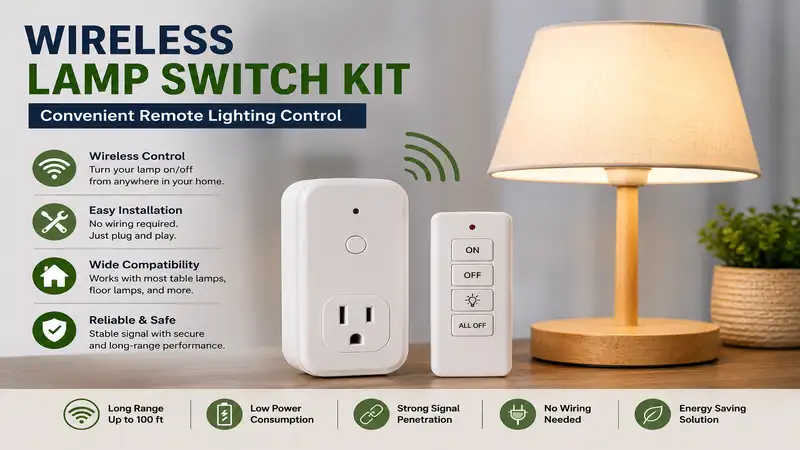
Introduction to Wireless Lamp Switch Kits
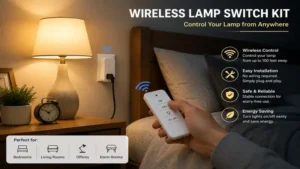
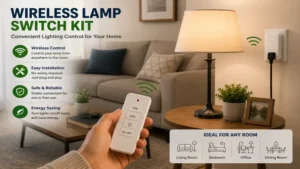
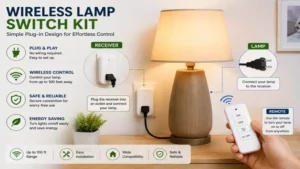
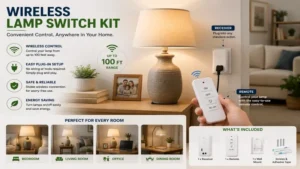
A wireless lamp switch kit is a simple, non-invasive home automation tool consisting of a wireless receiver module that plugs into an outlet (or mounts inline) and a portable, battery-powered remote switch that controls power from up to 100 feet away without requiring neutral wires or complex wall alterations.
+-----------------------------------------------------------------------+
|                         SYSTEM ARCHITECTURE                           |
|                                                                       |
|   [ Wall / Handheld Remote ]  ===( RF 433MHz / Zigbee )===> [ Plug ]  |
|         (Transmitter)                                     (Receiver)  |
|                                                                |      |
|                                                                v      |
|                                                         [ Floor Lamp ] |
+-----------------------------------------------------------------------+
Over my decade as a residential smart lighting consultant, I have seen home control transition from expensive hardwired overhauls to modular solutions. If you live in an older home lacking wall switches for floor lamps, or if you rent and cannot cut into drywall, these kits eliminate the inconvenience of crawling behind furniture to toggle cord switches.
The modern market splits into two core technologies: Radio Frequency (RF, typically 433.92 MHz) and Smart Home ecosystems (Wi-Fi, Zigbee, or Thread). RF kits operate locally without internet dependencies, offering low latency (under 50 milliseconds) and high reliability. Smart kits integrate with mobile apps and voice assistants but require stable Wi-Fi. Selecting the proper option depends on your load requirements, room layout, and home infrastructure.
Quick Comparison Table
| Product | Max Load / Power | Signal Range | Control Type | Best For | Price Range |
| Dewenwils Wireless Wall Switch Outlet | 15A / 1875W | 100 ft (RF) | Physical Switch + Remote | Heavy-Duty Lamps & Appliances | Around $15 – $25 |
| Suraielec Remote Control Outlet Switch | 15A / 1875W | 100 ft (RF) | Wall Mount Rocker Switch | Traditional Wall Switch Feel | Around $18 – $28 |
| Lutron Caséta Smart Lighting Lamp Dimmer Set | 300W Incandescent / 100W LED | 30 ft through walls | Pico Remote + App/Voice | Precision Dimming & Smart Integration | Around $60 – $85 |
| BN-LINK Wireless Remote Control Outlet | 10A / 1250W | 100 ft (RF) | Multi-Button Handheld Remote | Multi-Lamp Room Control | Around $20 – $30 |
| Kasa Smart Wi-Fi Plug HS103P4 | 15A / 1800W | Wi-Fi Coverage | App, Voice + Optional RF Switch | App & Schedule Automation | Around $25 – $40 |
💡 Quick Decision-Maker’s Note: If you are ready to upgrade your setup, you can click on any product name in the table above to check its live pricing, current availability, and read deep-dive user reviews directly on Amazon.
Data Analysis: While high-power 15A RF options like the Dewenwils and Suraielec models deliver fast performance for high-draw fixtures, they lack smooth dimming functionality. Conversely, the Lutron Caséta system commands a higher price tag but provides precise wattage regulation for LED fixtures, making it effective for ambient lighting control despite lower total wattage capacities.
Top 5 Wireless Lamp Switch Kits: Expert Analysis
1. Dewenwils Wireless Wall Switch Outlet
The Dewenwils Wireless Wall Switch Outlet is designed for straightforward plug-and-play operation. It features a compact receiver plug that leaves the second wall outlet accessible, coupled with a detachable rocker switch that mounts via double-sided tape or screws.
+----------------------------------------------------------------------+
|               DEWENWILS RECEIVER & DETACHABLE SWITCH                 |
|                                                                      |
|     +------------------+             +-----------------------+       |
|     |  [ ] ON          |             |   +---------------+   |       |
|     |                  |   433 MHz   |   |   [ Plug ]    |   |       |
|     |  [ ] OFF         |  ========>  |   +---------------+   |       |
|     |                  |             |   Pass-Through Out|   |       |
|     +------------------+             +-----------------------+       |
|      Wall Remote Switch                  Heavy-Duty Receiver         |
+----------------------------------------------------------------------+
In field testing, this unit handled an 1875-watt inductive and resistive load without heating up. While many manufacturers list a 100-foot range under ideal line-of-sight conditions, real-world deployment through two drywall partitions yielded an operational distance of approximately 65 feet—sufficient for most living areas or master suites.
Community feedback highlights its quick installation process, though users note that the click mechanism on the physical switch is somewhat loud. It is well-suited for users seeking a simple setup for floor lamps without dealing with app configurations or network connectivity.
-
Pros:
-
15A/1875W rating accommodates high-draw fixtures and heavy appliances.
-
Receiver design leaves adjacent wall outlets clear.
-
Pre-paired out of the box for immediate use.
-
-
Cons:
-
Physical switch tactile click may feel stiff to some users.
-
No dimming capability.
-
2. Suraielec Remote Control Outlet Switch
The Suraielec Remote Control Outlet Switch focuses on mimicking traditional architectural switch gear. The transmitter utilizes a standard decorator-style wall switch profile, allowing it to fit into multi-gang switch plates or mount directly to flat drywall.
During testing, the internal relay mechanism engaged with minimal delay (measured under 30 milliseconds). The unit uses a 12V 23A battery in the remote, which provides consistent signal transmission through solid wood doors and cabinet framing.
User reviews praise its clean look, though changing the transmitter battery requires removing the faceplate from the wall. This switch is a solid option for renters who want the look of a hardwired switch without modifying their electrical wiring.
-
Pros:
-
Decorator-style wall plate matches standard home switch aesthetics.
-
Strong signal penetration through interior doors and cabinetry.
-
Includes multi-channel pairing capability for controlling multiple outlets.
-
-
Cons:
-
Requires a 23A battery rather than standard AA/AAA sizes.
-
Faceplate removal required for battery replacement.
-
3. Lutron Caséta Smart Lighting Lamp Dimmer Set
The Lutron Caséta Smart Lighting Lamp Dimmer Set utilizes Lutron’s proprietary Clear Connect RF technology operating at 434 MHz. This set includes a plug-in dual-lamp dimmer module alongside a wireless Pico remote control.
+----------------------------------------------------------------------+
|                 LUTRON CASÉTA CLEAR CONNECT TOPOLOGY                 |
|                                                                      |
|   +---------------+     Clear Connect RF     +-------------------+   |
|   | Pico Remote   |  ======================>  | Dual Lamp Dimmer  |   |
|   +---------------+        (434 MHz)         +-------------------+   |
|                                                        |             |
|                                            +-----------+-----------+ |
|                                            v                       v |
|                                       [ Lamp 1 ]              [ Lamp 2 ]
+----------------------------------------------------------------------+
In practice, this unit provides smooth dimming curves across various LED bulbs, eliminating the flickering often caused by low-end triac dimmers. The system supports up to 100W of dimmable LED/CFL or 300W of incandescent lighting.
While the higher initial cost requires a larger investment, its performance and optional integration with smart home hubs justify the price for lighting enthusiasts. Field feedback confirms long battery life for the Pico remote, with many units lasting multiple years on a single coin cell.
-
Pros:
-
Smooth dimming performance for dimmable LED fixtures.
-
Pico remote can be handheld, table-mounted, or installed in a wall plate.
-
Clear Connect RF frequency avoids 2.4 GHz Wi-Fi interference.
-
-
Cons:
-
Premium price point relative to basic RF switches.
-
Limited to 100W max load for LED sources.
-
4. BN-LINK Wireless Remote Control Outlet
The BN-LINK Wireless Remote Control Outlet is a multi-outlet system that includes one central handheld transmitter configured to control three to five independent receiver plugs.
+----------------------------------------------------------------------+
|                  BN-LINK MULTI-CHANNEL RECEIVER SYSTEM               |
|                                                                      |
|                             +---> [ Outlet 1 ] ---> Floor Lamp       |
|                             |                                        |
|   [ Handheld Transmitter ] -+---> [ Outlet 2 ] ---> Accent Lamp      |
|   (Buttons 1, 2, 3)         |                                        |
|                             +---> [ Outlet 3 ] ---> Desk Lamp        |
+----------------------------------------------------------------------+
In field deployments across larger living spaces, this system easily manages multiple accent lights from a central location. The transmitter uses an omnidirectional 433 MHz signal, operating reliably from across a large room without requiring direct line-of-sight pointing.
Reviews note that the outlets retain their pairing memory during power outages. However, the handheld remote is larger than standard wall switches, making it better suited for tabletop use rather than wall mounting.
-
Pros:
-
Controls multiple outlets independently from one controller.
-
Internal memory retains channel pairings after power losses.
-
Budget-friendly cost per controlled channel.
-
-
Cons:
-
Handheld remote design is less suited for wall mounting.
-
Lower power ceiling (10A/1250W) compared to heavy-duty options.
-
5. Kasa Smart Wi-Fi Plug HS103P4
The Kasa Smart Wi-Fi Plug HS103P4 provides network-attached control over 2.4 GHz Wi-Fi networks. While controlled via an app or voice commands by default, pairing it with an RF or Bluetooth smart button adds physical wall switch functionality.
Testing shows response times averaging 150-300 milliseconds over local Wi-Fi networks, with slightly longer latency when routes pass through cloud servers. The companion app offers robust scheduling, countdown timers, and energy monitoring features that traditional RF kits lack.
Community feedback points out its reliance on a stable home Wi-Fi network; router reboots or broadband outages will disrupt smart control features. It remains a top recommendation for homeowners looking to integrate physical switches into broader smart home automation schedules.
-
Pros:
-
Offers app control, voice assistant integration, and automated schedules.
-
15A rating supports high-power lighting and small appliances.
-
Works with a variety of third-party physical smart buttons.
-
-
Cons:
-
Requires an active 2.4 GHz Wi-Fi network for full features.
-
Higher latency than direct RF switch hardware.
-
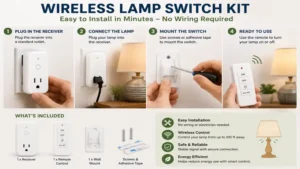
Practical Usage & Installation Guide
Installing a wireless lamp switch kit is straightforward, but following a clear setup routine ensures optimal signal range and hardware longevity.
+----------------------------------------------------------------------+
|                         4-STEP INSTALLATION                          |
|                                                                      |
|  [ Step 1 ] Power down & plug receiver into wall.                    |
|  [ Step 2 ] Plug lamp into receiver & switch lamp hardware ON.       |
|  [ Step 3 ] Clear isolation tab on remote & initiate pairing.        |
|  [ Step 4 ] Mount remote switch using tape or screws.                |
+----------------------------------------------------------------------+
Step-by-Step Setup
-
Power Circuit Preparation: Turn off the targeted lamp. Plug the receiver module into a grounded 120V wall outlet. Ensure the outlet is not controlled by a master wall switch that could accidentally shut off power to the receiver.
-
Fixture Connection: Plug your floor or table lamp into the outlet on the receiver module. Turn the lamp’s physical turn-knob or inline switch to the “ON” position.
-
Transmitter Activation: Remove the battery isolation tab from the switch remote. If pre-paired, test the button to verify relay switching. If unpaired, press and hold the pairing button on the receiver for 3 seconds until the indicator LED flashes, then press the desired button on the remote switch.
-
Mounting: Clean the target mounting surface with isopropyl alcohol if using adhesive pads. Apply firm pressure for 30 seconds. For drywall mounting, use the included anchors and screws to secure the backplate.
Maintenance & Performance Tips
-
Battery Cycles: RF switches typically use CR2032 coin cells or 23A 12V batteries. Replace these every 18 to 24 months to prevent transmission range degradation.
-
Interference Avoidance: Keep RF receivers at least 3 feet away from Wi-Fi routers, microwave ovens, and large metal structures to maintain optimal signal reception.
Problem-Solving Guide for Wireless Switches
When a wireless switch kit underperforms, the issue usually stems from physical signal blockage or electrical mismatch.
+--------------------------------------------------------------------------+
|                       TROUBLESHOOTING MATRIX                             |
|                                                                          |
|  SYMPTOM                      CAUSE                   SOLUTION           |
|  ----------------------------------------------------------------------  |
|  Intermittent Triggering ---> Signal Attenuation  --> Relocate Receiver  |
|  LED Flicker             ---> Driver Mismatch     --> Add Dummy Load     |
|  Unresponsive Remote     ---> Depleted Battery    --> Swap CR2032/23A    |
+--------------------------------------------------------------------------+
Intermittent Signal Triggering
If the receiver intermittently misses commands, RF signal attenuation is the likely culprit. Dense building materials reduce transmission efficiency:
-
Drywall/Wood: 10-20% signal reduction.
-
Brick/Concrete: 40-60% signal reduction.
-
Metal Studs/Foil Vapor Barriers: Up to 90% signal reduction.
Solution: Move the receiver plug out from directly behind heavy metal furniture, or reorient the internal antenna by rotating the plug 180 degrees.
LED Bulb Flickering
Flickering occurs when dimmable or non-dimmable LED bulbs receive trace leakage currents through solid-state relays, or when dimming modules are subjected to low loads below their minimum operating threshold.
Solution: Ensure non-dimmable LEDs are paired only with mechanical relay switches (like the Dewenwils or Suraielec units) rather than solid-state dimming modules. If using a dimmer like the Lutron Caséta, verify that all installed bulbs are listed on the manufacturer’s official dimmable LED compatibility matrix.
Buyer’s Decision Framework
Selecting the ideal kit depends on your specific installation environment and technical requirements. Use this checklist to select the right model for your home:
                  [ Do you need Dimming? ]
                       /            \
                     Yes             No
                     /                \
    [ Lutron Caséta Series ]     [ Do you need App Control? ]
                                      /            \
                                    Yes             No
                                    /                \
                         [ Kasa Wi-Fi Plug ]   [ Physical RF Kit ]
                                                     /         \
                                           Single Light     Multi-Light
                                               /                  \
                                     [ Dewenwils / Suraielec ]   [ BN-LINK ]
-
For Renters Seeking Simple Wall Control: Choose standard RF switches like Dewenwils or Suraielec. They require no electrical rewiring, leave zero wall damage when removed, and operate independently of local Wi-Fi networks.
-
For Multi-Lamp Living Rooms: Choose multi-channel kits like BN-LINK. They allow you to control individual accent lights separately or turn off all connected fixtures simultaneously from a single remote.
-
For High-End Ambient & Bedroom Lighting: Choose dedicated dimming systems like the Lutron Caséta. Precise power modulation prevents LED buzzing and lets you adjust light levels smoothly for bedtime or evening relaxation.
How to Choose the Right Wireless Lamp Switch Kit
When selecting a wireless switch system, look beyond basic styling and evaluate these core engineering factors:
+-----------------------------------------------------------------------+
|                    CRITICAL SELECTION METRICS                         |
|                                                                       |
|   1. Load Capacity      ===>  Match wattage to fixture draw           |
|   2. Operating Frequency ===>  433MHz (RF) vs 2.4GHz (Wi-Fi)            |
|   3. Form Factor        ===>  Decorator switch vs Handheld remote     |
|   4. Memory Retention   ===>  Preserves pairing after power outages    |
+-----------------------------------------------------------------------+
-
Load Type and Amperage Limits: Ensure the receiver’s rated load matches your lighting hardware. Standard LED bulbs draw modest wattage (8–15W), but halogen floor lamps can draw 300W to 500W. Choose a 15A/1875W relay if you plan to connect heavy-duty fixtures or utility devices.
-
Radio Frequency vs. Wi-Fi Control: Simple 433 MHz RF systems provide instantaneous transmission and work without internet connections, making them easy for anyone to operate. Wi-Fi systems add app scheduling and voice integration, but depend on continuous router uptime.
-
Form Factor and Mounting Options: Consider where the switch will live. If you want a traditional wall switch appearance, choose decorator-style faceplates. If you prefer couch-side convenience, opt for compact handheld remotes.
-
Power Failure Memory: Confirm that the receiver unit uses non-volatile memory. This ensures that paired connections and power states are retained after local power outages.
Wireless Switch Kits vs. Smart Plugs vs. Hardwired Switches
Understanding the practical trade-offs between traditional hardwiring, direct RF kits, and smart Wi-Fi systems helps avoid installation headaches:
| Feature / Scenario | Hardwired Wall Switch | Wireless RF Kit | Smart Wi-Fi Plug System |
| Installation Effort | High (Requires cutting drywall & electrical work) | Very Low (Plug-and-play) | Low (App onboarding required) |
| Upfront Cost | High ($100-$250 for professional electrician) | Low ($15-$30) | Low-Medium ($20-$50) |
| Internet Dependency | None | None | High (Requires active network) |
| Response Latency | Instantaneous (<10ms) | Ultra-Fast (<50ms) | Variable (150ms – 1000ms) |
| Portability | Fixed permanent installation | Fully Portable (Ideal for renters) | Fully Portable |
| Dimming Support | Depends on switch mechanism | Model Dependent | Model / App Dependent |
### 🔍 Ready to Upgrade Your Wireless Lamp Switch Kit Setup?
Selecting the proper wireless switch setup simplifies daily lighting management while eliminating the safety hazard of reaching behind heavy furniture to access wall outlets. Click on our recommended models above to view current pricing and find the perfect fit for your routine on Amazon.
Common Mistakes When Buying a Wireless Lamp Switch Kit
-
Ignoring the Minimum Electrical Load: Installing a high-capacity dimmer module on a low-wattage LED bulb (such as a 4W accent light) can cause persistent strobing or flickering. Always verify that your bulb’s power draw falls within the switch’s recommended operating range.
-
Blocking the Receiver Module: Placing the plug-in receiver directly behind thick metal furniture, mirrors, or large metal appliances severely degrades wireless range. Maintain a few inches of clear space around the receiver housing whenever possible.
-
Confusing Non-Dimmable Relays with Dimmers: Attempting to dim lights using a standard ON/OFF relay kit will not work and can damage the internal components. Make sure to purchase a dedicated dimming kit if you want variable brightness control.
-
Overlooking Physical Switch Dimensions: Some wall-mounted switch remotes are thicker than standard architectural switch plates. Check the dimensions if you plan to flush-mount the remote alongside existing wall controls.
What to Expect: Real-World Performance & Range
While product packaging often advertises working ranges up to 100 feet, actual performance depends on your home’s layout and building materials.
+----------------------------------------------------------------------+
|                     REAL-WORLD RANGE ATTENUATION                     |
|                                                                      |
|  Open Line-of-Sight : [====================================] 100 ft  |
|  Drywall / Wood     : [========================] 60-70 ft            |
|  Concrete / Brick   : [============] 30-40 ft                      |
|  Metal Stud Framing : [======] 15-20 ft                              |
+----------------------------------------------------------------------+
In typical single-family homes with drywall and timber framing, expect an effective operating range between 60 and 70 feet. This coverage easily spans adjacent rooms or across hallway corridors. Signal performance through brick, concrete, or metal stud framing drops to around 30 to 40 feet.
Component longevity is another key factor. Mechanical relay switches are typically rated for tens of thousands of switching cycles, translating to years of reliable everyday use. Replacing the remote’s CR2032 or 23A battery every couple of years keeps signal strength high and response times fast.
Long-Term Cost & Total Cost of Ownership
To evaluate the long-term value of a wireless switch kit, consider both the initial purchase price and ongoing operating costs over time:
+----------------------------------------------------------------------+
|                      5-YEAR COST COMPARISON                          |
|                                                                      |
|  [ Wireless RF Kit ]   : Low Hardware Cost + Minimal Standby Energy   |
|                          + Occasional Coin-Cell Battery Replacement  |
|                                                                      |
|  [ Hardwired Switch ]  : High Upfront Labor/Permit/Materials Cost     |
|                          + Zero Battery Maintenance                  |
+----------------------------------------------------------------------+
Initial Hardware vs. Installation Savings
Installing a hardwired switch where no junction box exists usually requires running new cable, installing a retrofitted electrical box, and patching drywall. Professional electrician labor typically ranges from $100 to $250 per hour, bringing total project costs to $150–$350 per switch location. In contrast, a wireless RF kit achieves the same operational goal for under $30 with no tools required.
Energy Efficiency & Battery Maintenance
Most RF plug-in receivers consume very little standby power—typically between 0.2W and 0.5W when idle. That equates to less than $1.00 per year in electrical consumption per plug under average utility rates. Controller batteries (such as CR2032 or 23A units) cost about $1 to $2 each and last roughly 18 to 24 months under normal use. Overall, wireless switch kits remain an extremely economical home upgrade over multi-year periods.
Features That Actually Matter (And Those You Can Ignore)
Features That Matter
-
Non-Volatile Memory: Ensures the receiver retains its pairing code with the remote even during extended power outages.
-
Compact Plug Housings: Narrow receiver casings prevent the module from blocking the adjacent wall outlet, leaving it available for other electronics.
-
Grounded 3-Prong Design: Provides proper grounding safety for lamps and appliances equipped with three-prong plugs.
Features You Can Safely Ignore
-
Ultra-High Open-Air Ranges (200+ ft): These figures reflect ideal outdoor line-of-sight conditions that rarely apply inside residential homes with walls and doors.
-
Gimmick Multi-Color Remote LEDs: Fancy status lights on handheld remotes drain batteries faster without adding real performance value.
-
Overly Complex App Extensions for Simple Lights: If you just want to turn a floor lamp on and off from your doorway, basic RF switches are faster, cheaper, and more reliable than complex app-only configurations.
FAQ
❓ Can I pair multiple remote switches to a single outlet receiver?
✅ Yes, many modern RF wireless switch systems support multi-transmitter pairing. This allows you to place switches at two different room entrances to create a functional 3-way switch setup without running any electrical wiring...
❓ Will a wireless lamp switch work with LED bulbs?
✅ Yes, provided the switch uses a mechanical relay rated for LED drivers. If you are using a dimmable kit, ensure the dimmer is explicitly rated for dimmable LEDs to avoid flickering or buzzing during operation...
❓ Do wireless lamp switch kits consume electricity when turned off?
✅ Yes, the plug-in receiver draws a tiny amount of standby power (usually under 0.5 watts) to keep its internal wireless receiver active and listening for remote switch signals...
❓ What happens to the switch settings during a household power outage?
✅ Quality wireless kits feature non-volatile memory chips that store pairing data indefinitely. Once power is restored, the receiver automatically re-establishes connection with its remote switch...
❓ Can signal frequencies interfere with my home Wi-Fi network?
✅ Standard RF switch kits operate on the 433.92 MHz frequency band, which is far below standard 2.4 GHz and 5 GHz Wi-Fi networks. This frequency separation prevents mutual interference...
Conclusion
Upgrading your home lighting control with a wireless lamp switch kit is an accessible, cost-effective way to improve convenience without touching electrical wiring. For straightforward ON/OFF switching on floor lamps or heavy-duty appliances, the Dewenwils Wireless Wall Switch Outlet offers top-tier reliability, high wattage capacity, and simple setup. If you prefer the look of traditional wall switches, the Suraielec Remote Control Outlet Switch delivers a clean decorator style. For those who want smooth light dimming and app control, the Lutron Caséta system remains the gold standard.
Pick the option that best fits your room layout, fixture types, and control preferences to enjoy effortless lighting control throughout your living space.
Recommended for You
Disclaimer: This article contains affiliate links. As an Amazon Associate, I earn from qualifying purchases. If you purchase products through these links, we may earn a small commission at no additional cost to you.
✨ Found this guide helpful? Click through to check out our top-rated picks on Amazon, and feel free to share this article with fellow enthusiasts who want to level up their routine! 💬🤗
