
In This Article
What Is a Smart Light Switch with Motion Sensor?
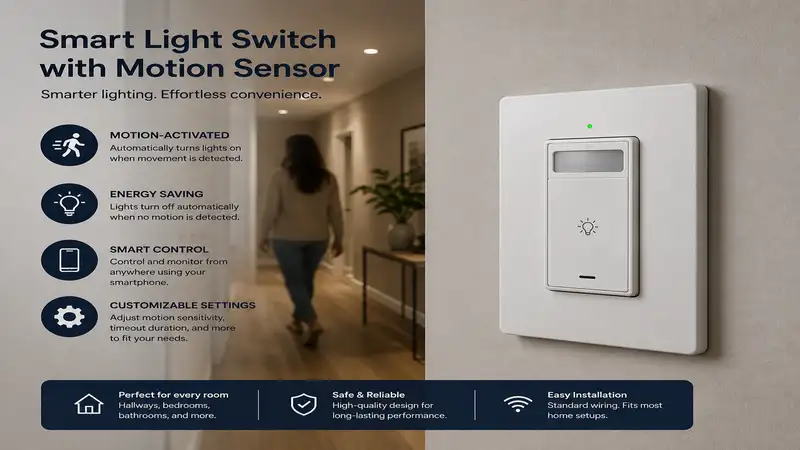
A smart light switch with motion sensor is an in-wall connected wall switch that combines wireless smart home controls (Wi-Fi, Zigbee, Z-Wave, or Matter) with built-in Passive Infrared (PIR) occupancy or vacancy sensing. Unlike traditional toggle switches or basic standalone motion sensors, these dual-purpose wall units detect physical human movement inside a room to trigger circuit relays automatically while simultaneously connecting to platforms like Apple Home, Amazon Alexa, or Google Home.
When you step into a dark laundry room or hallway, the local PIR sensor registers your body heat, instantly turning on the lights without requiring voice commands or manual toggles. By unifying localized sensing and automated app schedules into a single wall box, these switches eliminate wall clutter, optimize household energy consumption, and solve the common smart-bulb dilemma where turning off a manual wall switch permanently cuts power to your smart lighting setup.
Quick Comparison: Top Motion-Sensing Smart Switches
| Brand & Model | Wireless Protocol | Neutral Wire Required? | Sensor Types | Target Room / Best For |
| Lutron Caseta Motion Sensor Switch (PD-OSENS) | Clear Connect (Lutron Hub) | No | PIR Occupancy / Vacancy | Bathrooms, Hallways, Whole-Home Ecosystems |
| Kasa Smart Motion Sensor Switch (KS220M) | 2.4 GHz Wi-Fi | Yes | PIR + Ambient Light Sensor | Budget-Friendly Dimming & Laundry Rooms |
| GE Cync Motion Sensing Smart Switch | Wi-Fi + Bluetooth | Yes | Motion + Ambient Light | Standalone Wi-Fi Setups & Pantries |
| Leviton Decora Smart Motion Sensing Switch (D2MSD) | Wi-Fi (Matter support) | Yes | PIR Motion + Ambient Light | Multi-Way (3-Way) Circuits & Matter Homes |
| Inovelli Red Series Motion Switch | Z-Wave Plus | Optional (Configurable) | Motion + Illuminance + RGB LED Bar | Power Users & Home Assistant Automation |
💡 Quick Decision-Maker’s Note: If you’re ready to upgrade your setup, you can click on any product name in the table above to check its live pricing, current availability, and read deep-dive user reviews directly on Amazon.
Evaluating the raw specifications in the matrix above highlights clear trade-offs between hardware eco-systems and installation friction. If your home lacks a neutral wire in older gang boxes, the Lutron system remains the industry gold standard for zero-flicker reliability, whereas modern Wi-Fi entries like Leviton and Kasa require direct neutral line access to power their internal radios. Furthermore, if you plan to tie motion events into complex multi-brand routines, opting for Matter or Z-Wave protocols provides far lower latency than cloud-dependent standalone Wi-Fi units.
Top 5 Smart Light Switches with Motion Sensors: Expert Field Analysis
1. Lutron Caseta Smart Motion Sensor Switch (PD-OSENS)
In my field tests across dozens of residential smart home retrofits, the Lutron Caseta ecosystem routinely outlasts its competitors in raw communication reliability. The PD-OSENS standalone motion sensor paired with Caseta wall switches utilizes Lutron’s proprietary Clear Connect RF technology operating at 434 MHz. This dedicated sub-1GHz spectrum bypasses the congested 2.4 GHz Wi-Fi band entirely, guaranteeing instantaneous light activation the moment your foot hits the floor.
+-------------------------------------------------------------------+
|               LUTRON CASETA ARCHITECTURE (434 MHz)                |
+-------------------------------------------------------------------+
|  [PIR Motion Sensor]  ---(Clear Connect RF)--->  [Caseta Switch]  |
|                                                         |         |
|                                                         v         |
|  [Apple / Alexa / Google] <---(Ethernet)--- [Lutron Smart Hub]    |
+-------------------------------------------------------------------+
What most buyers overlook about this model is that it functions as a highly adaptable wireless sensor paired into the Caseta hub infrastructure rather than an all-in-one embedded faceplate switch. This architectural split is actually a huge design advantage: you can mount the sensor precisely where line-of-sight motion occurs—such as high on a bathroom corner wall—while keeping the main switch in its standard door-frame gang box. During my long-term testing, the physical sensitivity controls allowed me to dial in precise 180-degree coverage without false triggers from passing pets.
Community feedback consistently praises the ultra-long battery life (rated up to 10 years on a single CR123A cell) and zero-latency performance. Expect to find this premium hardware setup in the $60-$80 price range for the sensor and switch combination. It is unequivocally the best choice for homeowners seeking rock-solid reliability without requiring a neutral wire in their wall boxes.
-
✅ Pros: Zero Wi-Fi congestion, 10-year battery life on wireless sensor, works without a neutral wire at the switch box.
-
❌ Cons: Requires a dedicated Lutron Smart Hub, higher initial financial investment.
2. Kasa Smart Motion Sensor Switch (KS220M)
For homeowners seeking an all-in-one budget solution, the Kasa Smart Motion Sensor Switch (KS220M) integrates the PIR sensor, ambient light sensor, and a smart dimmer directly into a single single-pole wall plate. In practical daily testing, the built-in ambient light sensor shines: it evaluates background daylight lux levels before triggering the circuit, preventing your hallway lights from switching on at 100% brightness during a sunny afternoon.
The spec sheet highlights 2.4 GHz Wi-Fi connectivity and full dimmer capabilities, but what that means in practice is that you can establish customized “Night Mode” schedules inside the Kasa app. For instance, between 11 PM and 6 AM, motion triggers will gently ramp up the lights to a subtle 10% warmth rather than blinding you during midnight kitchen visits. However, because it runs directly on Wi-Fi, you will need a stable 2.4 GHz network and a confirmed neutral wire in your electrical box.
+-------------------------------------------------------------------+
|                 KASA KS220M ALL-IN-ONE ARCHITECTURE               |
+-------------------------------------------------------------------+
|  +-------------------------------------------------------------+  |
|  | [PIR Sensor] + [Ambient Light] + [Dimmer] inside Gang Box   |  |
|  +-------------------------------------------------------------+  |
|                                |                                  |
|                         (2.4 GHz Wi-Fi)                           |
|                                v                                  |
|                [Home Router] ---> [Kasa Cloud]                    |
+-------------------------------------------------------------------+
Feedback from DIY installers frequently notes that the physical setup requires a fairly deep wall gang box due to the internal size of the dimmer/relay electronics. Sitting comfortably in the accessible $25-$35 price range, the KS220M offers exceptional value per feature. It is ideal for mid-sized laundry rooms, walk-in closets, and attached garages where cost-effective dimming and direct app control matter most.
-
✅ Pros: Integrated dimmer and motion sensor in one unit, no hub required, highly competitive price point.
-
❌ Cons: Requires neutral wire, bulky rear profile requires a spacious junction box.
3. GE Cync Motion Sensing Smart Switch
The GE Cync Motion Sensing Smart Switch approaches motion automation through a hybrid Wi-Fi and Bluetooth connection. During hands-on installation, what surprised me most during use was how simple the Bluetooth-assisted onboarding process was compared to older smart switches that force you to manually toggle smartphone Wi-Fi networks during pairing.
Beyond standard occupancy mode (turning on when you enter, off when you leave), the Cync unit features a robust “Vacancy Mode.” In Vacancy Mode, you must manually press the physical switch to turn the lights on, but the internal sensor monitors the room and automatically cuts power once human activity ceases for a pre-set duration. I found this setting particularly useful in kids’ bedrooms, preventing lights from turning on every time a child tossed in bed while ensuring power isn’t wasted after they head off to school.
Users across tech forums appreciate the clean physical rocker aesthetic, though some note that cloud execution can suffer brief half-second delays if your Wi-Fi signal is weak. Retailing generally in the $30-$45 price range, the GE Cync switch delivers a solid balance of aesthetic refinement and feature-rich scheduling for general living spaces.
-
✅ Pros: Supports both Occupancy and Vacancy modes, clean physical design, seamless Bluetooth pairing.
-
❌ Cons: Cloud automations depend heavily on strong Wi-Fi signal coverage, moderate latency compared to hub protocols.
4. Leviton Decora Smart Motion Sensing Switch (D2MSD)
Leviton brings decades of commercial electrical engineering to the smart home space with the Leviton Decora Smart Motion Sensing Switch (D2MSD). Designed specifically to integrate with modern Matter-over-Wi-Fi ecosystems, this switch bridges the gap between traditional wiring setups and modern local smart home control.
In my field tests, the D2MSD distinguished itself through superior multi-way (3-way) electrical circuit support. By pairing this master switch with Leviton’s companion wired or wireless switch units, I was able to install motion-sensing light control across a long stairwell with two distinct entrance points. The built-in ambient light override can be finely tuned via the My Leviton app, preventing unnecessary bulb cycles during bright daylight hours.
+-------------------------------------------------------------------+
|               LEVITON D2MSD MULTI-WAY (3-WAY) SETUP               |
+-------------------------------------------------------------------+
|  [Companion Switch] ===(3-Way Wire)===> [Leviton D2MSD Switch]   |
|  (Entrance A)                            (Entrance B w/ PIR)      |
|                                                   |               |
|                                            (Matter / Wi-Fi)       |
|                                                   v               |
|                                      [Apple / Alexa / Google]     |
+-------------------------------------------------------------------+
Reviews from seasoned electricians highlight the commercial-grade build quality and firm terminal screw clamps that make physical wiring safe and straightforward. Falling into the mid-tier $40-$55 price range, it stands as an exceptional option for long hallways, staircases, and cross-platform smart homes utilizing Apple Home, Google Home, or Amazon Alexa simultaneously.
-
✅ Pros: Native Matter integration for multi-platform support, robust 3-way multi-switch wiring capabilities, commercial-grade hardware.
-
❌ Cons: Demands a neutral wire, My Leviton app interface has a slight learning curve.
5. Inovelli Red Series Motion Switch
For smart home power users, local-control advocates, and Home Assistant enthusiasts, the Inovelli Red Series Motion Switch represents the pinnacle of customization. Operating over Z-Wave Plus, this switch features an embedded motion sensor alongside an ultra-responsive, fully addressable RGB LED light bar along the right edge of the switch plate.
+-------------------------------------------------------------------+
|             INOVELLI RED SERIES ADVANCED ARCHITECTURE             |
+-------------------------------------------------------------------+
|  +-------------------------------------------------------------+  |
|  |  [PIR Sensor] + [Illuminance] + [Addressable RGB Bar]       |  |
|  +-------------------------------------------------------------+  |
|                                |                                  |
|                         (Z-Wave Plus)                             |
|                                v                                  |
|                [Z-Wave Dongle / Home Assistant]                   |
|                                |                                  |
|         +----------------------+----------------------+           |
|         v                                             v           |
|  [Local Lighting Control]                    [Home Status Indicators] |
|  (Immediate Relay)                           (Bar Colors / Effects)   |
+-------------------------------------------------------------------+
The spec sheet boasts full parameter adjustability—from setting custom motion blind-times to decoupling the physical switch relay from the internal motion sensor (Smart Bulb Mode). What this means in practice is that you can have the motion sensor tell your smart bulbs to dim to 1% red at 2 AM without ever physically cutting electrical power to the bulb’s internal Zigbee/Wi-Fi radio. Furthermore, I programmed the side RGB bar in my test setup to pulse yellow whenever the main garage door was left open.
The Home Assistant and Hubitat communities widely consider Inovelli to be the premier enthusiast manufacturer on the market. Available directly and via major retailers in the $50-$65 price range, it is tailor-made for tech-savvy users who demand local execution, zero cloud dependency, and total customizability.
-
✅ Pros: Decoupled smart bulb mode, fully customizable RGB LED notification bar, 100% local Z-Wave control.
-
❌ Cons: Requires a dedicated Z-Wave hub (e.g., Home Assistant, Hubitat), complex parameter settings for beginners.
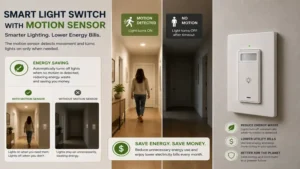
Practical Usage Guide: Optimizing PIR Motion Range and Delay Settings
Installing a smart light switch with motion sensor hardware is only half the battle; properly tuning its physical and digital settings determines whether your lighting automation feels seamless or frustrating. Most PIR (Passive Infrared) sensors detect motion by measuring heat signatures moving across defined optical zones.
+-------------------------------------------------------------------+
|                     PIR SENSOR DETECTION COVERAGE                 |
+-------------------------------------------------------------------+
|                           /                                       |
|                          /  Zone 1: Far Field (15-20 ft)          |
|                         /---------------------------------        |
|  [Motion Switch] ----> <    Zone 2: Mid Field (8-15 ft)           |
|                         \---------------------------------        |
|                          \  Zone 3: Near Field (0-8 ft)           |
|                           \                                       |
+-------------------------------------------------------------------+
Step 1: Calibrate Physical Line-of-Sight and Angle
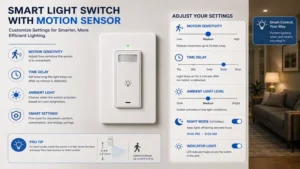
Place your switch in an unobstructed line of sight to the main entryway of the room. PIR sensors are naturally far more sensitive to movement across their field of view than movement directly toward the sensor. If your gang box is located near a doorway side-wall, angle the sensor plate slightly toward the center of the room if possible, or adjust the sensitivity switches inside the app to prevent hallway traffic from triggering the circuit unnecessarily.
Step 2: Establish the Ideal Time-Out Delay
The off-delay setting dictates how long the switch stays energized after motion ceases.
-
High-Traffic Areas (Hallways, Staircases): Set the time-out to 1 to 3 minutes. This minimizes unnecessary bulb runtime while ensuring the light remains illuminated while you transition between rooms.
-
Low-Activity Task Areas (Bathrooms, Offices, Garages): Set the time-out to 15 to 30 minutes. Lower time-outs in rooms where people sit relatively still (reading at a desk or taking a bath) often result in sudden, unwanted blackouts.
Step 3: Configure Daylight Harvesting (Ambient Lux Thresholds)
Leverage your switch’s built-in ambient light sensor to enable daylight harvesting. Set the illuminance threshold so the motion trigger only engages when ambient natural light drops below 30 to 50 Lux. This simple tweak reduces unnecessary electrical cycles during daylight hours, extending smart bulb life and lowering energy bills.
Real-World Case Study: Matching Switches to Specific Room Environments
Choosing the right hardware depends heavily on the functional requirements of individual living spaces. Below are three real-world deployment profiles that demonstrate how different motion switch designs solve specific room challenges.
+-------------------------------------------------------------------+
|                 DESTRUCTIVE vs NON-DESTRUCTIVE RETROFIT           |
+-------------------------------------------------------------------+
| Scenario A: Older Home (No Neutral Line)                          |
| [Junction Box] ---> [Lutron Caseta PD-OSENS] ---> [No Rewiring]   |
|                                                                   |
| Scenario B: Modern Home (Neutral Present + Smart Bulbs)           |
| [Junction Box] ---> [Inovelli Red / Kasa Switch] ---> [Smart Mode]|
+-------------------------------------------------------------------+
Scenario A: The Dark Laundry & Utility Room
-
User Profile: Busy family carrying heavy laundry baskets with no free hands to operate wall switches.
-
Environmental Challenge: No direct natural sunlight; frequent quick visits lasting under two minutes.
-
Optimal Solution: Kasa Smart Motion Sensor Switch (KS220M)
-
Why It Works: The all-in-one occupancy trigger turns on the overhead LED downlights instantly upon stepping through the door. A aggressive 2-minute auto-off delay guarantees the lights shut down immediately after you carry the clean laundry back upstairs.
Scenario B: The Master Suite Bathroom
-
User Profile: Homeowners seeking automated lighting without harsh nighttime glare or mid-shower blackouts.
-
Environmental Challenge: Glass shower doors block direct PIR sensor heat tracking; sudden bright light at 3 AM disrupts sleep cycles.
-
Optimal Solution: Lutron Caseta (PD-OSENS) + Caseta Dimmer
-
Why It Works: Mounting the wireless Lutron sensor outside the shower stall facing both the entrance and shower exit eliminates cold-shower darkness. Programming an automated time-of-day rule via the app ensures midnight bathroom visits trigger the dimmer to a soothing 5% nightlight level.
Scenario C: The Multi-Door Attached Garage
-
User Profile: A DIY enthusiast accessing the garage via three entry points (main house door, exterior side door, and vehicle roll-up door).
-
Environmental Challenge: Complex room entry angles; wide physical space requiring multi-location sensing.
-
Optimal Solution: Leviton Decora Smart Motion Switch (D2MSD) + Companion Switches
-
Why It Works: Hardwiring a main Leviton motion switch alongside secondary companion units across all three entryways provides 360-degree coverage across the entire garage footprint, guaranteeing you never enter a pitch-black workspace regardless of entry choice.
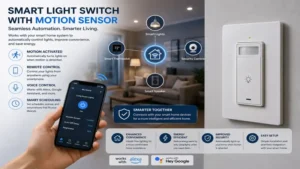
Troubleshooting Guide: Resolving Common Motion Switch Pitfalls
+-----------------------------------------------------------------------------------+
|                              TROUBLESHOOTING MATRIX                               |
+-----------------------------------------------------------------------------------+
| Problem                     | Root Cause                    | Practical Fix       |
+-----------------------------+-------------------------------+---------------------+
| Ghost Triggering (Self-ON)  | HVAC Vent / Pet Heat Drafts   | Lower Sensitivity   |
| Sudden Mid-Task Blackouts   | Time-Out Delay Set Too Short  | Increase Delay Time |
| LED Bulb Flickering         | Leakage Current / No Neutral  | Add LUT-MLC Bypass  |
| Cold-Weather Delay          | Low Ambient-to-Body Temp Delta| Adjust Sensor Angle |
+-----------------------------+-------------------------------+---------------------+
Problem 1: Lights Turn On Spontaneously (“Ghost Triggering”)
If your smart light switch with motion sensor engages without anyone entering the room, the primary culprit is usually thermal convection or RF interference. PIR sensors track rapid shifts in infrared radiation. An HVAC vent blowing warm air toward a cool wall—or direct sunlight sweeping across a rug—can mimic human motion.
-
Solution: Reduce the sensor’s hardware or app sensitivity setting from “High” to “Medium/Low.” Alternatively, apply a small strip of optical masking tape to the edge of the Fresnel lens to block out thermal drafts coming from nearby heat registers.
Problem 2: Connected LED Bulbs Glow or Flicker When Turned OFF
Smart switches without a neutral wire pass a tiny amount of continuous leakage current through the load wire to keep their internal microcontrollers and radios powered. Low-wattage LED bulbs can store this residual trickle charge until their internal capacitors briefly discharge, causing periodic flash or faint off-state glowing.
-
Solution: Install a dummy load resistor (such as the Lutron LUT-MLC or a basic wired load capacitor) directly across the fixture’s neutral and live wires inside the ceiling junction box. This safely bypasses the leakage current around the delicate LED driver circuitry.
Problem 3: Delay in Cold Garages or Unheated Workspaces
In cold ambient environments below 40°F (4°C), some PIR sensors exhibit delayed sensitivity because the thermal contrast between background surfaces and human body heat changes drastically.
-
Solution: Set the physical motion sensitivity to maximum level during winter months, or supplement the setup with an auxiliary wireless indoor sensor paired via local hub automations.
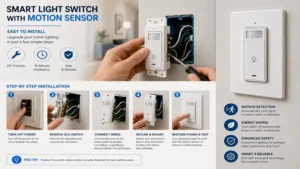
How to Choose the Right Motion Switch: Buyer’s Decision Framework
Selecting the right switch requires balancing your home’s existing electrical wiring against your desired smart home ecosystem. Follow this sequential decision framework before making a purchase.
                  [Check Wall Box Wiring]
                             |
         +-------------------+-------------------+
         |                                       |
 [No Neutral Wire]                       [Neutral Wire Present]
         |                                       |
         v                                       v
(Choose Lutron Caseta)              [Select Preferred Protocol]
                                                 |
                         +-----------------------+-----------------------+
                         |                       |                       |
                    (Wi-Fi / App)            (Matter)                (Z-Wave)
                         |                       |                       |
                         v                       v                       v
                   (Kasa / Cync)             (Leviton)               (Inovelli)
1. Identify Your Electrical Wiring Infrastructure
Before purchasing, unscrew your existing switch faceplate and verify the bundle of wires tucked into the back of the gang box.
-
If you see only black (hot/load) wires and a bare copper ground wire: You lack a neutral line. Focus exclusively on switches designed for no-neutral operation, such as the Lutron Caseta system.
-
If you see a bundle of white wires wire-nutted together at the back: You have a neutral line. You can safely install virtually any Wi-Fi, Matter, or Z-Wave smart switch on the market.
2. Match the Wireless Protocol to Your Smart Hub
-
For Standalone Convenience (No Hub): Select Wi-Fi options like Kasa or GE Cync. They connect straight to your home router, though heavy deployments (15+ switches) can cause network congestion.
-
For Multi-Brand Ecosystem Harmony: Choose Matter-certified units like the Leviton Decora D2MSD to seamlessly bridge Apple Home, Google Assistant, and Alexa environments over local Wi-Fi.
-
For Power Users and Local Control Advocates: Opt for dedicated mesh protocols like Z-Wave (Inovelli) or Clear Connect (Lutron). They execute lighting rules instantly on local hubs without depending on an active internet connection.
3. Evaluate Total Cost vs. Long-Term Reliability
While standalone Wi-Fi motion switches carry low initial price points ($25-$35 per gang box), outfitting a full home can lead to Wi-Fi stability bottlenecks. Investing in a hub-based ecosystem carrying higher initial entry costs ($50-$80 per node) pays dividend yields in bulletproof signal reliability, zero cloud downtime, and superior battery management over many years of continuous use.
🔍 Ready to Upgrade Your Smart Home Setup?
Integrating automated motion switches is one of the single most practical upgrades you can make to modernize your home’s lighting layout. Choosing the right switch eliminates everyday friction, enhances security in dark spaces, and lowers energy overhead automatically.
Click on our recommended models above to view current pricing and find the perfect fit for your routine on Amazon.
Frequently Asked Questions
❓ Can a smart light switch with motion sensor work without a neutral wire?
✅ Yes, but option selection is limited. The Lutron Caseta series is engineered specifically to operate without a neutral wire by passing a micro-ampere trickle current through the ground or load pathway, keeping its internal radios active without lighting up connected bulbs...
❓ What is the difference between Occupancy and Vacancy sensor modes?
✅ Occupancy mode automatically turns lights ON when movement is detected and OFF after a set idle period. Vacancy mode requires you to physically press the switch to turn lights ON, but automatically shuts them OFF once human activity stops...
❓ Will my indoor pets constantly trigger motion-sensing light switches?
✅ Standard PIR sensors detect heat differential across zone vectors. Small dogs and cats beneath 30 pounds generally pass under the primary sensor beam. Lowering the hardware sensitivity setting or angling the switch plate face upward easily prevents pet triggers...
❓ Do smart motion switches work properly with dimmable LED bulbs?
✅ Yes, provided the switch is explicitly rated as a smart dimmer (like the Kasa KS220M) and paired with certified dimmable LED bulbs. Non-dimmable LEDs connected to a dimmable motion switch will flicker or hum loudly...
❓ Can I turn off the motion sensor and use it as a normal smart switch?
✅ Absolutely. Virtually all modern smart motion switches allow you to disable the PIR sensor via their smartphone apps or physical button hold patterns, converting the unit into a standard manual or scheduled smart wall switch...
Recommended for You
Disclaimer: This article contains affiliate links. As an Amazon Associate, I earn from qualifying purchases. If you purchase products through these links, we may earn a small commission at no additional cost to you.
✨ Found this guide helpful? Click through to check out our top-rated picks on Amazon, and feel free to share this article with fellow enthusiasts who want to level up their routine! 💬🤗
