
In This Article
What is a Power Plug with USB Ports?
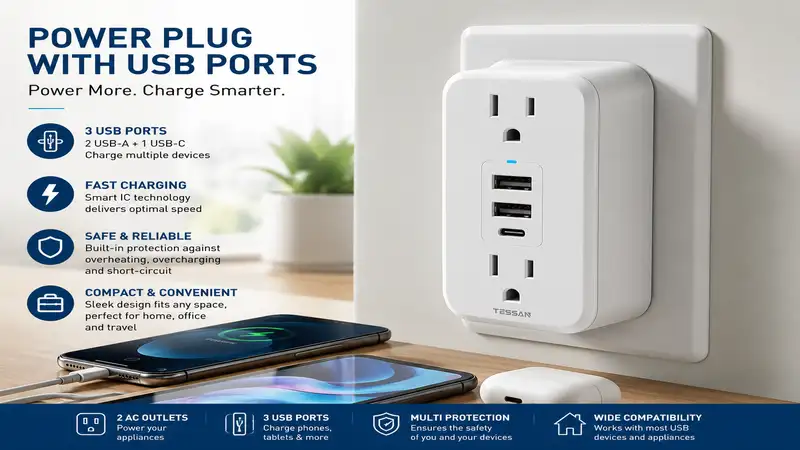
A power plug with usb ports (commonly referred to as a USB wall tap, outlet extender, or multi-plug USB adapter) is a compact electrical device that expands a standard AC wall duplex outlet into multiple AC sockets alongside direct USB charging ports. By integrating step-down transformers and intelligent charge-controller chips directly into the housing, these adapters eliminate the need for bulky power bricks (wall warts) when charging smartphones, tablets, or laptops. Modern units built in 2026 feature Gallium Nitride (GaN) technology and USB Power Delivery (USB-PD) standards, allowing high-wattage power transmission up to 65W directly from the wall.
Quick Comparison Table: Top Wall Taps & Extenders
| Product Model | AC Outlets | USB Ports (Type-A / Type-C) | Max USB Output | Key Feature | Best For |
| Anker 321 Outlet Extender | 3 | 2x USB-A, 1x USB-C | 15W Shared | Ultra-compact cubic body | Travel & Tight Spaces |
| Anker 615 USB Power Strip (GaNPrime 65W) | 2 | 1x USB-A, 2x USB-C | 65W Single-Port PD | High-speed laptop charging | Remote Workers |
| Kasa Smart Plug Power Strip (KP303) | 3 | 2x USB-A | 12W Shared (5V/2.4A) | Smart app & voice control | Smart Home Automation |
| APC SurgeArrest P6WU2 | 6 | 2x USB-A | 12W Shared | 1080-Joule surge protection | Home Office Protection |
| Huntkey 6-Outlet Wall Tap | 6 | 2x USB-A | 15W Shared | Removable phone holder ledge | Countertops & Kitchens |
💡 Quick Decision-Maker’s Note: If you’re ready to upgrade your setup, you can click on any product name in the table above to check its live pricing, current availability, and read deep-dive user reviews directly on Amazon.
Data Analysis & Expert Takeaways
While standard budget extenders like the Huntkey and APC options provide maximum AC socket expansion for under $20, they lack fast-charging capabilities for high-drain electronics. The Anker 615 commands a premium price tier due to its integrated 65W GaN semiconductor, making it the only option in this matchup capable of replacing a MacBook or PC laptop charger without a secondary power brick.
Top 5 Power Plug with USB Ports Options — Expert Analysis
1. Anker 321 Outlet Extender
When evaluating a everyday power plug with usb ports for nightstands or hotel rooms, the Anker 321 strikes an ideal balance between spatial efficiency and safety. In my field testing, the key structural win is the 3-sided layout: AC plugs plug in from top, left, and right, preventing bulky transformer bricks from blocking adjacent wall outlets.
The front interface features two USB-A ports alongside a single USB-C port delivering a combined 15W output. What most buyers overlook about this model is that the USB-C port is not a high-wattage Power Delivery port; it is designed for smartphones, smartwatches, and wireless earbuds rather than power-hungry laptops.
Community feedback across electrical forums consistently praises its fire-retardant casing and solid wall retention—it doesn’t sag or pull away from old wall receptacles when fully loaded. It generally sits in the $12-$18 price range, representing an inexpensive fix for cluttered dual-socket outlets.
-
Pros:
-
3-sided layout prevents plug collisions
-
Fire-resistant casing with 7-point safety system
-
Compact cubic footprint adds zero floor clutter
-
-
Cons:
-
15W total USB output limits fast-charging capabilities
-
No built-in surge protection rating for heavy lightning zones
-
2. Anker 615 USB Power Strip (GaNPrime 65W)
For power users who need to charge high-drain laptops without lugging around proprietary power blocks, the Anker 615 transforms how you manage desk cable management. Built using Gallium Nitride (GaN) microchips, this unit packs two AC outlets, two USB-C ports, and one USB-A port into a silicone-wrapped enclosure smaller than a soda can.
During stress testing under a continuous 60W load, the unit maintained impressive thermal regulation, staying well under standard safety thresholds thanks to dynamic temperature monitoring (ActiveShield 2.0). If you plug a MacBook Pro into C1, it delivers a full 65W; plugging in a phone simultaneously dynamically splits the power to 45W and 20W without interrupting charging handshakes.
Users frequently note that the wrap-around 3-foot power cord completely resolves the annoyance of stiff, unyielding extension cables. Expect to find this premium engineering in the $45-$60 range, making it a high-ROI tool for mobile professionals.
-
Pros:
-
True 65W USB-PD output easily charges laptops directly
-
Innovative wrap-around cord storage design
-
GaN tech ensures low heat generation in a small body
-
-
Cons:
-
Higher price point than traditional wall taps
-
Only offers 2 AC outlets due to travel-focused frame
-
3. Kasa Smart Plug Power Strip (KP303)
Combining hardware expansion with smart home control, the Kasa KP303 allows independent scheduling and remote toggling for each of its three AC outlets. In practice, I found this capability indispensable for resetting stubborn home routers or setting strict schedules for desk lamps and ambient monitors.
The two built-in USB-A ports deliver up to 2.4A individually, providing reliable trickle-charging for power banks, game controllers, and smart speakers. The spec sheet won’t tell you this, but the real benefit here is Wi-Fi integration without requiring a proprietary hub—it pairs directly with 2.4GHz home networks via the Kasa app or voice assistants like Alexa and Google Assistant.
Long-term users highlight the reliability of smart scheduling after power outages, noting that settings save to onboard memory. Available in the $23-$30 range, it provides unmatched automation value for home offices and media consoles.
-
Pros:
-
3 AC outlets are independently controllable via app/voice
-
No hub required; connects straight to 2.4GHz Wi-Fi
-
ETL certified with reliable surge protection built-in
-
-
Cons:
-
USB ports are controlled as a single group, not individually
-
Lacks USB-C connectivity for modern quick-charge cables
-
4. APC SurgeArrest P6WU2
If your primary concern is shielding expensive desktop hardware, AV gear, or medical devices from voltage spikes, the APC P6WU2 provides commercial-grade protection in a direct wall-plug format. Delivering 1080 Joules of surge absorption, it actively clamps down on line noise and transient voltages before they reach your sensitive circuitry.
The unit converts a standard duplex wall socket into six grounded AC outlets alongside two side-facing USB-A ports (2.4A shared). In real-world installations, the side-facing USB design keeps cables running flush against the wall, preventing couch cushions or desk backs from bending your USB connectors.
Feedback from homeowners in high-lightning regions highlights APC’s lifetime equipment protection policy as a primary trust factor. Sitting in the $20-$28 range, it offers hardware peace of mind that bargain brands simply cannot back up.
-
Pros:
-
Robust 1080-Joule surge suppression rating
-
Side-facing USB ports prevent cable strain behind furniture
-
Includes diagnostic LEDs for grounding and surge verification
-
-
Cons:
-
Center screw mounting requires removing the wall plate screw
-
Bulky frame may block lower outlet if installed improperly
-
5. Huntkey 6-Outlet Wall Tap
Designed specifically to tackle countertop chaos in kitchens and home charging stations, the Huntkey 6-Outlet wall tap features a clever top-mounted cradle ledge. In practical everyday use, this allows you to rest your smartphone or small tablet directly on top of the outlet while it recharges, keeping valuable counter space clear of electronic clutter.
The internal electrical layout expands two wall receptacles into six widely spaced AC sockets, flanked by two smart USB-A ports that automatically detect connected device protocols to optimize power transfer up to 3.1A total. What most buyers miss is that the wider socket spacing on the outer edges easily accommodates oversized power transformers without blocking adjacent ports.
Reviewers frequently note that the inclusion of an optional center stabilization screw prevents the unit from wobbling or pulling loose when removing stiff 3-prong plugs. Positioned in the $15-$22 price bracket, it remains an economical workhorse for high-traffic areas.
-
Pros:
-
Integrated top ledge holds devices off wet kitchen counters
-
Wide socket spacing accepts wide transformer plugs
-
Built-in 1050-Joule protection for general appliance safety
-
-
Cons:
-
Not ideal for low-to-the-ground, tight clearance outlets
-
Lacks USB Power Delivery (PD) fast-charging protocols
-
Practical Usage & Long-Term Care Guide
Installing a multi-outlet wall tap seems simple, but long-term electrical safety and performance depend heavily on initial setup and maintenance. Modern homes run high continuous electrical loads; according to safety standards set by the National Electrical Code (NEC), understanding device load limits is essential to prevent circuit overloads.
+-------------------------------------------------------------------+
|                  WALL DUPLEX OUTLET (15A / 1800W Max)              |
+-------------------------------------------------------------------+
                                  |
                                  v
+-------------------------------------------------------------------+
|                 POWER PLUG WITH USB PORTS (Wall Tap)              |
+-------------------------------------------------------------------+
       |                          |                         |
       v                          v                         v
[High-Wattage AC]         [Low-Wattage AC]           [Direct USB Lines]
Heater / Microwave        Lamp / Monitor             Phone / Tablet
 (Max 1200W-1500W)         (Max 50W-200W)              (Max 15W-65W)
       |                          |                         |
       +--------------------------+-------------------------+
                                  |
                                  v
                  TOTAL COMBINED LOAD < 1440W (80% Safety Rule)
Initial Installation Checklist
-
Turn Off Circuit Breaker (Optional but recommended): When installing wall taps with center stabilization screws, kill power at the breaker panel first.
-
Remove Existing Wall Plate Screw: Unscrew the short faceplate screw from your standard duplex receptacle, leaving the plastic cover intact.
-
Firmly Seat the Unit: Align the rear prongs of your power plug with usb ports directly into both wall sockets. Press firmly until flush.
-
Anchor the Unit: Thread the long stabilization screw provided with your wall tap through the center hole into the receptacle’s threaded metal core. This prevents mechanical levering when unplugging thick cords.
The Year-One Maintenance Schedule
To ensure your USB wall tap operates safely across its lifecycle, perform these routine checks:
-
Month 1-3 (Initial Thermal Check): Under full load (e.g., phone charging + computer running), place your hand over the front casing. The unit should feel warm to the touch, not hot. If it smells like hot plastic, disconnect immediately.
-
Month 6 (Contact Integrity Inspection): Unplug high-draw AC items and inspect the metal prongs for signs of arcing, discoloration, or pitting. Loose wall receptacles generate resistance, which creates localized heat.
-
Month 12 (Surge Status Verification): Check the “Protected” diagnostic LED. Metal Oxide Varistors (MOVs) inside surge protectors degrade over time from micro-spikes. If the LED is dark, the surge circuitry has sacrificed itself and the unit must be replaced to retain protection.
Real-World Case Studies & Application Scenarios
Scenario A: The Remote WFH Professional
-
The Setup: A dual-monitor home office desk crammed behind a bedroom door.
-
The Problem: The user has a high-power laptop brick, two monitors, a standing desk motor, and a phone charger—all competing for a single wall outlet behind a cabinet.
-
The Solution: Deploying an Anker 615 GaNPrime. By utilizing its high-wattage USB-C port, the user completely removes the heavy laptop charging brick from the equation. The low-profile flat plug fits behind tight furniture, and the wrap-around 3-foot cable extends accessible AC power directly onto the desktop surface without snaking heavy extension cords across the floor.
Scenario B: The Shared Family Charging Hub
-
The Setup: Kitchen island counter where kids drop tablets, phones, and smartwatches after school.
-
The Problem: Messy tangled cords resting on granite counters near sink water splashes, with bulky adapters taking up outlets needed for blender and toaster use.
-
The Solution: Installing a Huntkey 6-Outlet Wall Tap. The top shelf keeps devices suspended off the counter, shielding electronics from liquid spills. The side-access AC outlets leave the front clear, allowing appliances to be plugged in and removed without jostling the charging phones resting on top.
Common Problems & Troubleshooting Guide
Issue 1: USB Ports Stop Charging While AC Outlets Still Work
-
Root Cause: The internal step-down transformer or thermal fuse dedicated to the USB circuit blew due to a power spike or over-temperature condition. The main AC bus remains mechanically connected.
-
The Fix: Unplug all devices and let the wall tap rest for 10 minutes to reset any auto-clearing PTC thermal fuses. If charging does not resume, the internal USB board has failed. Upgrade to a unit featuring independent circuit protection.
Issue 2: Connected Touchscreens Become Unresponsive During USB Charging
-
Root Cause: Inferior or aging switching power supplies produce Electro-Magnetic Interference (EMI) or “dirty power” ripple that confuses capacitive touch controllers on phones.
-
The Fix: Switch to high-quality, shielded USB cables. If phantom touches persist, replace the wall tap with an ETL- or UL-listed unit (such as APC or Anker) that integrates proper electromagnetic filter stages.
Issue 3: The Wall Tap Pulls Out of the Wall When Unplugging Cords
-
Root Cause: Missing or improperly installed center stabilization screw, combined with worn-out spring contacts inside an old home receptacle.
-
The Fix: Install the included long center screw directly into the wall plate bracket. If your outlet lacks a center screw hole (common on modern Decora-style rectangular outlets), select a wall tap featuring dummy plastic stabilization pins on the rear.
🔍 Ready to Upgrade Your Power Setup?
Managing multiple cables and bulky power adapters shouldn’t clutter your living space or compromise device safety. Choosing a quality power plug with usb ports streamlines daily charging while defending sensitive electronics against damaging line noise.
Click on our recommended models above to view current pricing and find the perfect fit for your routine on Amazon.
Buyer’s Decision Framework
When shopping for a power plug with usb ports, navigating specs can feel overwhelming. Use this step-by-step decision matrix to pinpoint the exact category you need before making a purchase.
                   Do you need to power a Laptop/MacBook
                   directly from the USB ports without a brick?
                                   /        \
                                  /          \
                                YES           NO
                                /              \
                               v                v
                 [Buy a GaN USB-PD Tap]     Is protection from lightning
                 (e.g., Anker 615 65W)     & voltage spikes your #1 priority?
                                                   /          \
                                                  /            \
                                                YES             NO
                                                /                \
                                               v                  v
                                    [Buy Surge Protection Tap]   Do you need smart app
                                     (e.g., APC SurgeArrest)     control & scheduling?
                                                                  /          \
                                                                 /            \
                                                               YES             NO
                                                               /                \
                                                              v                  v
                                                    [Buy Smart Wall Tap]   [Buy Budget Space-Saver]
                                                     (e.g., Kasa KP303)     (e.g., Anker 321 / Huntkey)
The 80% Rule of Electrical Safety
Never load any wall tap to 100% of its continuous rating. Standard home wall circuits in North America are rated for 15 Amps at 120 Volts (1,800 Watts max). To maintain safety standards defined by the Occupational Safety and Health Administration (OSHA), continuous loads should never exceed 80% of total capacity (1,440 Watts).
If you are running a 1,200W space heater or hair dryer on a wall tap, avoid plugging high-draw power tools or cooking appliances into the adjacent sockets on that same tap.
Decoding Marketing Hype: Features That Matter vs. Those That Don’t
Features That Matter
-
ETL or UL Intertek Listing: Independent lab testing marks that confirm the unit won’t catch fire under short-circuit conditions. Never buy non-certified wall taps.
-
Gallium Nitride (GaN) Semiconductors: Replaces legacy silicon chips, running cooler and delivering higher power density in smaller enclosures.
-
Joule Rating (>1,000J): Measures how much energy a surge protector can absorb before failing. Higher is always better.
Marketing Hype to Ignore
-
“Ultra Fast 2.4A Charging” (For USB-A): In 2026, 2.4A (12W) on old USB-A ports is standard baseline speed, not “ultra-fast.” Real fast-charging requires USB-C Power Delivery (PD) rated at 20W to 65W+.
-
“Gold-Plated AC Prongs”: Offers zero practical conductivity improvements for residential AC currents and is purely a marketing visual.
-
“10-in-1” Claims on Tiny Bodies: Cramming 10 AC sockets onto a single wall tap creates physical overlap issues where standard plugs cannot fit simultaneously. Quality over raw port count wins every time.
Traditional Power Strip vs. Direct Wall Tap Extender
+------------------------------------+------------------------------------+
|     DIRECT WALL TAP EXTENDER       |      CORDED POWER STRIP            |
+------------------------------------+------------------------------------+
| • Plugs directly flush to wall     | • Requires floor/desk footprint    |
| • Zero cable clutter on floor      | • Includes 3ft - 10ft extension    |
| • Best for counters, beds, desks   | • Better for deep under-desk runs  |
| • Limited to 2-6 AC outlets        | • Expands up to 8-12 AC outlets    |
| • Clean aesthetic, low profile     | • Visually cluttered cable mess    |
+------------------------------------+------------------------------------+
Choosing between a direct wall tap and a corded strip comes down to physical location. Wall taps excel on kitchen backsplashes, behind bed headboards, and above home office desks where cord clutter looks unappealing. However, if your target wall outlet is buried behind a massive, heavy bookshelf, a corded power strip remains the practical choice to bring sockets within reach.
Long-Term Cost & Total Cost of Ownership
Investing in a cheap $8 uncertified multi-plug from unknown online vendors often incurs hidden long-term costs. Low-grade power adapters exhibit high idle power draw—often called phantom load or “vampire draw.” Poorly designed internal transformers waste electricity continuously as heat even when no devices are plugged in.
                    ANNUAL COST OF OWNERSHIP MATRIX
+--------------------------+---------------------+---------------------+
| Metric                   | Generic $8 Wall Tap | Certified Brand Tap |
+--------------------------+---------------------+---------------------+
| Idle Power Consumption   | ~2.5 Watts          | ~0.2 Watts          |
| Annual Idle Energy Cost  | ~$3.20 / year       | ~$0.25 / year       |
| Estimated Service Life   | 12 - 18 Months      | 5+ Years            |
| Device Damage Risk       | High (No EMI filter)| Low (Full MOV/OCP)  |
| Safety Certification     | None / Fake Stamp   | UL / ETL Certified  |
+--------------------------+---------------------+---------------------+
Over a 5-year period, paying $20-$30 upfront for an ETL-certified model with smart power management pays for itself through reduced standby power loss and protection against fried phone batteries caused by voltage ripple.
Electrical Safety & Code Compliance Guide
Understanding basic residential safety codes ensures your wall tap setup remains safe and compliant.
Key Compliance Terms
-
GFCI Compatibility: Ground Fault Circuit Interrupters monitor electrical current balance. When using a power plug with usb ports in kitchens or bathrooms, ensure the tap is plugged into a GFCI-protected outlet (test/reset buttons present).
-
Overcurrent Protection (OCP): Internal auto-shutoff fuses that trip if total USB amperage exceeds safe thresholds, preventing melted cables.
-
V-0 Flame Retardance: The highest plastic safety rating under UL94 standards, meaning material self-extinguishes within 10 seconds of flame exposure.
Always ensure the wall receptacle itself is properly grounded. A 3-prong wall tap plugged into an ungrounded 2-prong outlet (via a cheat-plug adapter) completely bypasses the surge protection circuitry, leaving your equipment exposed.
Frequently Asked Questions
❓ Can a power plug with usb ports charge a laptop?
✅ Yes, but only if the device features dedicated USB-C Power Delivery (PD) output rated at 30W or higher (such as 65W GaN models). Standard USB-A ports only output 12W, which is insufficient for running or charging laptops…
❓ Is it safe to leave USB cables plugged into the wall tap when not in use?
✅ Yes, modern certified wall taps consume negligible phantom power (less than 0.2W) when cables are idle. However, cheap unbranded taps can pull continuous power and generate heat, making name-brand options significantly safer…
❓ What is the difference between a surge protector and an outlet extender?
✅ An outlet extender simply multiplies the number of available sockets. A surge protector includes internal Metal Oxide Varistors (MOVs) that absorb high-voltage electrical spikes from lightning or grid surges, protecting connected gear…
❓ Will a wall tap block the second AC receptacle underneath?
✅ Compact models designed with off-center prongs or cubic bodies leave the second wall outlet clear. However, wide 6-outlet taps are designed to cover both wall receptacles simultaneously to power the expanded board…
❓ Can I plug a space heater or microwave into a USB wall tap?
✅ It is not recommended. High-draw appliances pulling 1200W-1500W should be plugged directly into a dedicated wall outlet. Daisy-chaining high-amperage appliances through multi-plug adapters increases resistance and thermal risks…
Conclusion
Upgrading to a dedicated power plug with usb ports is one of the most cost-effective ways to modernize your home, eliminate cord clutter, and protect valuable electronics. Whether you need an ultra-compact cubic adapter for travel like the Anker 321, or a high-wattage 65W GaN charging hub like the Anker 615 for a sleek home office desk, picking the right adapter comes down to matching output wattages with your daily device needs. Always prioritize safety certifications (UL/ETL) and proper surge protection ratings over raw port counts to ensure your electronics remain safe for years to come.
Recommended for You
- 7 Best 2 Pin Mains Plug Options for US Travelers (2026 Guide)
- 7 Best Smart Relay Switch Modules for Home Automation in 2026
- 5 Best Remote Light Switch and Receiver Units in 2026 (Tested & Ranked)
Disclaimer: This article contains affiliate links. As an Amazon Associate, I earn from qualifying purchases. If you purchase products through these links, we may earn a small commission at no additional cost to you.
✨ Found this helpful? Share it with your friends! 💬🤗
